
how to scrape a website python: A practical guide
- Nov 13, 2025
- 16 min read
If you want to scrape a website using Python, the classic combination is the library to grab the page's HTML and to parse it. This duo is the bread and butter for most static site scraping and gets the job done with just a handful of code.
Your Foundation for Python Web Scraping
Welcome to your complete guide on web scraping with Python. Think of this less as a technical manual and more as a practical roadmap built from years of experience in the trenches. We'll kick things off with the basics, starting with why Python is the go-to language for this kind of work.
By 2025, Python has cemented its lead in the web scraping world, with around 69.6% of developers choosing it to pull data from the web. This isn't surprising when you look at its incredible ecosystem of libraries like BeautifulSoup, Scrapy, and Playwright, which make everything from parsing HTML to wrangling complex browser automation much, much easier.
One of the first things you learn—often the hard way—is the difference between static and dynamic websites. Getting this right from the start will save you a world of headaches.
Static Sites: These are the most straightforward. All the content is right there in the initial HTML file, making it a simple job for a library like .
Dynamic Sites: These are trickier. They rely on JavaScript to load content after the page first appears in your browser. To scrape them, you need a tool that can actually run that JavaScript, like a headless browser driven by Playwright or Selenium.
Key Considerations Before You Start
Before you even think about writing code, there are a couple of crucial checks to perform. First, always look for the website’s file (you can usually find it at ). This file tells you which pages the site owner prefers you not to crawl. Respecting these rules is just good practice.
For a more in-depth look at the do's and don'ts, check out our guide on 10 web scraping best practices for developers in 2025.
This whole process can be boiled down to a simple workflow: check the rules, pick the right tool for the website's tech, and then get to coding.
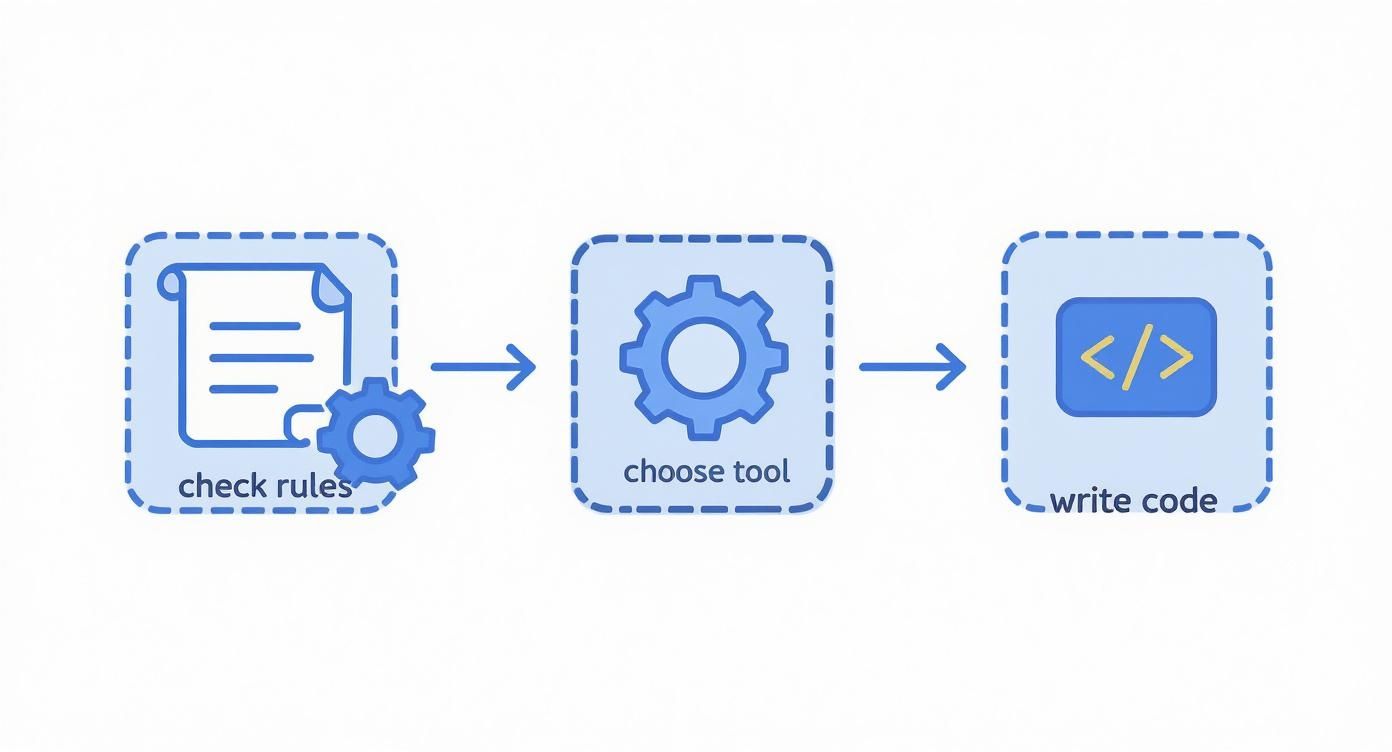
Following this simple flow helps you approach every project efficiently and ethically, making sure you grab the right tool for the job based on how simple or complex the target site is.
Scraping Static Sites with Requests and BeautifulSoup
When you're first diving into web scraping with Python, the classic toolkit is the combination of and . This duo is your best friend for static websites, where all the content you need is delivered in the initial HTML document.
Think of it this way: is the courier that goes out and fetches the raw HTML from the server. Then, acts as your expert translator, parsing that document into a structured format so you can easily pick out the exact data you want.
Let's walk through how this works in a real-world scenario. The goal is simple: grab a webpage and then systematically extract specific pieces of information, like product names, prices, or article headlines.
Making Your First HTTP Request
Everything starts with getting the page's source code. The requests library makes this incredibly straightforward, often boiling it down to a single line of code. You send an HTTP GET request to a URL, which is just a formal way of asking the server, "Hey, can you send me the contents of this page?"
Let’s try this with a simple quotes website. The very first move is to fetch the HTML.
import requests
url = 'http://quotes.toscrape.com/'response = requests.get(url)
The .text attribute holds the raw HTML content
html_content = response.textprint(html_content)When you run this, you’ll see the page's entire HTML source printed to your console. It looks like a messy jumble of tags and text at first, but that's exactly what we need. This is where shines.
Keep in mind, this simple request just grabs the static HTML. It doesn't execute any JavaScript, which makes it super fast and efficient for the right kind of website.
Parsing HTML with BeautifulSoup
Once you have the raw HTML string, you need to turn it into something you can actually work with. BeautifulSoup parses the messy HTML into a clean Python object that lets you navigate the document's structure. This is often called creating a "soup" object.
from bs4 import BeautifulSoup
... assuming you have html_content from the requests code ...
soup = BeautifulSoup(html_content, 'html.parser')Now, the variable holds a structured representation of the webpage's Document Object Model (DOM). You can use it to pinpoint specific elements by their tags, classes, or IDs. The real trick is to first inspect the live webpage in your browser (usually by pressing F12 or right-clicking and selecting "Inspect") to find the unique selectors for the data you're after.
Pro Tip: When inspecting a page, hunt for unique and descriptive class names or IDs on the elements you want to scrape. Don't just look for generic tags like or on their own—you'll find hundreds of them, and it's like searching for a needle in a haystack.
Finding and Extracting Specific Data
gives you a handful of powerful methods for searching the parsed HTML. This table highlights the ones you'll use most often.
Key BeautifulSoup Methods for Data Extraction
Here’s a quick reference guide to the most common functions for pulling data from a "soup" object.
Method | Description | Example Usage |
|---|---|---|
Returns the first element that matches the specified criteria. | ||
Returns a list of all elements that match the criteria. | ||
Extracts the text content from within an element, stripping out HTML tags. | ||
Accesses the value of a specific attribute of an element, like a link's URL. | ||
Finds all elements matching a CSS selector, returning a list. |
These methods give you a ton of flexibility for targeting the exact data you need.
Let's apply this to our quotes example. After inspecting the page, we'd find that each quote is wrapped in a with the class . Inside, the quote itself is in a with the class , and the author is in a tag with the class .
With that knowledge, we can write a simple loop to extract all of them.
Find all the quote containers
all_quotes = soup.find_all('div', class_='quote')
for quote_container in all_quotes: text = quote_container.find('span', class_='text').text author = quote_container.find('small', class_='author').text
print(f'"{text}" - {author}\n')This code iterates through each quote found on the page, pulls out the text and author from the nested elements, and prints them in a nice, clean format.
Mastering is a foundational skill, and learning to configure it for more complex jobs—like routing traffic through a proxy—is a crucial next step. For a deeper look at that, our guide to Python requests and proxies provides detailed instructions to help make your scrapers more resilient. Once you have this down, you're ready to tackle almost any static site out there.
Dealing with Dynamic JavaScript Websites

Sooner or later, your and scraper will hit a wall. It happens to all of us. You'll target a site, maybe an e-commerce store or a social media feed, and your script will come back with a nearly empty HTML file. What gives?
The answer is JavaScript. Modern websites often load a bare-bones HTML shell first, then use JavaScript to fetch and render the actual content. Your script, which just grabs that initial response, misses everything. The product prices, user reviews, and status updates never even make it into your parser.
This is where you need a more powerful tool—one that can act like a real user.
Why You Need a Real Browser
Tools like Playwright or Selenium solve this by automating an actual web browser. Instead of just fetching a static document, your Python script fires up a headless instance of Chromium or Firefox, navigates to the URL, and waits.
The browser does all the heavy lifting. It executes the JavaScript, makes the necessary API calls, and builds the page just as you'd see it on your screen. Once everything is fully loaded and rendered, your script can grab the final HTML. This is the secret to scraping the vast majority of modern, dynamic websites.
Getting Playwright Up and Running
First things first, you need to install the Playwright library and the browsers it controls. It's a quick two-step process in your terminal.
Install the Python library:
Download the browser engines:
That's it. Now you can write a script to launch a browser, visit a page, and pull down its fully-rendered content. Using a context manager () is the cleanest way to do this, as it handles opening and closing the browser resources for you.
from playwright.sync_api import sync_playwrightfrom bs4 import BeautifulSoup
url = 'https://quotes.toscrape.com/js/'
with sync_playwright() as p: browser = p.chromium.launch(headless=True) page = browser.new_page() page.goto(url)
# This is the magic: page.content() gets the final HTML
html_content = page.content()

browser.close()
Now we can parse the JavaScript-rendered HTML
soup = BeautifulSoup(html_content, 'html.parser')print(soup.prettify())
Notice the argument? That tells Playwright to run the browser in the background without a visible window, which is exactly what you want for automated scraping. The key here is , which returns the page source after all the client-side magic has happened.
Interacting with the Page Like a User
The real power of a tool like Playwright isn't just rendering the page; it's the ability to interact with it. Many sites hide content behind buttons or load more data when you scroll.
Think about it:
An e-commerce site where you have to click a "Show More Reviews" button.
An infinite-scroll social media feed.
A search bar you need to type into before results appear.
Your -based scraper is dead in the water here. But with Playwright, you can script these actions easily.
Clicking a button:
Typing in a search box:
Waiting for content to load:
That last one, , is your best friend. JavaScript doesn't run instantly, so you can't just click a button and immediately grab the results. You have to tell your script to wait until a specific element appears on the page. This simple step prevents countless race conditions and timing-related errors.
Expert TipThe best workflow I've found is using Playwright and BeautifulSoup together. Let Playwright handle the complex stuff—loading the page, clicking buttons, and waiting for dynamic content. Once you have the final, fully-rendered HTML, pass it off to BeautifulSoup. Its API is just more intuitive and powerful for the actual parsing and data extraction.
Combining Playwright with BeautifulSoup
Once Playwright has done its job and you have the final , you're back on familiar ground. You can feed that string directly into a BeautifulSoup object and parse it just like you did with the static site.
Let's update our example to pull the actual quotes from the JavaScript version of the site.
from playwright.sync_api import sync_playwrightfrom bs4 import BeautifulSoup
url = 'https://quotes.toscrape.com/js/'
with sync_playwright() as p: browser = p.chromium.launch(headless=True) page = browser.new_page() page.goto(url)
# A crucial wait: ensures the JS has loaded the quotes
page.wait_for_selector('div.quote')

html_content = page.content()
browser.close()
soup = BeautifulSoup(html_content, 'html.parser')
all_quotes = soup.find_all('div', class_='quote')
for quote_container in all_quotes: text = quote_container.find('span', class_='text').text author = quote_container.find('small', class_='author').text print(f'"{text}" - {author}\n')
This hybrid approach is incredibly effective. You use the right tool for the right job: a browser automation library to render the page, and a dedicated parsing library to extract the data. Mastering this pattern is essential for scraping a huge chunk of the modern web.
Navigating Anti-Scraping Defenses

Sooner or later, you're going to hit a wall. Once you move past basic projects, you'll find websites that actively fight back against scrapers. As web scraping has become more common, site owners are deploying some pretty clever defenses to guard their data and keep their servers from getting overloaded. A big part of learning how to scrape a website in Python is figuring out how to build bots that are resilient and don't get shut down immediately.
The reason for all this security is simple: data is valuable. The web scraping market was worth around $1 billion in 2024 and is expected to shoot up to nearly $2.49 billion by 2032. With that kind of money on the line, you can see why companies are so protective. You can get a better sense of this trend from the latest web scraping market report.
Let's break down the most common roadblocks you'll face and how to get around them.
Mimicking a Real Browser With Headers
The first and most basic check a website runs is on your request headers. When you visit a site with a real browser, it sends a packet of information along with the request, including a User-Agent string. This little piece of text identifies your browser, its version, and your operating system.
Out of the box, a Python script using the library sends a generic User-Agent that screams "I'm a bot!" Luckily, faking a real one is incredibly easy.
import requests
headers = { 'User-Agent': 'Mozilla/5.0 (Windows NT 10.0; Win64; x64) AppleWebKit/537.36 (KHTML, like Gecko) Chrome/91.0.4472.124 Safari/537.36'}
response = requests.get('http://example.com', headers=headers)
Just by setting a realistic User-Agent, your scraper instantly becomes less conspicuous. It's a simple trick, but it's enough to get past the initial security layer on many websites.
Avoiding IP Blocks With Proxies
If you try to pull down hundreds of pages from the same IP address in just a few minutes, you're going to get blocked. It's a massive red flag. Websites use IP-based rate limiting to shut this down, thinking it’s either a malicious attack or a poorly behaved scraper.
The classic solution here is to use proxies. A proxy server is just a middleman; your request goes to the proxy, which then forwards it to the target website. To the website, the request looks like it came from the proxy's IP address, not yours. By rotating through a pool of proxies, your traffic looks like it’s coming from dozens or even hundreds of different users.
You generally have a few types of proxies to choose from:
Datacenter Proxies: These are fast and cheap, but their IP ranges are well-known and often the first to get blocked.
Residential Proxies: These are IP addresses assigned by real internet service providers to homeowners. They look like genuine user traffic, making them much tougher to detect but also more expensive.
Mobile Proxies: IPs from cellular networks. These are the top-tier option for legitimacy and are crucial for scraping heavily fortified sites.
Managing a large proxy pool—checking which ones are live, rotating them correctly, and handling failures—is a job in itself. If you want to go deeper on this, we've got a great guide on rotating proxies for web scraping unlocked.
Beating Rate Limiters With Delays
Even if you're rotating IPs, sending requests as fast as your code can execute them is a dead giveaway. Real people don't browse that quickly. We pause, read, and click. You can make your scraper act more human by simply adding delays between requests.
A basic is a decent start, but a fixed delay is still predictable. A much better approach is to randomize it.
import timeimport random
Wait for a random time between 2 and 5 seconds
time.sleep(random.uniform(2, 5))
This tiny change makes your scraper's activity pattern look far less robotic, which can be enough to sneak past automated systems looking for machine-like precision.
My Personal TakeawayWhen I first started, I ignored delays to get data faster. I learned the hard way that a slightly slower, successful scraper is infinitely better than a fast one that gets blocked on the second page. Patience is a virtue in web scraping.
Handling CAPTCHAs and Advanced Defenses
At some point, you'll hit the final boss of anti-scraping: the CAPTCHA. These tests are designed specifically to stop automated programs. Trying to solve them with your own code is a massive headache and an ongoing cat-and-mouse game you're unlikely to win.
This is where you stop trying to build everything yourself and turn to a dedicated service. Tools like ScrapeUnblocker are built from the ground up to handle this entire mess for you. They bundle all the hard parts into a single, simple API call.
Feature | How It Helps Your Scraper |
|---|---|
JavaScript Rendering | Executes all the JS on a page to get the final HTML, just like Playwright. |
Premium Proxy Rotation | Manages a huge pool of high-quality residential proxies automatically. |
CAPTCHA Solving | Integrates CAPTCHA-solving services to get past challenges seamlessly. |
Browser Fingerprinting | Mimics the unique digital signature of a real browser to avoid detection. |
Instead of spending weeks building and maintaining this complicated infrastructure, you just send your target URL to their API and get clean HTML back. This lets you focus on what actually matters—parsing the data you need. It's the go-to strategy when you're up against a site with serious anti-bot tech.
Structuring and Saving Your Scraped Data
So, you’ve pulled the raw text and attributes from a webpage. That’s a great first step, but let's be honest—that data is a chaotic mess. It isn't really useful until you give it some structure.
This is the final, crucial phase of any web scraping project: organizing that raw information into a clean, machine-readable format. This is how you transform a jumble of HTML fragments into a predictable and valuable dataset that you can actually use for analysis, populating a database, or feeding into another application.
From Raw Data to a Python Dictionary
In Python, the most natural way to start organizing your data is with a dictionary. This key-value structure is perfect for representing a single "thing" you've scraped, whether it's a product from an e-commerce site or a single real estate listing.
Think about it. Each piece of information you grabbed—the price, the title, the user rating—becomes a value assigned to a descriptive key.
Let's say you've extracted these details for a product:
Title: "The Legend of Zelda"
Price: "$59.99"
Rating: "4.8 out of 5 stars"
Turning this into a Python dictionary is dead simple and immediately makes the data more coherent.
product_data = { "title": "The Legend of Zelda", "price": "$59.99", "rating": "4.8 out of 5 stars"}This simple structure is your building block. From here, you can create a list containing hundreds or thousands of these dictionaries, forming a complete dataset.
Key Takeaway: By structuring your data this way, you make it portable and ready for whatever comes next. Clean, organized data is exponentially more valuable than a folder full of raw HTML files.
Saving Your Data as JSON
Once your data is neatly arranged in a list of dictionaries, you need to save it. The undisputed industry standard for this is JSON (JavaScript Object Notation). Why? It’s lightweight, easy for humans to read, and, most importantly, universally supported by just about every programming language and data platform out there.
Thankfully, Python’s built-in library makes this incredibly easy. The process, known as serialization, takes your Python object and writes it directly to a file using the method.
Here’s a quick example:
import json
Let's pretend 'all_products' is a list of dictionaries you've scraped
all_products = [ {"title": "Product A", "price": "$19.99"}, {"title": "Product B", "price": "$29.99"}]
with open('products.json', 'w', encoding='utf-8') as f: json.dump(all_products, f, ensure_ascii=False, indent=4)Adding is a nice touch that makes the final JSON file nicely formatted and easy for a human to read. The resulting file, , is now a self-contained, structured dataset ready for action.
This final step is more important than ever. Globally, around 65% of enterprises rely on data extraction to make business decisions. E-commerce, in particular, drives about 48% of all web scraping activity, a testament to how critical this data has become. You can dig into more of these fascinating figures in these web crawling industry benchmarks on thunderbit.com.
Scaling Your Scraper for Large Projects

Grabbing data from a few pages is one thing, but the real value of web scraping kicks in when you need to gather information from thousands, or even millions, of URLs. Once your project scales up, fetching pages one by one just won't cut it. That simple, synchronous approach becomes a massive bottleneck, and you’ll need to start thinking seriously about performance and reliability.
This is where modern Python scraping techniques come into play. A standard script processes pages sequentially. If you need to scrape 25 URLs and each one takes 10 seconds, you're looking at a wait time of over four minutes. That’s not sustainable. To get around this, we can turn to asynchronous programming. Frameworks like let you manage hundreds of concurrent requests, turning a slow crawl into a high-speed data harvest. If you want to dive deeper into these trends, you can discover more insights about web scraping on kanhasoft.com.
Embracing Concurrency with Asyncio
The secret to speeding up a big scraping job is to stop waiting around. Instead of sending a request and sitting idle until the server responds, you fire off a whole batch of requests at once. This is the whole idea behind concurrency.
Python's library, when used with an asynchronous HTTP client like , lets you juggle thousands of requests in parallel without the heavy resource cost of multi-threading. Your script sends a request, and while it's waiting for a response, it immediately moves on to send the next one. This simple change dramatically cuts down on the time your code spends doing nothing.
A typical setup looks something like this:
You define an function that handles fetching and parsing a single URL.
You create a list of all the URLs you need to hit and turn them into a list of tasks.
Finally, you use to kick everything off and run all the tasks at the same time.
Making this switch can be the difference between a scraper that runs for hours and one that gets the job done in minutes.
My Experience with ScalingThe first time I converted a synchronous scraper to use , the performance gain was staggering. A job that took over an hour to complete finished in less than five minutes. It’s a game-changer for anyone serious about large-scale data collection.
Building a Resilient Scraper with Error Handling
When you’re making thousands of requests, something is bound to go wrong. Servers time out, connections drop, and sometimes pages just return weird error codes. A scraper built for scale has to be tough enough to handle these hiccups without crashing.
The bedrock of any resilient scraper is a solid try-except block. You should wrap every network request and every piece of parsing logic inside one. This lets you catch specific problems—like a or a when you’re digging through data—and deal with them gracefully.
For temporary problems like a network flicker, an automatic retry system is a must. A really effective strategy here is exponential backoff. If a request fails, you wait a couple of seconds (say, 2) and try again. If it fails a second time, you double the wait to 4 seconds, and so on, up to a set limit. This tactic gives a struggling server some breathing room and greatly improves your chances of getting the data you need.
Common Python Web Scraping Questions
As you dive into web scraping with Python, you'll quickly run into the same handful of questions that everyone faces. Let's tackle them head-on, because figuring these out early will save you a ton of headaches down the road.
The first big question is always about legality. Is web scraping even legal? It's a bit of a gray area. Generally, scraping data that's publicly available is fine, but it really depends on what you’re scraping, where you are, and how you do it. Pulling copyrighted content or personal data is a definite no-go.
My rule of thumb: Before you write a single line of code, check the website's file and its terms of service. These docs tell you what the site owners are cool with. If you play by their rules and don't hammer their servers, you're usually in the clear.
BeautifulSoup or Playwright?
This is the classic fork in the road for any Python scraper. The right tool for the job really boils down to how the target website is built.
BeautifulSoup (with Requests): This pair is your best friend for simple, static HTML sites. If you can see all the data you need by right-clicking and hitting "View Page Source," this combo is fast, efficient, and all you need.
Playwright: You’ll need to break out the heavy machinery for modern, dynamic websites. If a site loads its content with JavaScript, makes you click buttons to reveal data, or uses infinite scroll, Playwright is your answer. It drives a real browser, so it sees the page exactly like you do.
Why Do I Keep Getting Blocked?
Welcome to the club. Getting blocked is practically a rite of passage. Websites are constantly on guard, trying to protect their servers from getting overwhelmed by automated traffic.
Usually, you get flagged for a couple of classic rookie mistakes: sending way too many requests from one IP address in a short time, or using a generic request header that basically shouts, "I am a bot!" To fly under the radar, you have to make your scraper act less like a machine and more like a person.
Use a pool of rotating proxies. This makes your requests look like they're coming from many different users.
Set a realistic User-Agent header to identify your scraper as a standard web browser.
Toss in some random delays between requests. Humans don't click at perfectly timed intervals, and neither should your bot.
When you're dealing with tough targets, managing all these evasion tactics can feel like a full-time job. That's where a tool like ScrapeUnblocker comes in. It handles all the tricky stuff—JavaScript rendering, proxy rotation, and even solving CAPTCHAs—so you can just focus on the data. You can learn more about how to make your life easier at https://www.scrapeunblocker.com.

Comments