
A Practical Guide to Java Web Scraping
- Jan 6
- 17 min read
Welcome to the world of Java web scraping, where you can build powerful, scalable applications to unlock valuable data from the web. At its core, Java web scraping is simply the process of using Java to automatically extract information from websites. It's an excellent choice for creating robust, scalable applications that can do everything from parsing simple HTML on static pages to navigating the complexities of modern, JavaScript-heavy sites.
Why Java Is a Powerful Choice for Web Scraping
While Python often grabs the headlines in the scraping world, Java brings its own set of serious advantages, especially for enterprise-level projects. Its strong typing and object-oriented nature encourage you to write clean, maintainable code right from the start. This becomes incredibly important as your scrapers grow more complex and you need to keep them running smoothly over the long term.
What really sets Java apart is its mature and extensive ecosystem. You’ll find a well-tested library or framework for almost any scraping challenge you can think of, from lightweight HTML parsers to full-scale browser automation tools.
Key Advantages of Scraping with Java
Java really shines when you need to build more than just a quick, one-off script. Its benefits are most obvious when you're creating resilient systems designed for continuous, large-scale data collection.
Here are a few core reasons to consider Java for your next scraping project:
Performance and Scalability: Java's Just-In-Time (JIT) compiler optimizes your code on the fly, often resulting in performance that outpaces interpreted languages. Plus, its built-in multi-threading support is fantastic for building highly concurrent scrapers that can fetch and process data from many sources at once without breaking a sweat.
A Rich Library Ecosystem: You're never starting from scratch. Tools like Jsoup give you a simple, jQuery-like way to parse HTML, while giants like Selenium and Playwright for Java offer complete browser automation for tackling those tricky, JavaScript-driven websites.
Robustness and Reliability: Thanks to its static typing and solid exception handling, Java helps you catch errors early. This leads to far more stable applications that can run for long stretches without crashing—a must-have for any serious, production-level data pipeline.
Java has long been a cornerstone in web scraping, powering 25-30% of enterprise scraping projects globally due to its stability and vast libraries, even as Python leads at 69.6%. A key historical milestone was 2004's HtmlUnit launch, the pioneering Java headless browser simulating Chrome and Firefox to parse JS-rendered content—crucial before modern SPAs exploded post-2010. By 2012, Jsoup emerged as a lightweight HTML parser, beloved for its jQuery-like selectors that slash development time for static scraping. You can read more about these web scraping trends and statistics to see the full picture.
Scraping Static Websites with Jsoup
When you’re staring down a simple, server-rendered HTML page, reaching for a heavy-duty browser automation tool is like using a sledgehammer to crack a nut. For these bread-and-butter java web scraping tasks, Jsoup is your best friend. It’s a lean, mean library built to do one thing exceptionally well: fetch and parse static HTML.
Think of Jsoup as the surgical scalpel of your scraping toolkit. Instead of firing up a resource-hungry browser, it makes a direct HTTP request, grabs the raw HTML source, and gives you a brilliant API to pick it apart. This direct approach is blazing fast and incredibly light on system resources.
Setting Up Your Jsoup Project
Getting Jsoup into your project is a breeze, especially if you're already using a build tool like Maven or Gradle. I always recommend this approach; it keeps your dependencies organized and makes updates painless.
For any Maven project, you just need to drop the Jsoup dependency into your file. This is the standard way to tell Maven, "Hey, I need this library," and it will handle the download and setup for you.
With that dependency in place, a quick project refresh is all it takes. Maven pulls in the Jsoup library, and you're officially ready to start fetching web pages.
A key reason Jsoup remains so popular is its speed and simplicity. For tasks like scraping product listings from a classic e-commerce category page, Jsoup can often complete the job 5 to 10 times faster than a headless browser solution because it skips the entire browser rendering engine, including CSS and JavaScript execution.
Fetching and Parsing HTML
Once you’re set up, the first real step is to connect to a URL and pull down its HTML. Jsoup makes this laughably simple with a single, elegant line of code.
The method is a workhorse. It handles the entire round trip: establishing an HTTP connection, sending the request, and parsing the server's response into a tidy object. This object is your entry point to the entire page's structure.
import org.jsoup.Jsoup; import org.jsoup.nodes.Document; import java.io.IOException;
public class JsoupExample { public static void main(String[] args) { String url = "http://example.com"; try { Document doc = Jsoup.connect(url).get(); System.out.println("Title: " + doc.title()); } catch (IOException e) { e.printStackTrace(); } } }
This little snippet is the core of any Jsoup scraper: connect, get, and parse. The object now holds the entire DOM of the page, primed and ready for you to extract data from.
Extracting Data with CSS Selectors
Here’s where Jsoup really shines. It lets you pinpoint and extract data using CSS selectors, a syntax that’s second nature to anyone who has ever touched web development. This makes finding the exact bits of information you need incredibly intuitive.
You can grab elements by their tag (, ), class (), ID (), or any combination of attributes. For instance, to get all the product titles from an e-commerce page where each one is wrapped in an with a class of , your selector is simply .
Let's walk through a more practical example. Imagine you're scraping a blog, and each article preview is in a with the class .
Grab all article containers: Use to get a list of all matching elements.
Loop through the results: Iterate through the returned collection.
Extract the details: Inside the loop, you can run more selectors on each individual article element to find the title, author, or summary text.
This is how you turn messy, unstructured HTML into a clean dataset. By layering selectors, you can navigate even the most complicated page layouts and pull out exactly what you need for your java web scraping application.
Before we move on to more complex scenarios, it helps to understand where Jsoup fits in the broader ecosystem of Java scraping libraries.
Java Web Scraping Libraries Comparison
When choosing a tool, context is everything. Jsoup is fantastic for static sites, but what about pages that rely heavily on JavaScript? This table breaks down the most popular options and their ideal use cases.
Library | Best For | JavaScript Support | Overhead |
|---|---|---|---|
Static HTML parsing, speed, and simplicity | None | Very Low | |
Complex JS-heavy sites, end-to-end testing | Full | High | |
Modern web apps (SPAs), browser automation | Full | High | |
Basic JavaScript execution without a full GUI | Partial | Medium |
Ultimately, the best library depends entirely on the website you're targeting. For simple, server-rendered pages, Jsoup's low overhead and fast performance are unbeatable. For dynamic, modern web applications, you'll need the power of a full browser engine like Selenium or Playwright.
Handling Dynamic Content with Selenium
Sooner or later, your Jsoup scraper is going to hit a wall. You’ll request a page, get the HTML, and find… nothing. Just a shell with a loading spinner. Welcome to the world of dynamic websites. These sites, often built with frameworks like React or Angular, use JavaScript to fetch and display content after the initial page has loaded. A simple HTTP client like Jsoup only sees the empty starting point, not the rich, interactive page your browser shows you.
This is exactly the problem Selenium WebDriver was built to solve. Selenium isn’t just fetching HTML; it’s a full-blown browser automation tool. It literally launches a real web browser (like Chrome or Firefox) and lets your Java code drive it just like a person would. It waits for the scripts to run, renders the complete page, and then gives you access to the final, fully-formed Document Object Model (DOM) to pull your data from.
Configuring a Headless Browser
For scraping, you almost never need to see the browser window pop up on your screen. Running it in headless mode is the way to go. This means the browser engine does all its work in the background without a graphical user interface (GUI), making it much faster and less resource-intensive—perfect for running on a server.
Setting this up in Java is pretty straightforward with .
import org.openqa.selenium.WebDriver; import org.openqa.selenium.chrome.ChromeDriver; import org.openqa.selenium.chrome.ChromeOptions;
public class SeleniumSetup { public static void main(String[] args) { // Set up Chrome to run in the background, without a UI ChromeOptions options = new ChromeOptions(); options.addArguments("--headless=new"); options.addArguments("--disable-gpu"); // A common flag for headless stability
    // Fire up the WebDriver with our options
    WebDriver driver = new ChromeDriver(options);

    // Now we can start navigating
    driver.get("https://example-dynamic-site.com");

    // ... your scraping logic will go here ...

    // Don't forget to shut down the browser to release memory
    driver.quit();
}
}
This bit of code is your entry point for tackling any JavaScript-heavy site. The object becomes your remote control for a powerful, invisible browser. While Selenium has been the go-to for years, it's always good to know what else is out there. If you're curious about the next generation of tools, check out our in-depth comparison of Puppeteer vs Playwright for a look at modern alternatives.
Waiting for Content to Load
The single biggest mistake I see beginners make with Selenium is trying to grab an element the microsecond a page starts loading. Dynamic content doesn't appear instantly. If your code is too quick on the draw, it will find nothing and throw an error. The trick is to teach your scraper to be patient.
This is where comes in. It's a lifesaver. You tell your scraper to pause and wait for a specific thing to happen before it moves on—like an element becoming visible or a button being clickable.
The global web scraping market is exploding. It was valued at USD 754.17 million in 2024 and is on track to hit USD 2,870.33 million by 2034, driven by a powerful 14.3% compound annual growth rate. Back in 2015, Selenium WebDriver was already the king, with over 60% adoption among Java developers. Today, the retail and e-commerce sector dominates, holding a 36.7% market share, with scrapers constantly monitoring dynamic product pages on sites like Amazon and Zillow. You can find more details on this growth at market.us.
This incredible growth is happening precisely because businesses need to pull data from these complex, dynamic sites. Let's look at how to wait properly. Imagine you're scraping a product page, and the reviews are loaded in separately after the main content.
Here's the game plan:
Create a Wait Object: First, you instantiate , passing it the driver and a timeout, like 10 seconds.
Tell It What to Wait For: Next, you use to define your target. A classic example is waiting for the reviews container to show up: .
Let It Wait: Your code will now pause at this line until that reviews container is visible or until 10 seconds have passed, whichever comes first.
This one strategy will make your scrapers dramatically more reliable by syncing them with the website's actual state, which helps eliminate those frustrating, random failures caused by timing issues.
Simulating User Interactions
Sometimes, data is hidden behind a user action. Think "Load More" buttons, pop-up modals, or pages with infinite scroll. To get that data, your scraper has to act like a user. Selenium is fantastic at this.
For instance, to get all the products on an infinite scroll page, you can't just load it once. You have to scroll down, trigger the JavaScript that loads more items, wait, and repeat. You can do this easily with the .
JavascriptExecutor js = (JavascriptExecutor) driver; // This simple script tells the browser to scroll to the very bottom js.executeScript("window.scrollTo(0, document.body.scrollHeight)");
By combining smart waits with simulated actions like clicks () and scrolling, you can navigate through complex user flows to uncover data that would otherwise be completely inaccessible. This ability to interact with a page is what makes Selenium an essential tool for any serious Java web scraping developer facing the modern web.
Advanced Scraping: How to Stop Getting Blocked
So, your Java scraper is running, but you're hitting walls. It’s an inevitable part of the process. Once you start making hundreds or thousands of requests from the same IP, websites take notice. You'll suddenly face CAPTCHAs, temporary blocks, or even permanent IP bans. This is the point where you need to evolve your scraper from a simple script into something more resilient and stealthy.
Throttling your requests is a good start, but it's rarely the whole solution. Modern anti-bot systems are smart; they don't just look at how fast you're scraping. They're analyzing your IP's reputation, your browser's digital fingerprint, and your behavior patterns. To fly under the radar, your scraper needs to start acting a lot more like a real person.
This decision tree gives you a quick visual on choosing the right tool for the job.
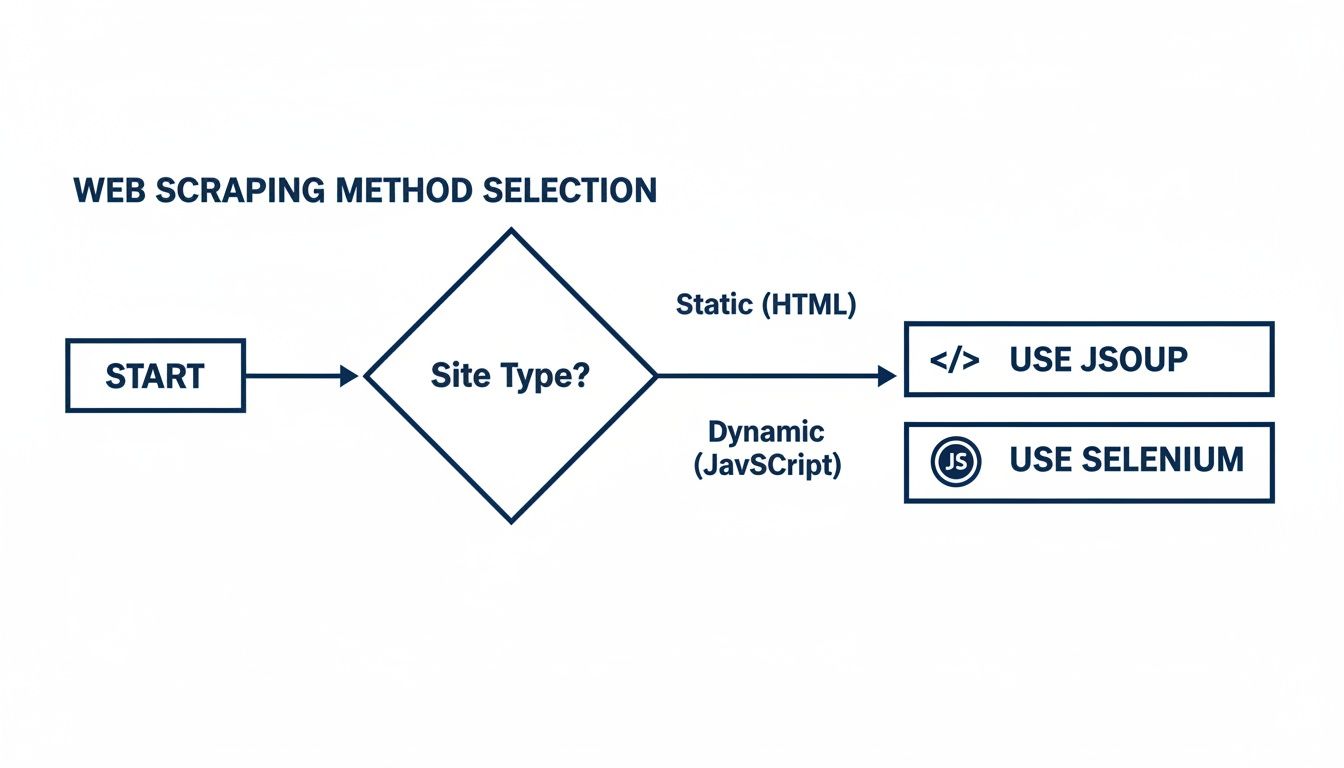
It boils down to this: if the site is just plain old HTML, Jsoup is your fast and efficient workhorse. But if you're dealing with a dynamic, JavaScript-heavy application, you'll need the full browser automation of a tool like Selenium to get the job done.
The Game-Changer: Proxy Rotation
The single most effective way to avoid getting blocked is to stop looking like a single user. That's where proxy rotation comes in. Instead of all your requests coming from one IP, you route them through a massive pool of different IP addresses. From the website's perspective, it just looks like traffic from thousands of different users around the world. For any serious scraping project, this isn't optional—it's essential.
You've got a few choices when it comes to proxies, and each has its place:
Datacenter Proxies: These are fast, cheap, and plentiful. They're great for hitting sites with weak defenses, but because their IP ranges are well-known, sophisticated anti-bot systems will spot and block them in a heartbeat.
Residential Proxies: These are IP addresses from real home internet connections, assigned by ISPs. They look like genuine user traffic, making them much harder to detect and far more successful against tough targets.
Mobile Proxies: IPs from mobile carrier networks are the gold standard. They're the most trusted and least likely to be blocked, but they also come with the highest price tag.
The right proxy really depends on your target's security. For a much deeper look into this, check out our guide on rotating proxies for web scraping unlocked, which gets into the nitty-gritty of integration.
It's All About Mimicking Human Behavior
Changing your IP is only half the battle. Your scraper also needs to act human. Anti-bot systems profile every request, looking at HTTP headers, browser features, and how you interact with the site. If those details don't add up, you'll stick out like a sore thumb.
Managing your HTTP headers is a critical first step. Real browsers send a ton of data with every request, including a User-Agent string identifying the browser and OS. Using a stale or generic User-Agent is an amateur mistake that gets you flagged instantly. Best practice is to keep a fresh list of popular User-Agent strings and rotate through them with each request.
We've seen that over 70% of digital businesses use public web data for market intelligence. Java web scraping is a major player in this, powering about 20% of these projects in e-commerce and real estate. In price monitoring, which makes up 25.8% of all scraping, Java teams using libraries like OkHttp with proxies can hit 85% uptime on dynamic sites. That’s a huge leap from the 50% success rate they see without them.
This data really drives home how crucial these anti-blocking techniques are for getting reliable data. Another key piece of the puzzle is managing cookies and sessions. Websites use cookies to remember you. A scraper that ignores cookies or handles them inconsistently is an obvious bot. Selenium manages this for you automatically, but if you're using a basic HTTP client, you'll need to handle the header yourself to maintain a believable session.
Even after all this, the most advanced anti-bot systems can still be a challenge. They employ sophisticated fingerprinting that analyzes everything from your screen resolution and installed fonts to tiny variations in your browser's JavaScript engine. It becomes nearly impossible for a simple script to go undetected. This is often the point where developers decide to offload the headache and use a specialized scraping API that handles all this complexity for them.
Using a Scraper API for Reliable Data
Sooner or later, every developer building a serious web scraper runs into the same wall. It's not the parsing logic or the data storage that becomes the bottleneck—it's the constant, infuriating battle against being blocked. You end up spending more time managing proxies and tweaking browser fingerprints than you do actually working with the data you need.
This is where a dedicated scraper API changes the game entirely.
Instead of building and maintaining a fragile, complex infrastructure of rotating proxies, user-agents, and headless browsers, you can simply hand off the dirty work. A scraper API is a specialized service designed to take your target URL and return the clean HTML, no matter what anti-bot defenses it has.
From Complex Code to a Simple API Call
Think of a scraper API as an ultra-smart proxy on steroids. You tell it where to go, and it figures out how to get there successfully. It handles the proxy rotation, solves any CAPTCHAs that pop up, and even renders JavaScript-heavy pages for you.
This approach radically simplifies your Java code. All that boilerplate for setting up Selenium, configuring proxy managers, and implementing retry logic? It gets replaced by a single, clean HTTP request. Your focus shifts back to what you do best: parsing the data you receive.
Look at how straightforward it becomes. A task that might have required a full headless browser setup is reduced to this:
import okhttp3.OkHttpClient; import okhttp3.Request; import okhttp3.Response; import java.io.IOException;
public class ScraperApiExample { public static void main(String[] args) { OkHttpClient client = new new OkHttpClient(); String apiKey = "YOUR_API_KEY"; String targetUrl = "https://example.com/dynamic-product-page"; String apiUrl = "https://api.scrapeunblocker.com/scrape/html?token=" + apiKey + "&url=" + targetUrl;
    Request request = new Request.Builder().url(apiUrl).build();

    try (Response response = client.newCall(request).execute()) {
        if (response.isSuccessful()) {
            String html = response.body().string();
            // Now parse the clean HTML with Jsoup
            System.out.println("Successfully fetched HTML!");
        }
    } catch (IOException e) {
        e.printStackTrace();
    }
}
} That's it. This one block of code takes the place of WebDriver initializations, wait conditions, and all the proxy integration headaches.
How Scraper APIs Outsmart the Blockers
The real magic of a scraper API is the massive, sophisticated infrastructure working for you behind that simple request. These services are purpose-built to navigate the trickiest obstacles that trip up homemade scrapers.
JavaScript Rendering: Need to scrape a single-page application built with React or Vue? Just add a parameter like to your API call. The service fires up a real browser, waits for all the JavaScript to execute, and sends back the final, fully-loaded HTML.
Proxy Management: Your requests are automatically routed through a vast pool of residential and datacenter IPs from all over the world. To the target website, your scraper looks like thousands of unique, legitimate users, making IP-based rate limiting ineffective.
CAPTCHA Solving: When the API encounters a CAPTCHA, it automatically deploys advanced solvers—sometimes even human-powered services—to get past it. You don't have to write a single line of code to handle it.
By outsourcing these difficult tasks, development teams report a reduction in maintenance overhead by as much as 75%. This frees them up to focus on analyzing data instead of constantly putting out fires and fixing broken scrapers.
Making Geographically Targeted Requests
Many websites serve different content, prices, or even languages depending on the visitor's location. A good scraper API makes navigating this a breeze.
Want to see how a product page looks to a customer in Germany? Simple. Just add a country parameter to your API call, like . The API will instantly route your request through a German proxy, ensuring you get the exact localized data you need.
This is invaluable for a ton of real-world use cases:
Price Intelligence: Scraping e-commerce sites to see how product prices change across different international markets.
Ad Verification: Confirming that geo-targeted ad campaigns are being displayed correctly in their intended regions.
SERP Analysis: Analyzing search engine results as they appear to users in specific countries.
The ability to control the perceived location of your scraper gives you incredible precision. Of course, the market is full of providers. It’s always a good idea to check out the best web scraping API options for 2025 to see which one has the right mix of features, performance, and pricing for your project.
Processing and Storing Scraped Data
Pulling down raw HTML and JSON is just the beginning. The real magic happens when you turn that messy, raw data into something structured and genuinely useful. Once you've successfully scraped a page, your next job is to parse it cleanly and store it somewhere sensible. This is how you transform a chaotic stream of information into an organized asset.
Let’s be honest: without a solid plan for processing and storage, even the most brilliant scraping run ends up as a digital junk drawer—a pile of data you can't actually use.
From Raw Text to Clean Java Objects
First things first, you need to parse the data. If you’re dealing with JSON responses, you can’t go wrong with industry-standard libraries like Jackson or Gson. They make it incredibly simple to map JSON fields directly to your Java objects (POJOs), which is a lifesaver for keeping your code clean, organized, and type-safe.
And what about HTML? Even if you're using a sophisticated tool for the initial scrape, Jsoup is still fantastic for the parsing stage. You can take the clean HTML you got from a scraper and feed it right into Jsoup to surgically extract the exact elements you need.
Here's a pro tip I can't stress enough: always map scraped data to dedicated POJOs. Don't just stuff everything into a generic . Creating a class with specific fields like , , and decouples your parsing code from your business logic. Trust me, this makes your entire application much easier to test, maintain, and reason about down the road.
Finding the Right Home for Your Data
With your data neatly packaged in Java objects, the final question is where to store it. The best choice really boils down to the scale of your project and what you plan to do with the data.
CSV Files: Need a quick data dump for analysis in a spreadsheet? Writing to a CSV is often the simplest and fastest way to get it done. A library like OpenCSV makes it trivial to serialize your list of objects into a format anyone can open. It's perfect for one-off jobs.
Relational Databases (PostgreSQL, MySQL): If you're building something more permanent, like a price monitoring dashboard, you'll want the structure and reliability of a SQL database. When you need data integrity, complex queries, and well-defined relationships between your data points, this is the way to go. I personally lean towards PostgreSQL for its robust feature set.
NoSQL Databases (MongoDB): What if you're scraping huge volumes of data from many different sources, and the structure isn't always consistent? This is where a NoSQL database like MongoDB really shines. Its flexible, document-based model is ideal for projects where the schema might evolve, giving you the scalability you need without a rigid structure.
Choosing the right parsing tools and storage backend from the start is what makes your hard-won data a reliable, powerful resource instead of a headache.
Answering Your Top Java Web Scraping Questions
When you first dive into web scraping with Java, a few questions always seem to surface. Getting these sorted out early on can save you a world of trouble down the road, from legal tangles to banging your head against a website that just won't cooperate.
Is This Even Legal?
Let's get the big one out of the way first: the legality of web scraping. Generally speaking, scraping publicly available data is legal, but it's not a complete free-for-all. You're operating in a bit of a legal gray area.
Before you even write a line of code, your first stops should always be the website's file and its Terms of Service. These are the ground rules. If a site explicitly forbids scraping, you proceed at your own risk. Beyond that, it's critical to avoid scraping personal data, copyrighted material, or anything that requires a login.
Think of it like being a guest in someone's house. You wouldn't just start rummaging through their drawers. The same principle applies online—be respectful, don't hammer their servers, and honor their explicit rules.
Jsoup vs. Selenium: Which One Do I Need?
This is probably the most common technical question, and the answer really boils down to what the target website is made of. It’s a classic case of using the right tool for the job.
Here’s my rule of thumb:
Go with Jsoup for static HTML. If you can right-click, "View Page Source," and see all the data you need right there in the initial HTML document, Jsoup is your best friend. It’s incredibly fast, lightweight, and perfect for old-school, server-rendered websites.
You need Selenium for dynamic JavaScript-driven sites. Is the content loading in after the page shell appears? Are you dealing with a modern single-page application built with something like React or Angular? That's where a real browser automation tool like Selenium becomes essential. It loads the page, executes the JavaScript, and lets you scrape the final, fully-rendered content, just as a user would see it.
What Do I Do When I Get Blocked?
It’s not a matter of if you’ll get blocked, but when. The best way to deal with it is to be proactive from the start. Your first line of defense is always proper rate-limiting. Don't bombard a server with hundreds of requests a second; mimic human browsing speeds.
But even with a polite approach, sophisticated anti-bot systems will eventually catch on. When that happens, your most robust solution is to use a dedicated unblocking service. Integrating a tool like ScrapeUnblocker takes the headache out of the equation by automatically handling things like proxy rotation, CAPTCHAs, and realistic browser fingerprinting for you.
Comments