
Proxy Requests Python: Master Web Scraping with Requests, Selenium, and aiohttp
- Dec 17, 2025
- 13 min read
If you're getting serious about web scraping, learning to make proxy requests in Python is a must. It's the difference between a toy script that gets blocked after a few hundred requests and a robust data collection engine that can run for days. Think of it as giving your scraper a fresh disguise for every request it makes.
Why Proxies Are a Game-Changer for Python Web Scraping
When you run a scraper from your own machine, every single request you send out has your home or office IP address stamped on it. For a quick test run, that's fine. But try to pull down thousands of pages, and you'll stick out like a sore thumb. Websites see that flood of traffic from one place, flag it as bot activity, and—bam—your IP is blocked. Project over.

Sidestepping the Usual Scraping Headaches
A proxy server is basically a middleman. Your request doesn't go straight to the target website; it gets routed through the proxy first. The website sees the proxy's IP, not yours. This simple rerouting maneuver solves the biggest problems that kill most scraping jobs.
IP Bans and Rate Limiting: This is the big one. By rotating through a pool of proxies, you can make every request look like it's coming from a completely different person. This lets you fly under the radar of most anti-scraping systems.
Geo-Restrictions: Ever needed to see product pricing in Germany or Japan? A proxy located in that country makes your scraper look like a local user, unlocking content you couldn't otherwise see.
Anonymity and Privacy: Masking your IP keeps your scraping operations private and prevents websites from tracing activity back to your network. It's just good practice.
The difference this makes is huge. Data shows that over 70% of professional web scrapers rely on rotating proxies to keep their operations alive. It can take success rates from a dismal 20% up to over 95%. From experience, I can tell you that sending more than 100 requests per minute from one IP will get you blocked on most major sites in a heartbeat. You can find more practical discussions about Python proxy strategies over at Plain English.
A proxy isn't just a "nice-to-have" for privacy. For any scalable scraping project, it's essential infrastructure. Without a solid proxy setup, you’re not building a data pipeline—you're just waiting to get shut down.
To make this crystal clear, let's break down exactly what changes when you introduce proxies into your workflow.
Direct Vs Proxy Requests At A Glance
Feature | Direct Requests | Proxy Requests |
|---|---|---|
Origin IP | Your real IP address | Proxy's IP address |
Anonymity | None. Easily traceable. | High. Your identity is masked. |
Ban Risk | Very high with scale. | Low, especially with rotation. |
Geo-Access | Limited to your location. | Unlocks global content. |
Scalability | Poor. Quickly hits rate limits. | Excellent. Distributes load. |
Success Rate | Drops sharply with volume. | Stays high with a good proxy pool. |
As you can see, the moment your needs go beyond a few simple requests, a direct approach becomes a liability. Proxies are what enable you to gather data reliably and at the scale modern projects demand.
Integrating Proxies with the Python Requests Library
When you're making HTTP calls in Python, the library is pretty much the gold standard. It’s elegant, intuitive, and just gets the job done. That same simplicity carries over when you need to use proxies, making a potentially tricky networking task feel surprisingly easy.
The magic happens with a simple Python dictionary, which you pass to the argument. This dictionary tells exactly where to route its traffic by mapping a protocol (like or a) to your proxy server's address. It's that straightforward.
Setting Up a Basic Proxy Request
Let's say you have a proxy server running at on port . To send a request through it, all you need is a couple of lines of code.
import requests
Here's the address of our proxy
proxy_url = "http://123.45.67.89:8000"
Now, we create the dictionary that understands
proxies = { "http": proxy_url, "https": proxy_url, }
The website we want to visit
target_url = "http://httpbin.org/ip"
Make the request, but this time, tell it to use our proxies
response = requests.get(target_url, proxies=proxies)
print(response.json())
Run that script, and you won't see your own IP address in the output. Instead, will report the proxy’s IP—. That’s how you know it worked.
Handling Proxies with Authentication
Let's be real: free, open proxies are a minefield. They're slow, unreliable, and almost always flagged by websites. Any serious web scraping project uses a paid proxy service, and those services require you to authenticate, usually with a username and password.
Thankfully, makes this just as easy. You just need to build the credentials right into the proxy URL string. The format is a standard you'll see everywhere: .
For instance, with the username and password , your setup would look like this:
import requests
Note the username and password in the URL
proxy_url_auth = "http://user123:pass456@123.45.67.89:8000"
The structure of the proxies dictionary doesn't change
proxies = { "http": proxy_url_auth, "https": proxy_url_auth, }
target_url = "http://httpbin.org/ip"
try: # Adding a timeout is always a good practice response = requests.get(target_url, proxies=proxies, timeout=10) response.raise_for_status() # This will catch bad responses like 403 or 502 print("Successfully fetched IP through authenticated proxy:", response.json()['origin']) except requests.exceptions.ProxyError as err: print(f"Proxy Error: {err}") except requests.exceptions.RequestException as err: print(f"Something else went wrong: {err}") This is the bread-and-butter method for using most commercial residential or datacenter proxies. If you want to go a bit deeper, we have a comprehensive guide to Python requests proxies that gets into more advanced configurations.
Using Sessions for Persistent Proxies
What if you need to make a series of requests to a single website and look like the same user each time? Think about navigating a multi-step checkout process or scraping a site after logging in. If your IP address changes with every request, the server will get confused and likely boot you out.
This is where objects are invaluable. A session keeps track of things like cookies and headers across multiple requests. You can set the proxy on the session object once, and every request you make with it will use that same proxy.
Using a is a must for efficiency. It not only maintains state but also reuses the underlying TCP connection, which can significantly speed up consecutive requests to the same host.
Here’s what it looks like in practice. You set the proxy on the session, and then just use the session object to make your calls.
import requests
session = requests.Session()
Set the proxy once for the entire session
session.proxies = { "http": "http://user123:pass456@123.45.67.89:8000", "https": "http://user123:pass456@123.45.67.89:8000", }
Both of these requests will automatically use the same proxy
response1 = session.get("https://example.com/page1") response2 = session.get("https://example.com/page2")
print(f"Status for page 1: {response1.status_code}") print(f"Status for page 2: {response2.status_code}") This approach is key to building scrapers that can interact with a website more like a real person, which makes your data gathering much more reliable.
Implementing Smart Proxy Rotation and Management
Just plugging a single proxy into your script is a decent start, but for any serious scraping project, you need a smarter management strategy. This is where you'll hear terms like proxy rotation and sticky sessions thrown around. The one you choose really just depends on what you're trying to scrape and how the target website behaves.
Proxy rotation is the classic approach: you use a different IP address for every single request or for small batches of them. It's the go-to method for avoiding rate limits when you're pulling down thousands of product pages or search results.
On the other hand, a sticky session means you stick with the same proxy IP for a set amount of time or for a sequence of actions. This is absolutely essential for tasks that require a consistent identity, like getting through a login form or navigating a multi-step checkout process.
Deciding Between Rotating and Sticky Proxies
So, which one is "better"? That's the wrong question. It’s all about picking the right tool for the job.
Use Rotating Proxies When: You're doing mass data collection from simple, stateless pages. Think scraping search engine results, product listings, or news articles. Each page load is its own separate event, so a new IP each time works perfectly.
Use Sticky Sessions When: You need to look like the same user across multiple requests. This is non-negotiable for sites that use cookies or session data to track your journey, like e-commerce sites or social media platforms.
At its core, every proxy request follows the same basic path. Your Python script connects to the proxy, which then forwards the request to the target server on your behalf.
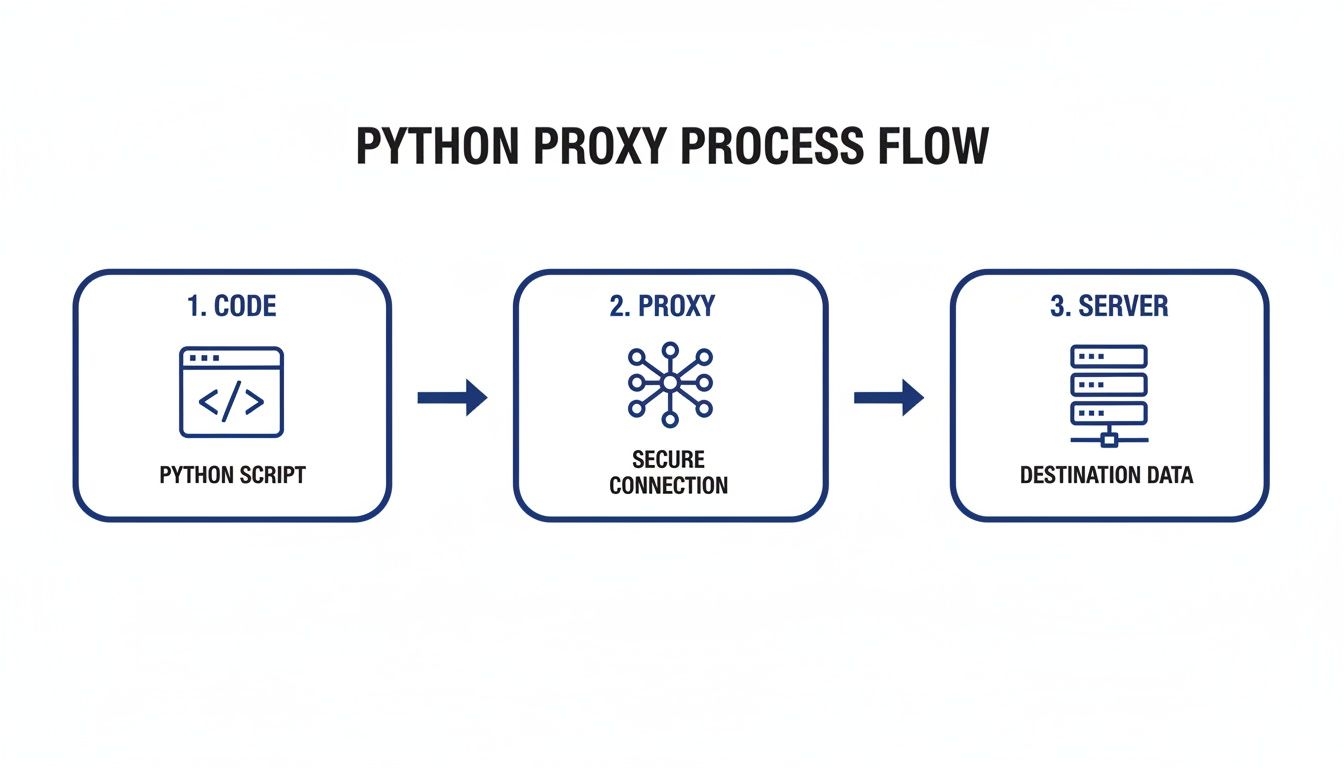
This simple rerouting is what shields your scraper's real IP and location from the target.
Building a Basic Python Proxy Rotator
You might be surprised how simple it is to implement basic rotation in Python. The core idea is just to pick a random proxy from your list every time you make a request.
Here’s a quick-and-dirty example using :
import requests import random
A list of your authenticated proxy servers
proxy_list = [ 'http://user:pass@proxy1.com:8000', 'http://user:pass@proxy2.com:8000', 'http://user:pass@proxy3.com:8000', ]
def get_random_proxy(): """Selects a random proxy from the list.""" return random.choice(proxy_list)
def make_request_with_rotation(url): """Makes a request using a randomly selected proxy.""" # Grab a random proxy from our list proxy = get_random_proxy() proxies = {"http": proxy, "https": proxy}
try:
    # Make the request with a timeout
    response = requests.get(url, proxies=proxies, timeout=15)
    print(f"Success with proxy: {proxy}")
    return response
except requests.RequestException as e:
    # If one proxy fails, we just log it and move on
    print(f"Failed with proxy: {proxy}. Error: {e}")
    return None
Let's test it out
target_url = "http://httpbin.org/ip" make_request_with_rotation(target_url)
This script gives you a solid foundation. Of course, you can build on this with more advanced logic. For a deeper dive, our guide on rotating proxies for web scraping covers more robust techniques.
A few bad proxies in your list shouldn't bring your entire operation to a halt. Building solid retry logic with reasonable timeouts is a non-negotiable step for any scraper you plan to run unattended.
The difference this makes is staggering. According to a Rayobyte analysis, a scraper without proxies gets blocked on major websites in 82% of sessions within just 1,000 requests. With rotating proxies, that number drops to a mere 5%. You're effectively slashing your ban rate by over 90%.
Distributing your requests across a pool of IPs is the secret to mimicking organic user traffic and unlocking large-scale data collection.
Moving Beyond : Proxies for Async and Browser Automation
The library is a fantastic workhorse, and it's perfect for a ton of web scraping jobs. But let's be real—sometimes you need more firepower. Modern web scraping often means you're either trying to make thousands of requests at lightning speed or you're up against a site that's basically a fortress of JavaScript.
This is where tools like for high-speed, concurrent jobs and for browser automation come into play. The good news is that getting them to work with proxies is just as straightforward.
Speeding Things Up with aiohttp
When you need to blast out thousands of requests and can't afford to wait for each one to finish, synchronous libraries just won't cut it. They become a massive bottleneck. That's why we turn to , a library built on Python's that lets you juggle a huge number of requests all at once.
Setting up a proxy with feels a lot like , but you'll pass the proxy URL and any credentials directly into the request method itself.
import aiohttp import asyncio
async def fetch_with_proxy(): # Your proxy URL, including username and password if needed proxy_url = "http://user:pass@proxy.example.com:8000" target_url = "https://httpbin.org/ip"
async with aiohttp.ClientSession() as session:
    try:
        # Pass the proxy URL directly to the get method
        async with session.get(target_url, proxy=proxy_url, timeout=10) as response:
            response.raise_for_status() # Good practice to check for HTTP errors
            data = await response.json()
            print(f"Success! IP via aiohttp proxy: {data.get('origin')}")
    except aiohttp.ClientError as e:
        print(f"An aiohttp error occurred: {e}")
This is how you run an async function
asyncio.run(fetch_with_proxy()) This asynchronous approach is an absolute game-changer for high-volume scraping. Sitting around waiting for one request to finish before starting the next is a massive waste of time, and solves that problem beautifully.
Taming JavaScript with Selenium
Some websites are just impossible to scrape with simple HTTP requests. Their content is built on the fly with JavaScript, and if you can't render it, you can't see the data. For these tough targets, you need to bring in the big guns: a real browser, automated with a tool like Selenium.
To get Selenium to use a proxy, you have to configure the browser before it even launches. This is a crucial point. By setting it up in the browser's options, you ensure that every single request—from the initial page load to all the background API calls and asset downloads—is routed through your proxy.
Here’s how you’d set this up for Google Chrome:
from selenium import webdriver
proxy_server = "123.45.67.89:8080" # IP:PORT format chrome_options = webdriver.ChromeOptions()
The key is this command-line argument
chrome_options.add_argument(f'--proxy-server={proxy_server}')
Note: Authenticated proxies are trickier with this method.
You'd often need a browser extension or use a proxy service
that authenticates based on your whitelisted IP address.
driver = webdriver.Chrome(options=chrome_options) driver.get("https://httpbin.org/ip")
The page source will now show the IP address of your proxy
print(driver.page_source)
driver.quit() This is an incredibly powerful technique for scraping modern, complex web apps. If you want to dive deeper, we have a whole guide on mastering Selenium with Python for web scraping.
A quick word of advice: When you start scaling up your async or browser-based scraping, the quality of your proxies becomes the biggest factor in your success. A slow or flaky proxy will cripple your performance, no matter how optimized your code is.
This is why serious operations rely on paid proxy providers. They often deliver speeds 5x faster (with latency around 0.8s) and 99.99% reliability, which is essential for applications in finance and ad-tech. The pros are constantly monitoring proxy health and swapping out the failing 10-15% every single day to keep their operations running smoothly. You can see more on these performance numbers on Bright Data's blog.
Troubleshooting Common Python Proxy Errors
Sooner or later, your proxy requests are going to fail. It’s just part of the game. The real skill isn't in preventing every single error—that's impossible—but in quickly figuring out why it failed and getting things back on track. We've all been there, wasting an afternoon chasing a simple typo in a proxy string. A good troubleshooting process can turn that hours-long headache into a two-minute fix.

Your first move should always be to isolate the problem. Is it your code? The proxy server? Or something in between?
My go-to tool for this is a simple command right from the terminal. By trying to connect through the proxy completely outside of your Python script, you can immediately tell if the proxy itself is even alive. If can't get through, your script never stood a chance.
Dissecting Common Failure Points
Once you start looking at the actual exceptions, the error messages themselves usually tell you exactly what’s wrong. You just have to know how to interpret them.
Here are the usual suspects I run into all the time:
Connection Timed Out: This is easily the most frequent error. It just means your script gave up waiting for the proxy server to respond. The proxy could be dead, swamped with traffic, or a firewall on either end is blocking the connection.
or : This one is a hard "no." You've successfully reached the server's address, but it slammed the door on your connection attempt. Usually, this points to a wrong port number or the proxy service being temporarily offline.
: This HTTP status code is a gift—it’s crystal clear. You connected to the proxy just fine, but your username and password are bad. Double-check them for typos, and make sure they haven't expired.
Here's a pro-tip: I always build a small logging function into my proxy rotation logic. When a request with a proxy fails, I log its IP and the specific error. If the same proxy fails, say, three times in a row, my code automatically sidelines it for a while. This keeps bad proxies from poisoning the whole pool.
Building a Resilient Scraping Workflow
The difference between a script that breaks every ten minutes and a robust data pipeline is how it handles failure. Your code should expect proxies to fail and know what to do when they do.
Don't just let a crash your entire program. Wrap your request logic in a block. When you catch a proxy-related exception, simply log the issue, grab the next proxy from your list, and try the request again. This simple loop is what lets your scraper run for hours unsupervised.
To make things even clearer, I've put together a quick-reference table for the errors you'll see most often.
Common Proxy Errors and Solutions
When an error pops up, a quick check here can often point you directly to the cause and the solution, saving you a ton of debugging time.
Error Code / Type | Common Cause | Recommended Solution |
|---|---|---|
Timeout | The proxy is dead, a firewall is blocking you, or the server is just too slow. | Increase your script's timeout setting. Test the proxy with . Double-check your firewall rules. |
Connection Refused | You've almost certainly got the wrong IP address or port in your proxy string. | Go back to your proxy provider's dashboard and verify every detail of the proxy address. |
407 Authentication | Your username or password is wrong, or you've formatted the authentication part of the URL incorrectly. | Carefully check your credentials for typos. Make sure you're using the right format (). |
Thinking this way—systematically identifying the error, understanding why it happened, and having your code automatically retry—is what will make your scrapers truly resilient. You'll spend less time babysitting scripts and more time actually working with the data you collect.
Python Proxy FAQs: What Every Developer Asks
When you start using proxies in Python, a handful of questions almost always come up. These are the practical, real-world issues that separate a scraper that works from one that constantly fails. Getting a handle on these details is crucial for building a reliable data pipeline.
Let's break down the most common questions we see from developers.
What's the Real Difference Between HTTP and SOCKS Proxies?
The main distinction is the network level they operate on. Think of it this way: HTTP proxies are specialists built for web traffic (HTTP and HTTPS). They work at the application layer, meaning they actually understand the requests you're sending and can even cache content to make things faster.
SOCKS proxies, however, are generalists. They operate at a lower network level (the transport layer) and don't care about the type of traffic. They'll route anything you throw at them, from web pages to email or gaming data.
For 99% of web scraping tasks, a solid HTTP proxy is exactly what you need. It’s purpose-built for the job and more efficient for fetching web content. You'd really only reach for a SOCKS proxy if you were dealing with something unusual outside of standard web scraping.
Are Free Proxies Ever a Good Idea?
I get the appeal, but let me be blunt: using free proxies for any serious project is a recipe for frustration. It’s a classic case of getting what you pay for.
You'll run into three major roadblocks with free proxies:
They Just Don't Work: Most are incredibly slow, unstable, and have already been flagged and blocked by any website you'd actually want to scrape. Your success rate will be near zero.
Constant Errors: Get ready for a flood of timeouts and connection errors. They'll bring your scraper to a screeching halt.
Huge Security Risks: This is the real deal-breaker. A free proxy operator can see, log, or even change your traffic. You're essentially sending your data through a complete stranger's computer.
Investing in a reputable paid proxy service isn't a luxury; it's a fundamental requirement for reliable performance, high success rates, and basic security.
How Can I Get Around Advanced Bot Blockers Like Cloudflare?
When you’re up against sophisticated anti-bot systems like Cloudflare or Akamai, simply rotating your IP address won't cut it. These systems are much smarter than simple IP rate-limiters.
They analyze a whole host of signals to spot a bot, including:
Browser Fingerprints: Your browser version, screen resolution, fonts, and even hardware details.
JavaScript Challenges: Complex puzzles that only a real browser can solve correctly.
Behavioral Analysis: How the mouse moves, the timing between clicks, and other user patterns.
To defeat these defenses, you need to upgrade your toolkit. The solution is usually a combination of high-quality residential or mobile proxies paired with a smart service like a web scraping API from ScrapeUnblocker. These tools manage the entire "human" side of the request for you, handling fingerprinting and solving challenges so your requests sail right through.
Comments