
A Guide to Transparent Proxy Servers
- Nov 7, 2025
- 15 min read
Think of a transparent proxy as an invisible gatekeeper on a network. It's a server that intercepts your internet traffic without you ever knowing it's there—no software to install, no settings to change on your device. This is because they're typically set up at the network level by organizations like your workplace, a school, or even your Internet Service Provider (ISP).
The Invisible Gatekeeper of Your Network

It’s like an invisible security checkpoint at an airport. You and all the other travelers walk right through without stopping or even realizing it exists, but it’s screening everyone just the same. That’s the perfect way to think about transparent proxy servers. They are powerful tools for managing large networks, automatically funneling all traffic through a central point for inspection, filtering, and even a bit of optimization.
Since they don't require any setup on your end, they're the ideal solution for organizations that need to enforce consistent rules across the board. This "forced" interception is really what sets them apart.
How They Are Used in Practice
A transparent proxy isn't about giving you anonymity; it's all about control and efficiency for a group of users. Network administrators put them in place for a few common reasons:
Content Filtering: This is a big one for schools and businesses. They use transparent proxies to block access to social media, gaming sites, or other inappropriate content, making sure everyone sticks to the company’s acceptable use policy.
Enhanced Security: They act as a first line of defense by stopping users from visiting known malicious websites, phishing domains, or servers that are trying to push malware.
Caching for Speed: ISPs love these. They use transparent proxies to store (or "cache") frequently requested content, like a viral video or common website files. When the next person asks for that same content, it’s served from the proxy's local storage—which is way faster and saves a ton of bandwidth.
The need for better security and network management has made these proxies incredibly common. In North America, over 70% of large enterprises use them to meet cybersecurity regulations and safeguard their data. Europe isn't far behind, driven by its strict data protection laws. You can dive deeper into these trends in a full proxy server market analysis.
The key thing to remember is that transparent proxies are built for administrators, not for user privacy. Their whole purpose is to manage traffic for a group, which makes them the polar opposite of proxies designed to hide who you are.
Unlike an anonymous or elite proxy, a transparent one doesn't even try to hide its existence or your real IP address. It openly tells websites that it's a proxy and passes along your information. This has huge implications for privacy and especially for things like data scraping, which we'll get into next. For now, just know that their main job is to control, not conceal.
How Transparent Proxies Handle Your Traffic
So, how does a transparent proxy actually work? Let's get into the nuts and bolts. The whole operation relies on something called traffic interception. Your internet requests are rerouted without you ever lifting a finger or changing a single setting.
This all happens at the network's gateway—the single point of exit for all internet-bound traffic. An administrator sets up this gateway to funnel all web requests, usually anything on HTTP port 80, straight to the transparent proxy. From your perspective, you're just browsing the web, completely unaware that your traffic is taking a detour.
Interception and Forwarding: The Nitty-Gritty
Once your request hits the proxy, it doesn't just pass it along blindly. The proxy examines the request and then forwards it to the destination server. And this is where the "transparent" part becomes a huge deal for your privacy.
Before sending your request on its way, the proxy adds a few extra bits of information called HTTP headers. Think of these headers like little sticky notes attached to your request, telling the destination server exactly how it got there.
The most important thing to remember is that transparent proxies are built for control, not privacy. The headers they add are a feature, not a bug—they're designed to announce the proxy's presence and reveal your original IP address.
This is the core mechanism that makes them completely wrong for any job where you need to stay anonymous.
HTTP Headers: The Telltale Signs
Two common headers give the game away: and . Each one paints a clear picture of your request's journey.
: This is the big one. This header flat-out contains your original IP address. When a web server sees the XFF header, it knows precisely where the request came from, even if it was delivered by the proxy.
: This header is like a travel stamp in a passport. It identifies the proxy server itself, sometimes even including its software version. It’s basically telling the destination, "Hey, this request came through me, a proxy server."
Imagine you're sending a letter. Normally, it just has your return address. Using a transparent proxy is like having someone else mail the letter for you, but they attach a note to the front saying, "This was originally sent by [Your Name] from [Your Home Address]." The recipient gets both the proxy's "address" and your real one.
A Step-by-Step Breakdown of the Traffic Flow
Let's walk through what happens when you try to visit a website on a network with a transparent proxy:
Request Fired: You type a URL into your browser. Your device sends out the request, tagged with your real IP address.
Gateway Interception: Before your request hits the open internet, the network's router or firewall grabs it and redirects it to the transparent proxy server. You don't see this happen.
Header Modification: The proxy gets your request. It adds the header (with your IP) and the header (identifying itself).
Forwarding: Now, the proxy sends the modified request to the website you want to visit. The website sees the request as coming from the proxy's IP address.
Server Response: The website's server gets the request. It sees the proxy's IP, but it also reads the header and logs your original IP. It then sends its response back to the proxy.
Delivery: Finally, the proxy forwards the website's response back to your device, and the page loads.
This whole round trip takes just milliseconds, so it feels seamless to you. But on the other end, the web server knows exactly who you are, which has major implications for privacy and security.
Choosing the Right Proxy for Your Needs
Picking the right proxy is a lot like choosing the right tool for a job. You wouldn't use a sledgehammer to hang a picture frame, right? In the same way, the proxy you need depends entirely on your goal, whether that’s network control, user anonymity, or large-scale data gathering.
Not all proxies are built the same. In fact, picking the wrong one can be worse than using none at all, leading to failed projects or even exposing your data. The key differences come down to how they handle your identity and how they're set up.
The infographic below gives you a bird's-eye view of how a proxy server acts as an intermediary, intercepting your request before it ever reaches the target website.
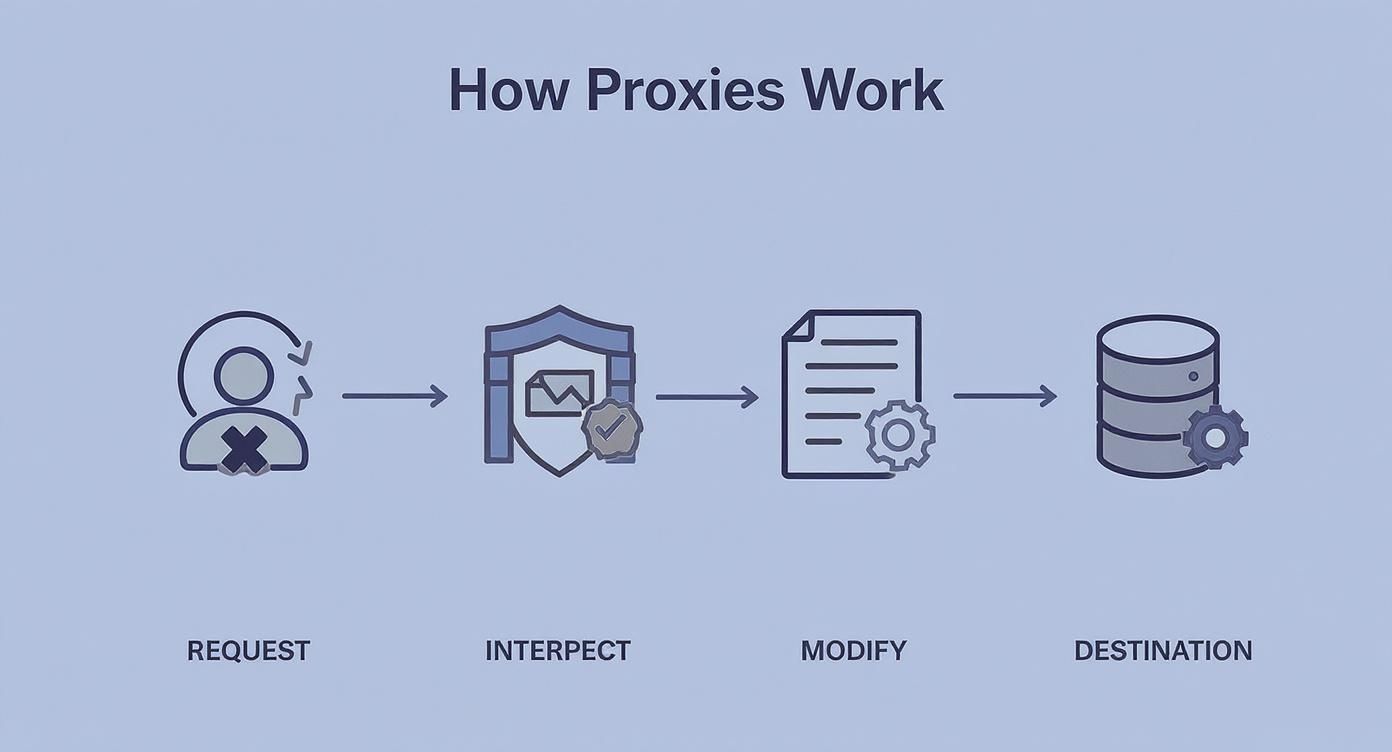
While every proxy sits in the middle like this, the way it handles that interception is what truly matters—especially when it comes to privacy.
Transparent Proxies vs. Forward Proxies
One of the most common points of confusion is the difference between a transparent proxy and a standard forward proxy. They both sit between you and the web, but they get there in completely different ways.
A forward proxy is something you have to choose to use. You go into your browser or system settings and manually configure it. A transparent proxy, on the other hand, is completely invisible and mandatory. If you're on a network that uses one (like at a school or office), your traffic is automatically routed through it. You have no say in the matter.
Transparent Proxy: An administrator's tool for managing network traffic. It's not optional and offers zero anonymity.
Forward Proxy: A user's tool for routing their own traffic through another server, often for bypassing simple content blocks.
Anonymity: The Real Dividing Line
When we get right down to it, the single most important factor that separates proxy types is the level of privacy they provide. This is where transparent proxies reveal their true purpose—control, not concealment. Anonymity isn't just about hiding your IP address; it's about hiding the fact that you're using a proxy in the first place.
A proxy’s value is measured by how well it achieves its intended purpose. For transparent proxies, that purpose is control and filtering, not hiding your identity. This makes them the worst possible choice for privacy-sensitive tasks like web scraping.
To make sense of it all, it helps to see how these different proxy types stack up against each other. The table below breaks down the most common options by their anonymity level, how they're configured, and what they're typically used for.
Comparing Proxy Types by Anonymity and Configuration
Proxy Type | Anonymity Level | Client Configuration | Primary Use Case |
|---|---|---|---|
Transparent | None | Automatic (None) | Network-wide content filtering & caching |
Anonymous | Medium | Manual | Basic private browsing & bypassing filters |
Elite (High Anonymity) | High | Manual | Web scraping, security research, geo-unblocking |
Reverse | N/A (Server-side) | N/A (Server-side) | Load balancing & protecting web servers |
As you can see, the path to true privacy moves away from transparent proxies and toward more specialized solutions.
Anonymous and Elite Proxies for True Privacy
When you actually need to protect your identity online, you’ll be looking at anonymous or elite proxies. An anonymous proxy does a decent job of hiding your real IP address, but it still announces itself as a proxy in the HTTP headers. A clever website can easily spot this and block your request.
An elite proxy, on the other hand, is the gold standard for stealth. It not only hides your real IP but also strips out any trace that a proxy is even involved. To the target server, your request looks like it came from a regular, everyday user. This makes elite proxies the go-to choice for serious web scraping, security research, and other tasks where staying undetected is critical.
But for complex projects, even a single elite proxy won't cut it. To avoid getting blocked during large-scale data extraction, you need a massive pool of IP addresses that automatically swap out. If that sounds more like what you need, our guide on rotating proxies for web scraping dives deep into how these advanced systems keep your operations running smoothly.
Real-World Uses for Transparent Proxies

Now that we've pulled back the curtain on the technical details, let's explore where you'll actually find transparent proxy servers out in the real world. Their "invisible" nature makes them the go-to tool for managing network traffic for large groups of people—especially when those users don't need to know (or shouldn't have to worry about) the plumbing behind their internet connection.
The core strength of a transparent proxy is its ability to create a controlled and secure online environment for hundreds or even thousands of users at once, all without a single person needing to configure anything. In fact, you've probably used the internet through a transparent proxy countless times without ever realizing it.
Corporate and Educational Networks
One of the most common places you'll find these proxies is in corporate offices and school districts. Network administrators in these environments have a clear mission: enforce acceptable use policies and shield the internal network from outside threats. A transparent proxy is the perfect tool for the job.
By forcing all outbound traffic through the proxy, an organization can:
Block Unproductive Websites: Easily restrict access to social media, streaming services, or gaming sites during work or school hours.
Prevent Malicious Access: Maintain a blacklist of known phishing sites and malware distributors, stopping people from accidentally wandering into a digital minefield.
Ensure Compliance: Log web traffic to meet regulatory requirements, which is crucial in sensitive industries like finance and healthcare.
This mandatory, zero-setup approach ensures every single device on the network—from a company-issued laptop to a personal smartphone on the office Wi-Fi—plays by the same rules.
Public Wi-Fi Hotspots
Ever logged onto the Wi-Fi at an airport, coffee shop, or hotel? If so, you were almost certainly browsing through a transparent proxy. The providers of these public networks have a responsibility to offer a reasonably safe and stable service.
They rely on transparent proxies for two big reasons:
Content Filtering: It allows them to block illegal or inappropriate content, protecting both themselves and the users on their network.
Security: It helps isolate users from each other, preventing bad actors from snooping on someone else's traffic on the same public network.
Without this invisible layer of management, public Wi-Fi would be a much more chaotic and risky place. The proxy acts as an unseen traffic cop, keeping requests in order and providing a baseline of safety for everyone.
Because they are designed for network-wide enforcement, transparent proxies have become an essential component of modern cybersecurity infrastructure. Their role is not just about convenience; it's about creating a manageable and secure digital space.
Internet Service Providers and Caching
Internet Service Providers (ISPs) are another major user of transparent proxies, but their primary motive is pure efficiency. ISPs have to manage a mind-boggling amount of data, so anything that reduces bandwidth usage saves them money and speeds things up for their customers.
They pull this off with a trick called caching. An ISP's transparent proxy can store copies of frequently accessed content—think popular YouTube videos, viral images, or major software updates. When the first user in a neighborhood requests a big file, the proxy saves a copy. The next time someone nearby requests that same file, the proxy serves it directly from its local cache instead of fetching it all the way from the internet again. This is way faster and takes a huge load off the ISP's main network.
Transparent proxies are now a fundamental part of our global network infrastructure. In fact, the transparent proxy segment is expected to see the highest growth in the proxy market, with over 60% of enterprises in North America and Europe using them in their cybersecurity strategies. You can find more insights in the growing proxy server service market report on Verified Market Reports. But while they're great for control, this technology is also easily detected, making it completely unsuitable for tasks like bypassing advanced bot detectors. For more on that, see our guide on how to bypass Cloudflare Turnstile.
Security Risks and Anonymity Concerns
While transparent proxy servers are a network admin's best friend for control and filtering, those very same features make them a privacy nightmare. Their entire purpose is to manage traffic, not hide it.
This built-in transparency means they are absolutely the wrong choice for any activity where you need to keep your identity under wraps. If you're looking to scrape a website securely, get around geo-blocks, or just browse privately, a transparent proxy simply won't cut it. It offers zero anonymity—and that’s by design.
It all boils down to the HTTP headers. Those headers, like , aren't a flaw; they're a feature. They act like a digital name tag, telling the destination server exactly where the request originally came from. It's the proxy's way of saying, "Hi, this request is from this user over here, I'm just passing it along."
The Anonymity Illusion
For anyone involved in data collection, this is a dealbreaker. Websites today are smarter than ever at sniffing out and shutting down automated traffic. When a request shows up with an header, it’s like a giant red flag for anti-bot systems. They'll instantly block not just your IP but the proxy's IP, too.
Any anonymity you think you have with a transparent proxy is an illusion. The proxy explicitly reveals your identity, defeating the entire purpose of using a proxy for privacy-sensitive tasks.
Trying to use a transparent proxy for a web scraping project is a recipe for failure. You’ll likely get blocked almost immediately. You just can't hide behind a tool that's designed to announce your presence. In these cases, learning how to ethically bypass website blocking with the right anonymous proxy is the only way forward.
The growth of AI applications has also changed how these proxies are used. The demand for compliant, real-time data has led to more complex setups. By 2025, over 45% of AI companies in the US and Europe reported using transparent proxies to ensure their data gathering was secure and controlled. You can read more about how AI is shaping the proxy market on Access Newswire.
Man-in-the-Middle Attack Risks
Beyond the obvious privacy issues, a poorly configured transparent proxy can open the door to serious security threats. This is particularly true when it comes to encrypted HTTPS traffic.
To filter or even just look at encrypted data, a transparent proxy has to perform what is essentially a man-in-the-middle (MITM) attack. It sounds scary, and it can be. Here’s how it works in simple terms:
Intercepting the Connection: The proxy steps in and catches your request to a secure HTTPS site.
Impersonating the Server: It then shows your browser its own SSL certificate, basically pretending to be the website you're trying to reach. For this to work without constant warnings, your device has to be set up to trust the proxy's certificate.
Decrypting Traffic: With that trust established, the proxy decrypts your data, does its filtering, and then opens a separate encrypted connection to the real website on your behalf.
This process completely breaks the end-to-end encryption that's supposed to protect your passwords, credit card numbers, and other sensitive information.
If that proxy server ever gets compromised, it becomes a single point of failure. A hacker could potentially sit there and read all the "secure" traffic from everyone on the network. This is why the security of the proxy itself is so critical; one weak link could expose everything.
Finding Anonymity Beyond Transparent Proxies
So, we've established that transparent proxies are the wrong tool for the job if you're trying to stay anonymous. What’s the right tool, then? For things like web scraping, getting around geo-blocks, or anything else where you need to fly under the radar, you need something built for stealth. The best alternatives don't just hide your IP; they make you look like a regular, everyday user.
This is where specialized proxy services come in, particularly ones that offer residential and rotating proxies. Datacenter proxies are easy for websites to spot because they come from known commercial IP blocks. But residential proxies? They use IP addresses from real internet service providers—the same kind people have at home. To any website, traffic coming from a residential IP just looks like normal, organic activity.
The Power of Residential and Rotating IPs
Even a single residential IP can become a liability if you use it too much. Modern websites are smart. Their anti-bot systems will quickly flag an IP that's firing off hundreds of requests a minute. The only way to counter this is to rotate your IP address, automatically swapping it out after every request or every few minutes.
This constant switching makes it incredibly difficult for a server to connect the dots and realize all that activity is coming from you. It's like having thousands of different people making requests on your behalf, which helps your automated traffic blend right in with the crowd.
The real magic of residential rotating proxies is legitimacy. They use real IP addresses from everyday devices, making your automated traffic look just like a human's. This is how you defeat even the most advanced anti-bot systems.
For any serious data extraction project, this kind of sophisticated setup is non-negotiable. A good proxy service manages a huge pool of these IPs, guaranteeing you get a fresh, clean address for every single connection.
Advanced Services Handle the Heavy Lifting
The best proxy providers do more than just hand you a list of IPs. They provide a whole infrastructure designed to tackle the toughest challenges of web scraping, which can save you a mountain of development work.
These premium services usually include features that ensure your data collection runs smoothly:
Automatic IP Rotation: They intelligently manage the IP pool to keep you from getting blocked, so your scrapers can run 24/7 without a hitch.
Browser Fingerprint Management: They tweak browser-level details like user agents, screen resolution, and fonts to create a consistent and believable user profile for each request.
CAPTCHA Solving: They have built-in systems to solve CAPTCHAs on the fly, stopping those annoying roadblocks from killing your data gathering.
JavaScript Rendering: They can execute all the client-side code on a page, just like a real browser, letting you scrape modern, dynamic websites built with frameworks like React or Vue.
Services like ScrapeUnblocker bundle all of this into a single API. Instead of trying to piece together separate tools for proxies, fingerprinting, and CAPTCHA solving, you just make one API call. This lets you focus on what you're actually good at—analyzing the data—instead of getting bogged down in the fight to collect it. By handing off the complexities of block evasion, you can get your projects done faster and trust that the data you collect is accurate.
Frequently Asked Questions
Got more questions? You're not alone. The world of proxies can be a bit confusing, so let's clear up a few common points of confusion about transparent proxies.
Think of this as a quick-reference guide to help solidify your understanding.
Is a Transparent Proxy the Same as a VPN?
Not at all. In fact, they have completely opposite goals. A VPN (Virtual Private Network) is a tool you choose to use for your own privacy. It encrypts your connection and hides your real IP address from the websites you visit and even from your network administrator.
A transparent proxy, on the other hand, is a tool the network administrator uses for control and monitoring. It offers you, the user, zero privacy. It's designed to enforce rules, not to protect your identity. A VPN is for hiding; a transparent proxy is for revealing.
Can I Disable a Transparent Proxy?
If you're just a user on the network, the answer is a hard no. This isn't a piece of software on your machine that you can just turn off. Transparent proxies are built into the network's gateway, intercepting your traffic before it even gets a chance to leave.
Because it's part of the network infrastructure itself, there's no setting you can tweak or app you can uninstall to get around it. The only real way to "disable" it is to get off that network entirely. This mandatory, non-optional setup is precisely why they're so effective for schools and businesses.
You can't "opt out" of a transparent proxy on a network you don't control. It's as fundamental to that network's operation as its firewall.
How Do Transparent Proxies Affect My Privacy?
They pretty much eliminate it. By design, a transparent proxy can see, log, and filter all of your unencrypted web traffic. And for your encrypted HTTPS traffic? A savvy admin can set up SSL/TLS interception to perform a sort of "man-in-the-middle" operation, letting them decrypt and inspect that, too.
Worst of all, from an anonymity standpoint, they inject headers like into your requests. This header openly tells every website you visit what your original IP address is. They are a tool for network control, not user privacy.
For any serious data collection work that requires real anonymity, transparent proxies are simply the wrong tool for the job. To get past modern anti-bot systems and gather data without getting shut down, you need a setup built for stealth. ScrapeUnblocker offers rotating residential proxies, manages browser fingerprints, and solves CAPTCHAs automatically through one API, letting you focus on the data itself, not on how to get it. Find out how to make your web scraping work at https://www.scrapeunblocker.com.
Article created using Outrank

Comments