
Build a Modern JavaScript Web Crawler That Actually Works
- Jan 27
- 17 min read
If you're still relying on basic HTTP requests to scrape websites, I've got some bad news: you're probably missing most of the data. Traditional scrapers hit a hard wall with modern web development. Today’s sites are built with dynamic JavaScript frameworks that load content after the initial page loads, which means a simple javascript web crawler is no longer a "nice-to-have"—it's an absolute necessity.
Why Your Old Scraper Fails on Modern Websites

The web has fundamentally changed. A decade ago, a website's HTML was mostly complete on arrival. You could fire off a GET request, parse the static markup with a tool like Cheerio, and reliably grab what you needed. That straightforward approach is now obsolete for a massive chunk of the internet.
Modern websites are now powered by client-side rendering. Frameworks like React, Vue, and Angular are everywhere, building interactive Single-Page Applications (SPAs). When your traditional scraper hits one of these sites, it often gets back a nearly empty HTML skeleton. The real meat—product prices, user reviews, flight details—is loaded dynamically by JavaScript running in the user's browser.
The Rise of Dynamic Content
This shift creates a huge gap between what a human user sees and what a simple scraper receives. Your old tool downloads the blueprint but never waits for the house to be built. It misses everything that appears after the initial page load, including:
Data fetched from APIs after the page is visible.
Content revealed by scrolling or clicking buttons.
Information tucked away behind interactive elements.
This reliance on client-side JavaScript is a primary reason why so many scraping projects fall flat. They’re working with incomplete data because they can't process the scripts that bring the page to life. For a deeper dive into the fundamental techniques, including how to handle dynamic content, this modern web scraping tutorial is a great resource.
The core problem is simple: modern websites aren't static documents anymore; they're applications. Your scraper needs to stop acting like a document reader and start behaving like a real user with a browser.
To drive this point home, let's compare the old way with the new way.
Static Crawlers vs JavaScript-Aware Crawlers
Feature | Traditional Crawler (Axios + Cheerio) | JavaScript Web Crawler (Puppeteer/Playwright) |
|---|---|---|
Page Rendering | Downloads only the initial, static HTML. | Renders the full page, including content loaded via JavaScript. |
Data Accessibility | Misses dynamically loaded data, interactive content, and API-fed info. | Accesses everything a real user sees in a browser. |
Interaction Capability | Cannot click buttons, scroll, or fill out forms. | Can simulate user actions to reveal hidden or paginated data. |
Success on Modern Frameworks | Fails on sites built with React, Angular, Vue, etc. | Works seamlessly with SPAs and other JavaScript-heavy frameworks. |
Block Evasion | Easily detected due to simple request patterns. | Can mimic human behavior more closely, making it harder to detect. |
Resource Consumption | Very low. Fast and lightweight. | High. Requires significant CPU and memory to run a browser instance. |
As you can see, while traditional crawlers are fast, they're simply blind to the way most of the web works today.
The Need for a Smarter Approach
Simply fetching HTML just doesn't cut it. A modern JavaScript web crawler has to render the page fully, just like a browser does. That means executing all the necessary scripts, waiting for API calls to resolve, and even interacting with the page to uncover the data you need.
This is where headless browsers, managed by tools like Puppeteer and Playwright, become indispensable. The web scraping market is on track to hit USD 2,870.33 million by 2034, largely driven by this need to handle dynamic sites. In fact, over 70% of modern web development involves frameworks that demand this kind of rendering.
But running headless browsers at scale introduces its own set of headaches—managing proxies to avoid getting blocked, solving CAPTCHAs, and handling a ton of server resources. This is exactly why services like ScrapeUnblocker exist. We handle the messy infrastructure of rendering, block evasion, and proxy rotation so you can focus on the data, not the plumbing. For more on this, check out our guide on https://www.scrapeunblocker.com/post/how-to-scrape-a-website-without-getting-blocked.
Building a Rock-Solid Crawler Architecture
Before you even think about writing a line of code, let's step back and put on our architect hats. A truly effective JavaScript web crawler isn't just a script; it's a system. Rushing straight into coding is the fastest way to build something that’s brittle, hard to fix, and falls over the moment a website changes its layout.
A solid architecture is all about separating concerns. This makes the whole operation easier to build, scale, and debug down the road. You shouldn't be wrestling with IP rotation logic while you're also trying to figure out the right CSS selector to grab a product price.
The Core Components of a Modern Crawler
Think of your crawler as a data assembly line. At a high level, it's a workflow that takes URLs as input and produces structured data as output. To get there reliably, you need a few key pieces working together.
Here’s a breakdown of the essential parts of a production-ready system:
URL Queue: This is your crawler's to-do list. It holds every URL you plan to visit. As you discover new links on a page, they get added right back into this queue.
Crawling Engine: This is your central orchestrator, the Node.js application that runs the show. It grabs a URL from the queue, sends it off to be fetched, and then hands the resulting HTML over to the parser.
Rendering & Anti-Bot Layer: This is where the magic—and the headaches—happen. This component is responsible for actually loading the page, executing JavaScript, and navigating all the anti-bot traps like CAPTCHAs and IP blocks. This is where a dedicated service like the ScrapeUnblocker API is a game-changer, handling all this complexity for you.
Data Extractor (Parser): Once you have the final, rendered HTML, this component gets to work. Its only job is to find and pull out the data you care about—product names, prices, user reviews—and organize it into a clean format like JSON.
Data Storage: This is the final stop for your neatly structured data. It could be as simple as a CSV file or as robust as a cloud database like PostgreSQL or MongoDB.
As you start designing your system, it's a great idea to explore established software architect patterns for Node.js to give you a solid foundation.
Why This Modular Approach Just Works
Keeping these jobs separate is the secret sauce. Your main crawling engine doesn't need to know how a page was rendered or if a CAPTCHA was solved; it just needs the final HTML. It delegates the messy work to the rendering layer and expects clean markup in return. This makes your whole system incredibly flexible.
By offloading the hardest parts of web scraping—browser automation, proxy management, and block evasion—to a specialized service, you radically simplify your own application. Your crawler becomes a manager, not a micromanager, which is the key to building a stable and maintainable system.
This isn't just theory; it's a response to how the web works today. The web scraping market is set to skyrocket from USD 7.28 billion in 2024 to a staggering USD 206.35 billion by 2033. A huge driver for this growth is complexity—a recent study found that 43% of businesses get stuck dealing with blocks on dynamic, JavaScript-heavy sites.
With browser automation tools like Playwright (used by 26.1% of developers) and Puppeteer (21.7%) becoming essential, letting an API manage them for you is a smart move. You can dig into more of these market trends on businessresearchinsights.com.
Choosing Your Browser Automation Tool
Under the hood of your rendering layer—whether you build it yourself or use a service—is a headless browser. In the Node.js ecosystem, the two heavyweights are Puppeteer and Playwright.
Puppeteer: Built by the Chrome team at Google, it's laser-focused on controlling Chromium-based browsers. It’s incredibly stable and has a massive community behind it.
Playwright: A Microsoft open-source project that takes a broader approach. It supports Chromium, Firefox, and WebKit and comes with a more modern API that includes handy features like auto-waiting for elements.
Honestly, for most JavaScript web crawler projects, you can't go wrong with either. But when you plug in a service like ScrapeUnblocker, this decision becomes almost irrelevant. The service manages the browser instance for you, giving you access to a perfectly configured, high-performance browser without you having to deal with any of the maintenance. This lets you build a more powerful and cost-effective crawler from the get-go.
Building Your First Dynamic Crawler in Node.js
Alright, enough with the theory. Let's get our hands dirty and write some actual code. This is where we'll build the core engine of our JavaScript web crawler. We're going to jump straight into a practical example that shows you how to pull the fully rendered HTML from a modern e-commerce product page—the kind that relies heavily on JavaScript.
The immediate goal is to get a working prototype up and running fast. Instead of getting bogged down in the messy business of managing headless browsers, rotating proxies, and solving CAPTCHAs right away, we’ll let the ScrapeUnblocker API handle that heavy lifting. This lets us focus on what we really care about: requesting a dynamic page and getting back the clean, complete HTML that a real user sees.
Getting Your Node.js Project Ready
First, we need a new Node.js project. Pop open your terminal, create a fresh directory, and initialize a file.
mkdir my-js-crawler cd my-js-crawler npm init -y
Next up, we need a way to send HTTP requests. While Node.js has a native function, I'm using for this guide. It's a battle-tested library with a simple, clean API that just works.
npm install axios
With our project set up and installed, we're ready to start building the crawler's logic.
Making Your First API Request
The heart of our crawler will be a function that sends a target URL to the ScrapeUnblocker API and then handles whatever comes back. Let's create a file called and wire up a basic request to a JavaScript-heavy e-commerce site.
The code below sends a request to the ScrapeUnblocker endpoint. We'll pass our API key in the header and put the target URL right in the request body.
const axios = require('axios');
async function scrapeDynamicPage(targetUrl) { // Replace with your actual API key from the ScrapeUnblocker dashboard const apiKey = 'YOUR_API_KEY'; const apiUrl = 'https://api.scrapeunblocker.com/v1';
try { const response = await axios.post( apiUrl, { url: targetUrl, }, { headers: { 'Content-Type': 'application/json', 'Authorization': , }, } );
// The API response body is the fully rendered HTML
const renderedHtml = response.data;
console.log('Successfully fetched rendered HTML!');

// We'll parse this properly in the next section. For now, just a peek.
console.log(renderedHtml.substring(0, 500) + '...');
} catch (error) { console.error('Error fetching page:', error.response ? error.response.data : error.message); } }
// A typical dynamic e-commerce product page const productUrl = 'https://example-ecommerce.com/product/dynamic-widget'; scrapeDynamicPage(productUrl);
Believe it or not, this simple script is already quite powerful. It can successfully fetch a page that a basic and Cheerio setup would completely fail on, all because the API handles the entire browser rendering nightmare for us in the background.
My Takeaway: Using a specialized API lets you sidestep the gnarliest parts of modern web scraping right from the start. Your script doesn't need to launch a browser, juggle cookies, or rotate IPs. It just makes a clean, simple API call.
This approach fits neatly into a resilient architecture. You can see how the pieces fit together here:
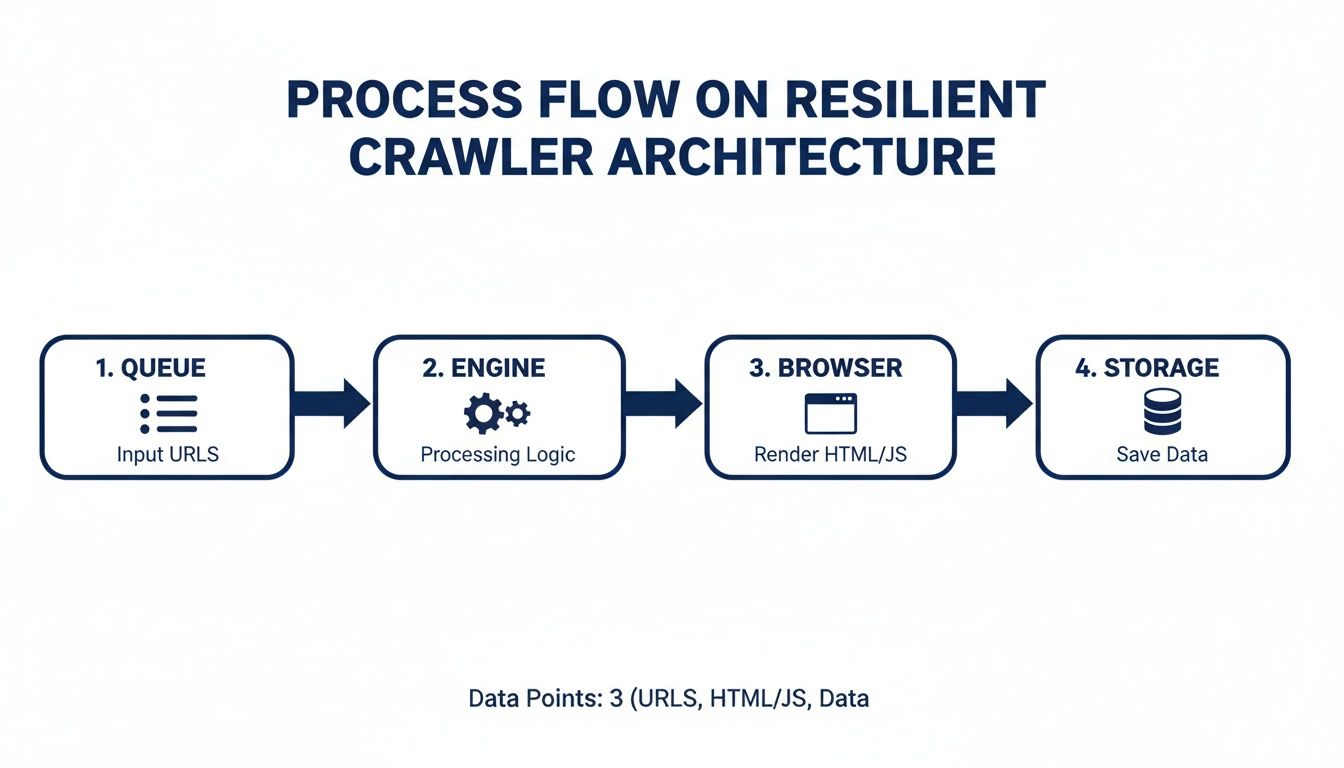
Breaking the system into a queue, engine, browser layer, and storage makes the whole thing much easier to manage and scale.
Adding Advanced Options Like Geo-Targeting
But what if you need to scrape a product page as a user from, say, Germany? E-commerce sites are notorious for showing different prices, currencies, or even different products based on your location. This is another one of those deceptively complex problems that a service can simplify.
You can easily control these factors by adding more parameters to the API request. Let's tweak our function to include geo-targeting.
By simply adding a parameter to our request body, we can tell the API to route our request through a proxy in that specific location.
// ... (previous axios and function setup) ...
async function scrapeDynamicPage(targetUrl, countryCode = 'us') { // ... (API key and URL setup remains the same) ...
try { const response = await axios.post( apiUrl, { url: targetUrl, country: countryCode, // Here's our new parameter }, // ... (headers remain the same) ... );
const renderedHtml = response.data;
console.log(`Successfully fetched HTML from country: ${countryCode.toUpperCase()}`);
console.log(renderedHtml.substring(0, 500) + '...');
} catch (error) { console.error('Error fetching page:', error.response ? error.response.data : error.message); } }
// Now let's scrape the same page, but as if we're in Germany scrapeDynamicPage(productUrl, 'de');
With just one extra line of code, our crawler can now access geo-restricted content. If you were to do this yourself, you'd be looking at sourcing and managing a pool of high-quality residential proxies from Germany, which is a massive headache both technically and financially.
As you get deeper into building your own crawlers, you'll inevitably face choices between different browser automation tools. To get a better handle on the landscape, our guide comparing Puppeteer vs. Playwright is a great resource.
Turning Raw HTML into Structured Data
Getting the fully rendered HTML is a huge win, but honestly, it’s only half the battle. What you have at this point is a giant string of markup—a messy soup of tags and text. To make any of this useful for an application, database, or analytics platform, you have to transform it into clean, structured data, like a JSON object.
This is where parsing comes in. It’s the art of sifting through the HTML's Document Object Model (DOM) to pinpoint and pull out the exact nuggets of information you actually care about. For any JavaScript web crawler built with Node.js, the undisputed champion for this task is almost always Cheerio.
The Classic Approach: Parsing HTML with Cheerio
If you've ever used jQuery to grab elements from a webpage with selectors like , you already know Cheerio. It's a brilliantly fast and lightweight library that gives you that same familiar API for navigating HTML on the server. It takes that raw HTML string, builds a traversable structure, and lets you extract data with incredible precision.
Let's say we just successfully scraped a product page and have the HTML stored in a variable called . Our goal is simple: extract the product's name, price, and rating.
Here’s how you’d do it: const cheerio = require('cheerio');
function parseProductData(html) { // First, load the raw HTML into Cheerio const $ = cheerio.load(html);
// Now, use standard CSS selectors to target the elements you need const productName = $('h1.product-name').text().trim(); const price = $('.price-tag span.amount').text().trim(); const rating = $('.star-rating').attr('data-rating-value');
// Finally, return a nice, clean JSON object return { name: productName, price: price, rating: parseFloat(rating) || null, }; }
// Imagine 'renderedHtml' holds the complete page source from our crawler // const structuredData = parseProductData(renderedHtml); // console.log(structuredData); // Expected output: { name: 'Dynamic Widget', price: '$49.99', rating: 4.5 } In this snippet, we first load our markup into Cheerio, which gives us back the powerful function. We then use specific CSS selectors to find and grab the text content of the name and price elements. For the rating, we pull the value from a attribute, a very common pattern you'll see in the wild.
The end result is a predictable JSON object—data you can actually work with.
The Smarter Path: Getting Structured JSON Directly
While parsing HTML with Cheerio works great, it has one major, painful weakness: it’s brittle. The second a website pushes a redesign and changes a CSS class name from to , your parser breaks. This turns into a constant game of cat-and-mouse, creating a huge maintenance headache.
Fortunately, there’s a much more resilient way to do this. Instead of fetching the raw HTML and parsing it yourself, you can just tell the ScrapeUnblocker API to handle the parsing for you and send back structured JSON from the start.
This method completely decouples your application from the target website's layout. You define the data you want, and the API handles the extraction, even if the site's HTML changes.
You’re essentially offloading the most fragile part of your scraper. You tell the API which data points you need and the selectors to find them, and it does the heavy lifting.
Here’s what that API call looks like: const axios = require('axios');
async function getStructuredData(targetUrl) { const apiKey = 'YOUR_API_KEY'; const apiUrl = 'https://api.scrapeunblocker.com/v1';
const response = await axios.post( apiUrl, { url: targetUrl, // The 'extract_rules' parameter tells the API to do the parsing extract_rules: { name: 'h1.product-name', price: '.price-tag span.amount', rating: { selector: '.star-rating', type: 'attribute', attribute: 'data-rating-value' } } }, { headers: { /* ... your authorization headers ... */ } } );
// The response.data now contains a clean JSON object, not HTML return response.data; }
// const productData = await getStructuredData(productUrl); // console.log(productData); // Expected output: { "data": { "name": "Dynamic Widget", "price": "$49.99", "rating": "4.5" } } By simply adding the object to our request, we've instructed the API to perform the parsing on its end. Your JavaScript web crawler now receives clean, ready-to-use JSON, which means you can ditch Cheerio entirely for this task. Your code becomes simpler, far more robust, and way easier to maintain over time.
Scaling Your Crawler for Production
Alright, so you’ve got a script that can scrape a single page. That's a great start, but it's not a production-ready JavaScript web crawler. When you need to pull data from thousands, or even millions, of pages, your approach has to fundamentally change. We need to shift from building a simple script to engineering a robust, resilient crawling operation that can run at scale without constant babysitting.
The secret to scaling is mastering concurrency—the art of juggling many tasks at once. Go too fast, and you’ll get your IP address blocked in minutes. Go too slow, and your crawl will take forever. For a Node.js application, this means ditching simple loops for a more controlled, asynchronous workflow.
Implementing Smart Concurrency
It’s tempting to just wrap everything in a , but that's a rookie mistake. It fires off all your requests simultaneously, which is like sending a denial-of-service attack from your own machine. You'll get blocked almost instantly.
A much savvier approach is to use a task queue. I'm a big fan of libraries like for this. It lets you set a concurrency limit, so you can tell your crawler, "Hey, only have 10 requests active at any given time." This little bit of control makes a huge difference in flying under the radar of most anti-bot systems.
Here's what that looks like in practice:
import PQueue from 'p-queue';
const queue = new PQueue({ concurrency: 10 }); // Cap at 10 simultaneous requests
const urlsToScrape = ['url1', 'url2', '...', 'url1000'];
urlsToScrape.forEach(url => { // Instead of running immediately, add the task to the queue queue.add(() => scrapeDynamicPage(url)); });
await queue.onIdle(); // Wait for the queue to empty console.log('All pages have been scraped!');
This one change transforms your aggressive, block-prone script into a polite and efficient data machine. For a deeper dive into managing your crawler's footprint, our guide on rotating proxies for web scraping is packed with practical strategies.
Building Battle-Tested Error Handling
Let me be clear: at scale, failures aren't an exception; they're a guarantee. Connections will drop, servers will throw errors, and pages will time out. A production-grade crawler doesn't crash—it anticipates these problems and handles them with grace.
This is where you absolutely need a retry mechanism with exponential backoff. When a request fails, don't just give up. Wait a few seconds and try again. If it fails a second time, wait a bit longer, and so on. This simple strategy gives temporary glitches, like an overloaded server, a chance to resolve themselves.
A robust crawler doesn’t just succeed; it knows how to fail intelligently. By building in retry logic, you create a self-healing system that can run for days on end, recovering from transient errors without any manual intervention.
For example, if the ScrapeUnblocker API returns a 5xx server error, your code should automatically schedule a retry. But if it fails with a 4xx client error (maybe a bad URL), you should log it and move on. Retrying a request that's guaranteed to fail is just a waste of resources.
Leveraging Unlimited Concurrency
While managing your own concurrency is a solid strategy, modern scraping infrastructure can completely change the game. This is where services like ScrapeUnblocker really shine. They are built from the ground up to handle a massive volume of concurrent requests. Because the service is managing a huge pool of browsers and proxies, your local setup is no longer the bottleneck.
What does this mean for you? It means you can crank up your concurrency from 10 to 100, or even 1000. You're no longer limited by the fear of getting your IP blocked. Your main constraints become your own machine's CPU and network bandwidth.
The rise of powerful JavaScript crawlers is directly tied to this kind of scale. It’s what allows companies to meet the soaring demand for price monitoring in a market projected to hit USD 2 billion by 2030. We're seeing 39.1% of operations now using premium, geo-targeted proxies to pull city-level data, with North America leading the charge. ScrapeUnblocker’s model—per-request pricing with unlimited concurrency—is a perfect fit for this trend, as it's designed to bypass the very anti-bot systems found on dynamic sites.
Think about scraping complex real estate data from Zillow. Getting that data back as structured JSON can slash your parsing time by 50%. By offloading the hardest parts of the infrastructure, you can build a faster, more scalable, and ultimately more effective data pipeline. You can read more about these market trends on mordorintelligence.com.
Common Questions About JavaScript Web Crawling
Once you start building and running a JavaScript web crawler, you'll quickly run into some common—and often tricky—scenarios. Let's walk through a few of the questions I see pop up all the time and talk about practical ways to handle them.
How Do I Handle Websites That Require a Login?
Scraping data from behind a login wall is a classic challenge. The whole game is about managing sessions. If you're running a browser automation tool like Puppeteer or Playwright on your own machine, the process is pretty direct. You'll automate the login flow just once: find the username and password fields, type in the credentials, and click the submit button.
After that initial login, the server sends back session cookies. Your job is to grab those cookies and include them in the headers of every single follow-up request to that domain. This tells the server, "Hey, it's me again," and keeps you authenticated, letting you access the protected pages.
This gets even easier when you're using a service like ScrapeUnblocker. Instead of automating the login yourself, you can often just pass your pre-authenticated session cookies directly in the API request. Their browsers will use your session, and you can get straight to crawling the data you need without wrestling with the browser instances yourself.
Pro Tip: Never, ever hardcode credentials directly in your scraper's source code. A much safer approach is to use environment variables or a proper secrets management tool to handle sensitive info like usernames, passwords, and API keys.
What Are the Ethical and Legal Lines in Web Crawling?
This is a big one. Ethical crawling is non-negotiable, and it all starts with respecting the website you're scraping. Before you do anything else, check the site's file. This is where the site owner lays out the rules of the road for bots, and you should always follow them.
Beyond that, it really comes down to being a good internet citizen.
Don't Hammer the Server: Your crawler can easily look like a denial-of-service attack if you're not careful. Make sure you throttle your requests by adding delays and limiting how many connections you make at once. The goal is to fly under the radar.
Steer Clear of Personal Data: Be incredibly careful about scraping personally identifiable information (PII). Privacy is paramount, and you need to be mindful of data protection laws like GDPR and CCPA.
Respect Copyright: Just because you can see it doesn't mean you can reuse it. Always be aware of the copyright laws that govern the content you're collecting.
The legal side of things can get complicated and changes depending on where you are. Landmark cases have generally sided with scraping publicly available data, but you should always err on the side of caution. When in doubt, especially for a commercial project, it's worth getting actual legal advice.
How Can I Make My JavaScript Crawler More Cost-Effective?
Let's be honest: running headless browsers is a resource hog, and those resources cost money. The key to keeping your expenses down is to be strategic. Start by asking yourself: does every single page on my target list really need full JavaScript rendering?
Often, the answer is no. For static HTML pages or data you can grab from an API endpoint, a simple HTTP client like is way faster and cheaper. You should save the heavy-duty browser rendering only for the pages where it's absolutely essential.
This is another area where using a specialized service can actually save you money in the long run. Sure, a tool like ScrapeUnblocker has a per-request cost, but it's predictable. Compare that to the total cost of ownership for a DIY setup: servers, premium residential proxies, and third-party CAPTCHA solvers. Offloading all that complexity often ends up being the more economical choice.
Should I Use Puppeteer or Playwright for My Crawler?
Ah, the classic debate. The good news is that for most JavaScript web crawler projects, both are excellent tools, and you can't really go wrong with either.
Playwright often gets a lot of love for its fantastic cross-browser support. You can drive Chromium, Firefox, and WebKit all from a single API, which is a huge plus. It also has some nice modern features, like auto-waits, that can make your code a bit cleaner.
Puppeteer, on the other hand, comes from the Chrome team and is laser-focused on Chrome/Chromium. It’s known for being rock-solid and has a massive community behind it, so you’ll never have trouble finding tutorials or help. If you only need to work with Chromium-based browsers, Puppeteer is an incredibly reliable choice.
But here's the thing: if you're using an API that manages the browsers for you, this decision becomes almost irrelevant. The service handles the underlying browser instance, so you can stop worrying about the tool and focus on what really matters—your scraping logic.
Comments