
A Practical Guide to LinkedIn Data Scraping
- John Mclaren
- 14 minutes ago
- 15 min read
At its core, LinkedIn data scraping is simply the process of automatically pulling public information from LinkedIn. Think profiles, company pages, job postings—all of it. It's how businesses get their hands on massive amounts of professional data for things like lead generation, market research, and talent acquisition, but without the soul-crushing manual work. Essentially, it transforms the world's biggest professional network into a well-organized database for smart business moves.
Why LinkedIn Data Scraping Is a Core Business Tool

In today's market, getting access to accurate, up-to-the-minute professional data gives you a serious edge. LinkedIn scraping has gone from a back-alley tech trick to a mainstream operation for any company that relies on data. It’s the engine running under the hood of countless modern B2B sales platforms, recruiting tools, and business intelligence dashboards.
Imagine a sales team trying to map out decision-makers in a new vertical. Sifting through thousands of profiles by hand is a non-starter. A scraper, on the other hand, can build them a targeted list—complete with job titles, company sizes, and locations—and pipe it right into their CRM. The entire sales cycle gets a massive speed boost.
Fueling Growth and Intelligence
The uses for this data go way beyond just building a simple contact list. Companies are getting creative and using it to power some pretty important initiatives.
B2B Prospecting: Sales and marketing folks can create hyper-targeted lead lists based on super-specific criteria like industry, job function, seniority, and even company headcount.
HR Technology: Recruiters, both in-house and at agencies, can automate their talent sourcing and build pipelines of qualified candidates for roles they need to fill now and in the future.
Market Analysis: You can keep an eye on competitor hiring trends, see which industries are growing, and spot new opportunities by looking at aggregated job and company data.
AI Model Training: The structured data from profiles, especially career histories and skills, is gold for training machine learning models. We actually have a whole guide on scraping data for AI if you want to go deeper on that.
The Scale of the Operation
The demand for LinkedIn data has absolutely skyrocketed. Between 2017 and now, it's become one of the most scraped websites on the entire internet. This surge is directly tied to the explosion in B2B sales tech, HR tools, and practical AI applications.
Recent industry surveys have shown that something like 78% of businesses are now using web scraping for market research and generating leads, and LinkedIn is almost always at the top of their list. The rich firmographic data is just too good to pass up. The market for web scraping services is on track to hit $11.1 billion by 2030, and a huge chunk of that growth is driven by the hunger for structured data from LinkedIn.
Key Takeaway: LinkedIn data scraping isn't just about grabbing names and emails. It’s about building a strategic asset—a live feed of professional intelligence that fuels sales, recruitment, and competitive analysis on a scale that's impossible to achieve manually.
Staying on the Right Side of Legal and Ethical Lines
Before you write a single line of code to scrape LinkedIn, you need to get your head around the legal and ethical boundaries. This isn't just about covering your back; it’s about creating a data strategy that's both responsible and built to last. The first question everyone asks is, "Is this even legal?"
The answer isn't a simple yes or no. It's complicated, shaped by major court battles and shifting views on data privacy. Getting familiar with these precedents is ground zero for compliant scraping.
The Game-Changer: hiQ Labs v. LinkedIn
The most important legal showdown here was the hiQ Labs v. LinkedIn case. This lawsuit set a massive precedent in the U.S. for how we think about accessing public data online. After a long fight, appellate courts ruled in both 2019 and 2022 that scraping publicly available LinkedIn profiles doesn't violate the Computer Fraud and Abuse Act (CFAA).
That's a big deal. The court essentially drew a line in the sand: if data is visible to anyone on the internet without needing to log in, it’s fair game under the CFAA. But this isn't a green light to go wild. LinkedIn still has its Terms of Service and a sophisticated defense system. If you ignore them, you're still risking getting your account banned or worse.
This legal history helps us sort LinkedIn data into three clear categories:
Public Data: This is the information you can see without a LinkedIn account, like someone's public profile page. It's generally considered the safest to scrape.
Semi-Public Data: Content you can only access once logged in, such as posts or group discussions. This is a gray area and carries more risk.
Restricted Data: Private information like direct messages or content shared only with connections. You should never attempt to scrape this.
Best Practices for Ethical Scraping
Legal compliance is the floor, not the ceiling. Your approach should also be guided by a strong ethical compass. The aim is to get the data you need without causing problems for the platform or violating user privacy.
First up, always check the file. While it's not a legally binding document, it’s a direct message from the website owner about where they don't want bots to go. Ignoring it is like walking past a "Please Keep Off the Grass" sign—it’s just bad form and makes your scraper look aggressive.
Next, you have to be smart about your request rate. Don't hammer LinkedIn's servers with thousands of requests a minute. That’s a surefire way to get your IP address blocked and can actually slow down the service for real users. A good scraper mimics human browsing patterns by including natural delays between requests.
Key Insight: Ethical scraping is less about what you scrape and more about how you scrape it. Politeness is your best tool. By limiting your request rate and respecting server rules, you build a much more sustainable and undetectable data pipeline.
Finally, always be conscious of personal data. Even if information is public, regulations like GDPR and CCPA still apply depending on where the user lives. Make sure you have a legitimate reason for collecting personal data and handle it with the security it deserves.
For a deeper dive into these principles, our guide on how to bypass website blocking ethically is a great resource.
Building Your LinkedIn Scraping Tech Stack
Let’s be clear: scraping a site as sophisticated as LinkedIn isn't a job for a simple Python script. You're up against a platform designed to fend off bots, so you need a serious tech stack to get reliable data. This is less about just grabbing HTML and more about building a resilient, intelligent data extraction engine.
The biggest hurdle right out of the gate is that LinkedIn is a modern, dynamic web application. Most of the juicy data—profiles, job details, search results—is loaded with JavaScript after the initial page loads. If you use a basic tool like Python's library, all you'll get is an empty shell of a page, not the rich content you see in your browser.
You Need a Real Browser, Not Just a Request
This is where headless browsers come into play. Think of them as real browsers like Chrome or Firefox, just without the visible window. They run in the background, controlled by your code.
Tools like Playwright and Puppeteer are the industry standards here. They let you automate a browser to open a URL, wait for all that JavaScript to execute and render the final content, and then capture the complete HTML.
Puppeteer: A Google project that works exclusively with Chromium-based browsers. It's been around for a while, so it has a huge community and tons of documentation.
Playwright: Microsoft's newer entry, which is fantastic because it supports Chromium, Firefox, and WebKit right out of the box. Its modern API and built-in "auto-waits" can make writing stable scrapers for complex sites a lot easier.
Picking the right one is a crucial first step. If you're weighing your options, our in-depth Puppeteer vs. Playwright comparison breaks down the pros and cons for real-world scraping projects.
Staying Invisible with the Right Proxies
Even with a perfect headless browser setup, blasting thousands of requests from one IP address is like waving a giant red flag at LinkedIn's security systems. That's why a smart proxy strategy isn't optional; it's essential.
Proxies route your requests through different IP addresses, making your scraper look like many different users browsing from all over the world. But not just any proxy will do.
For a target like LinkedIn, rotating residential proxies are the gold standard. These are real IP addresses from actual home internet connections, making them almost impossible to distinguish from legitimate user traffic. They're a world away from cheap datacenter proxies, which LinkedIn can spot and block in an instant.
Expert Tip: The secret isn't just using proxies, but managing them intelligently. You need a large pool of residential IPs and a system that automatically rotates them with every request or session. This mimics natural human behavior and drastically reduces your chances of getting blocked.
Getting Past CAPTCHAs and Other Roadblocks
No matter how careful you are, you will eventually hit a CAPTCHA. These little puzzles are designed specifically to stop scrapers like yours. You have to plan for them from day one.
The most common solution is to integrate a third-party CAPTCHA-solving service into your workflow. These services use a mix of AI and human solvers to crack the challenges you send them via an API. It works, but it adds another moving part and cost to your operation.
Before you even get to that point, it's wise to follow a basic compliance checklist to minimize friction.
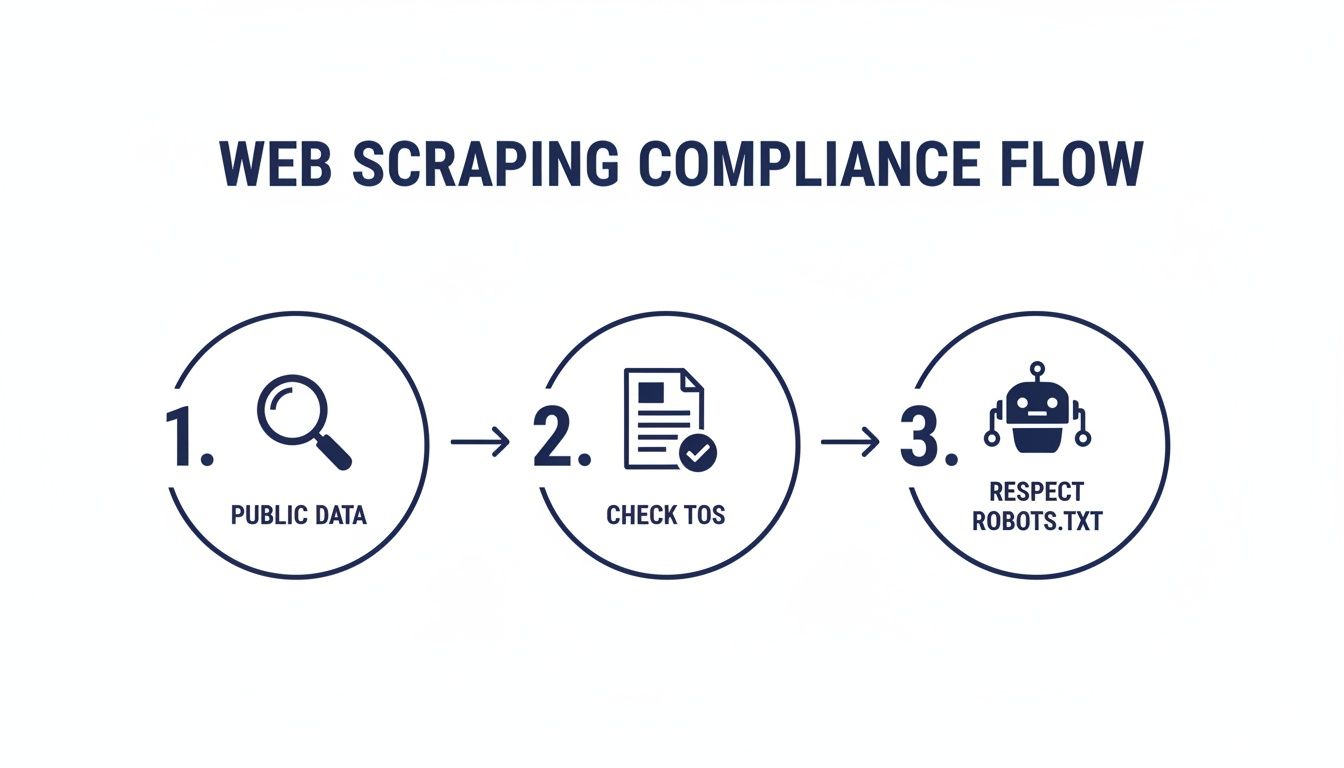
This simple flow—checking for public access, reviewing terms, and respecting —is the foundation of responsible scraping.
Comparing In-House vs. Managed APIs
As you can see, building and maintaining a robust LinkedIn scraper is a major engineering commitment. You’re signing up for a constant battle to manage headless browsers, proxy networks, and CAPTCHA solvers, all while LinkedIn continuously updates its defenses.
This reality has led to two main paths for teams that need this data.
LinkedIn Scraping Approaches Compared
This table gives you a quick breakdown of what to expect whether you build it yourself or use a ready-made service.
Feature | In-House Solution (DIY) | Managed Scraping API (e.g., ScrapeUnblocker) |
|---|---|---|
Initial Setup Cost | High (massive time investment from engineers) | Low (just integrate an API endpoint) |
Maintenance | A constant, never-ending job of updating and fixing | Handled entirely by the service provider |
Scalability | You have to build, manage, and pay for the infrastructure | Scales instantly on-demand with no overhead |
Success Rate | Can be high, but depends entirely on your team's expertise | Consistently high (>90%), managed by specialists |
Best For | Large organizations with a dedicated web scraping team | Most teams who need reliable data without the headache |
Ultimately, the best choice comes down to your team's resources and priorities. An in-house solution gives you total control but requires a huge, ongoing investment. A managed API handles all the hard parts, letting you focus on what you actually want to do: use the data.
Hands-On Scraping with Python and Code Examples
Alright, we've covered the theory and the ideal tech stack. Now it’s time to roll up our sleeves and get practical. This is where we move from planning to actually writing code, showing you how to scrape LinkedIn data with Python.
The examples below will give you a solid jumping-off point for pulling data from crucial areas like job listings and user profiles. We'll be using a couple of industry-standard libraries, for handling the web requests and for making sense of the messy HTML that comes back.
Just keep in mind, a full-blown production system would be more complex, involving headless browsers and robust proxy management. These snippets, however, are laser-focused on the core logic: how to spot the data you need and pull it out. They’re designed to be clear, easy to adapt, and a great foundation for your own projects.
Getting Your Python Environment Ready
Before you can scrape anything, you need the right tools in your toolkit. We'll lean on two powerhouse Python libraries that are absolute staples in the web scraping world. If you don't have them installed, you can get them in seconds using pip, Python's package manager.
Just open up your terminal and run this command:
Requests: This library is brilliant because it makes sending HTTP requests incredibly simple. It lets you fetch the raw HTML from a webpage in a single, clean line of code.
Beautiful Soup: Once you have that HTML, you need a way to navigate its structure. That's where Beautiful Soup comes in. It’s a powerful parser that turns messy HTML into a clean, searchable tree, which makes finding and extracting data a whole lot easier.
With those two installed, you’re all set to write your first scraper.
How to Scrape LinkedIn Job Postings
Job listings are a goldmine of data on LinkedIn. They can reveal hiring trends, what skills are in high demand, and even what your competitors are up to. Let's build a script to pull the key details from a public job posting.
The first step is always to define your target URL. For this example, we’ll start with a generic job search results page. Our initial goal is just to find the links to all the individual job postings on that page. Once we have those links, we can loop through them one by one to extract the juicy details from each.
Here’s a conceptual Python function to grab those individual job links:
import requests from bs4 import BeautifulSoup
def get_job_links(search_results_url): response = requests.get(search_results_url) soup = BeautifulSoup(response.text, 'html.parser')
job_links = []
# Note: CSS selectors change constantly. This is just for demonstration.
for link_element in soup.select('a.job-card-list__title'):
    job_links.append(link_element['href'])

return job_links
How you'd use it:
links = get_job_links(search_url)
print(links)
The real magic in that snippet is this line: . It’s using a CSS selector to find all the anchor () tags that have a specific class assigned to job titles. This is a classic pattern in linkedin data scraping—you identify a unique CSS class or ID that consistently pinpoints the data you're after.
A Word of Warning: LinkedIn updates its website all the time. The CSS selectors I'm using here are purely illustrative. You will absolutely need to open up the live page's HTML (using your browser's developer tools) to find the correct, up-to-date selectors for the data you want to scrape.
Extracting Details from a Single Job Page
Once you've collected a list of job URLs, the next logical step is to visit each one and pull out the specifics: the job title, company name, location, and the full description. This calls for a second function that takes a single job URL as its input.
The logic is pretty much the same: fetch the HTML, parse it with Beautiful Soup, and then use highly specific CSS selectors to zero in on each piece of information.
def scrape_job_details(job_url): response = requests.get(job_url) soup = BeautifulSoup(response.text, 'html.parser')
try:
    # These selectors are examples and WILL need to be verified.
    title = soup.select_one('h1.top-card-layout__title').get_text(strip=True)
    company = soup.select_one('a.topcard__org-name-link').get_text(strip=True)
    location = soup.select_one('span.topcard__flavor--bullet').get_text(strip=True)
    description = soup.select_one('div.description__text').get_text(strip=True)

    job_data = {
        'title': title,
        'company': company,
        'location': location,
        'description': description
    }
    return job_data
except AttributeError:
    # This is a crucial step to handle cases where a selector finds nothing.
    return None
How you'd use it:
single_job_url = "https://www.linkedin.com/jobs/view/some-job-id"
details = scrape_job_details(single_job_url)
if details:
print(details)
This function is a bit more robust. It wraps the extraction logic in a block. This is a smart move that prevents your entire script from crashing if a CSS selector comes up empty—a very common problem when scraping sites with slightly different page layouts.
Finally, it organizes all the extracted data into a clean dictionary. This structured approach is fundamental for building any kind of reliable data pipeline, making the data ready for storage in a database or further analysis.
Turning Raw HTML into High-Quality Structured Data
Getting the raw HTML from a LinkedIn page is a great first step, but let's be honest—it's just the beginning. What you have is a chaotic mess of tags, scripts, and code. The real magic happens when you turn that jumble into clean, structured data that’s actually useful.
This is the part of the process that separates a basic script from a professional data pipeline. It’s all about parsing, cleaning, and formatting the information you worked so hard to get. Without this, your linkedin data scraping efforts are just creating a pile of digital noise.
Parsing Messy HTML with Precision
First things first: you need to make sense of the page's complex Document Object Model (DOM). Trying to read through thousands of lines of HTML by hand is a non-starter. This is where a powerful parsing library, like Python's BeautifulSoup, becomes your best friend.
BeautifulSoup takes that raw HTML string and transforms it into a Python object you can actually work with—a searchable tree of tags and content. This lets you zero in on the exact bits of data you need using CSS selectors. For instance, you can tell your script to find the text inside the tag with a specific class that always holds the person's name.
Here's how you might think about grabbing key details from a profile:
Full Name: Find the tag at the very top of the main profile section.
Job Title: Look for a with a class like that sits right below the name.
Company: Target the tag within the experience section that has a specific, identifiable data attribute.
This approach essentially turns an unstructured mess into a predictable map, letting you pull out data points systematically. The trick is to find stable CSS selectors that aren't likely to break every time LinkedIn pushes a minor frontend update.
Expert Tip: Steer clear of relying on generic tags like or without specific class names or IDs. LinkedIn's code is constantly changing. The more specific your selectors are, the more resilient your parser will be.
Structuring Data for Maximum Utility
Once you've isolated individual data points—like a name, company, and location—it's time to get organized. The undisputed industry standard for this is JSON (JavaScript Object Notation). It’s a lightweight, human-readable format that’s perfect for feeding into APIs, databases, or machine learning models.
Turning your scraped data into a JSON object is pretty straightforward. In Python, you just create a dictionary where the keys are your data labels (e.g., "fullName") and the values are the text you extracted. This simple step creates a clean, predictable structure that other applications can easily understand.
For example, a scraped profile might be organized into a JSON object like this:
{ "fullName": "Jane Doe", "currentTitle": "Senior Software Engineer", "company": "Tech Solutions Inc.", "location": "San Francisco Bay Area", "skills": ["Python", "Data Analysis", "Machine Learning"] }
This structured output is infinitely more valuable than raw HTML. It’s ready to be loaded into a CRM, dropped into a spreadsheet for analysis, or used to train an AI.
Ensuring Data Quality and Handling Errors
A production-ready scraper has to be resilient; it can't just work on a perfect page and call it a day. What happens when a profile is missing a location field? Or what if a CSS class name changes and your title selector suddenly fails? If you don't have a plan, your script will either crash or start spitting out garbage data.
This is where data quality assurance comes in. You need to build validation rules right into your parsing logic. Before you process any data point, check if it even exists. If a field is missing, your code should handle it gracefully—maybe by inserting a value in your JSON or by logging the issue so you can review it later.
It’s also a smart move to set up alerts for when the page structure changes. A simple monitoring script can run daily, check that your key selectors still exist, and shoot you a notification if a significant number of scrapes start failing. This proactive approach saves you from discovering a week later that your entire data pipeline has been broken all along.
Taking Your Scraper from Hobby to Production-Scale
Scraping a handful of LinkedIn profiles is one thing. Building a system that can handle thousands, or even millions, is a completely different ballgame. When you scale up, the challenge isn't just about parsing HTML anymore; it’s about staying under the radar. This is the point where you stop being a scriptwriter and start engineering a serious data extraction operation.
At a large scale, your scraper’s activity leaves a distinct fingerprint. A single IP address hammering the site with hundreds of requests a minute? That’s an easy block. Using the same browser session for every request? That’s another predictable pattern that LinkedIn's anti-bot systems are built to catch. Your mission is to shatter these patterns and make your scraper fleet look like a crowd of unrelated, normal users.
It All Starts with Smart Session and Cookie Management
To look like a real person, your scraper needs to act like one. That means maintaining a consistent identity across multiple requests, which is where cookies and sessions come in. When you log in to LinkedIn, it gives you a session cookie to keep you authenticated. Your scraper needs to do the same thing.
Forget starting from scratch with every single request. A robust system needs to:
Hold onto session cookies: After a successful login or any interaction that generates a session, you have to save those cookies.
Reuse them for a while: Attach the right cookies to the right requests for that specific scraper "worker" or account.
Know what to do when they expire: Sessions don't last forever. Your scraper must recognize when it's been kicked back to the login page, then re-authenticate and grab a fresh set of cookies to continue its job.
This approach builds a much more believable browsing history. Each of your scraper instances maintains a persistent identity over time, just like a person would.
My Takeaway: I can't stress this enough—good cookie management is the bedrock of any serious scraping project. It lets your scraper instances build up a history and a reputation, making them look less like disposable bots and more like returning users.
The Art of Rotating IPs Intelligently
Just buying a block of proxies won't solve your problems. You have to be smart about how you use them. Cycling through a new IP for every single request is just as weird and suspicious as using the same one over and over. A much better way is to create "sticky" sessions, where one scraper instance hangs onto the same residential IP for a logical series of actions before it rotates.
Think about it from a human perspective. You don't get a new home IP address between loading someone's profile and clicking on their "Experience" section. Your scraper shouldn't either.
Here’s what a smarter rotation strategy looks like in practice:
Assign an IP: Kick off a scraping task by assigning it a fresh residential proxy.
Stick with it: Use that same IP for a handful of related actions—like viewing a profile, then checking their recent posts, and finally looking at the company they work for.
Give it a rest: After a certain number of requests or a few minutes of activity, put that IP on a "cool-down" timer and grab a new one for the next task.
When you combine this technique with realistic delays between your actions, your scraper's traffic starts to look incredibly organic. This drastically cuts down your chances of getting blocked or slapped with a CAPTCHA.
Learn to Adapt Your Speed in Real-Time
One of the rookie mistakes I see all the time is scraping at a fixed, aggressive pace. A production-ready system has to be more nimble. It needs to constantly listen to the server's responses and adjust its request rate on the fly.
If you suddenly start getting hit with HTTP or errors, that’s LinkedIn telling you to back off. A well-built scraper will immediately throttle itself, enter a cool-down period, and then slowly ramp its speed back up. This kind of dynamic, responsive behavior is absolutely critical for the long-term health of your operation. By listening to what the server is telling you, you can fly under the radar while still gathering data efficiently.
Comments