
A Developer's Guide to Scraping Google Search Results
- Feb 15
- 16 min read
Scraping Google search results is less about running a simple script and more about building a resilient system. It's an engineering discipline that demands a smart approach to query formulation, navigating anti-bot defenses, and parsing dynamic HTML to pull out structured data. This isn't a weekend project; it's about building a pipeline that can handle Google's immense complexity and deliver accurate data at scale.
This guide is a complete developer's lifecycle for doing just that.
A Modern Blueprint for Scraping Google
The goal here is to create a system that can consistently bypass sophisticated bot detection, make sense of ever-changing SERP layouts, and deliver clean, reliable data. Think of this as a developer-focused blueprint for building a production-ready solution.
The core workflow is a three-part process: formulating the right query, executing the scrape, and then parsing the raw HTML into usable data.
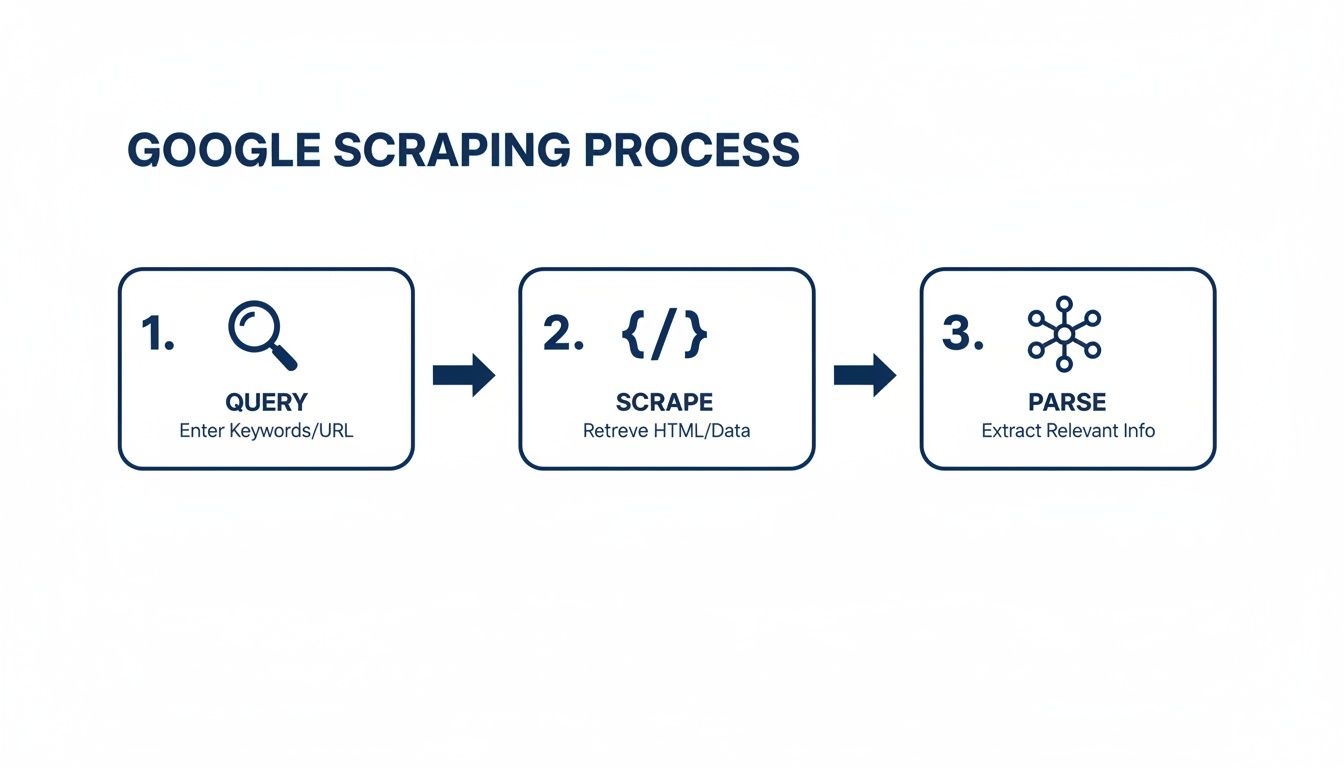
This simple flow illustrates a crucial point: success depends on mastering each stage independently. A failure in one part cascades down and tanks the entire operation.
To build a scraper that stands up to real-world demands, you need to assemble several key technical components. Each one solves a specific, and often painful, challenge you'll encounter when trying to gather data from Google.
Core Components of a Reliable Google SERP Scraper
Component | Challenge It Solves | Key Technology |
|---|---|---|
Query Engine | Formulating precise, repeatable search requests with proper parameters for location, language, and pagination. | URL encoding libraries, parameter management logic. |
Proxy Management | Bypassing IP-based blocking and rate limits by distributing requests across a pool of diverse IPs. | Rotating residential/datacenter proxies, proxy management services. |
Headless Browser | Rendering JavaScript-heavy pages to access content that isn't present in the initial static HTML. | Puppeteer, Playwright, Selenium. |
HTML Parser | Identifying and extracting data from complex, nested HTML structures using reliable selectors. | Cheerio (Node.js), BeautifulSoup (Python), lxml. |
Anti-Bot Evasion | Mimicking human browser fingerprints and solving CAPTCHAs to avoid getting blocked by Google's defenses. | User-Agent rotation, CAPTCHA solving services, fingerprint spoofing. |
Data Validation | Ensuring the extracted data is accurate, complete, and conforms to a predefined schema before storage. | Schema validation libraries (Zod, Pydantic), custom data cleaning scripts. |
These pillars form the foundation of any serious scraping project. Without them, you're building on shaky ground.
Understanding The Full Scraping Lifecycle
We're going to walk through the entire operational sequence. It starts with crafting precise search queries and handling pagination correctly. From there, we'll get into the nitty-gritty of extracting structured data from all the different SERP features Google throws at us.
We're talking about much more than just the classic "ten blue links." Modern SERPs are a rich tapestry of information, including:
Organic search results
Knowledge Panels and Google Business Profiles
"People Also Ask" (PAA) boxes
Local Map Packs and Shopping carousels
This guide will break down the primary technical hurdles you'll face. We'll get into the weeds on JavaScript rendering challenges and the advanced blocking mechanisms Google uses to stop automated traffic. More importantly, we'll cover practical strategies to get around them, like the strategic use of residential proxies and headless browsers.
At its core, successful Google scraping is about mimicking human behavior at scale. This involves not only rotating IP addresses and user agents but also handling dynamic content rendered by JavaScript—a task where simple HTTP requests fall flat.
Think of this article as your roadmap. It lays out the essential components and strategic thinking required to build a scraper that actually works in the real world. From initial design to ongoing maintenance, we’ll cover the techniques that separate hobbyist scripts from enterprise-grade data extraction pipelines. The following sections will dive deep into the mechanics of each stage, providing actionable advice and code examples to get you started.
Engineering Your Scraper for SERP Complexity
Building a Google scraper that doesn't break every other week is less about brute-force requests and more about smart engineering. To get reliable data, you have to master two things: how you ask Google for information and how you make sense of the complex HTML it sends back.
It starts with your search query. Don't just slap a keyword into a URL. Think of it as a finely-tuned request. Google gives you a whole toolkit of URL parameters to control the results, and moving beyond the basic parameter is where professional-grade scraping begins.

Crafting Precision Queries
To get data you can actually use, you have to tailor your requests. If you're checking local SEO rankings for a client in Denver, a generic search for "plumbers" is worthless. You need to look like you're searching from Denver.
Here are a few of the most important parameters to build into your query engine:
(Host Language): This sets the language for the SERP itself. For instance, will return the page in Spanish.
(Geographic Location): This tells Google which country you're searching from. Using simulates a search from Great Britain.
: This one is the secret sauce for local SEO. It’s a bit of a pain to generate, but it allows you to set a precise city-level location, which is non-negotiable for accurate local rank tracking.
: You used to be able to set this to 100 to get more results per page. Google has largely deprecated this, and you're now stuck with about 10 results per page. This shift makes solid pagination logic absolutely essential.
Since you can't just ask for 100 results anymore, your scraper must be built to walk through the pages one by one. This means looping through results by changing the parameter ( for page 1, for page 2, for page 3, and so on). A classic rookie mistake is hitting these pages too fast, which is a surefire way to get your IP blocked.
Deconstructing the Modern SERP
Once you get the HTML back, the real fun begins. A modern SERP isn't a simple list of ten blue links. It’s a dynamic, ever-changing collage of different result types, each with its own unique HTML structure. Understanding the wild world of Google SERP features is the key to parsing them correctly.
A solid parser needs to be modular. Instead of one giant function that tries to do everything, build smaller, focused functions for each SERP feature. This way, when Google inevitably tweaks the layout for the Knowledge Panel, you only have to update one small part of your code, not rewrite the entire thing.
Pro Tip: I can't stress this enough: never write a single, monolithic parsing function. Create small, dedicated functions like , , and . Your future self will thank you when you're debugging at 2 AM.
Your parsing logic will rely on CSS selectors or XPath expressions to find the right elements in the HTML. I find CSS selectors are usually more readable and get the job done for most SERP features. For a deeper look at the tools you'd use for this, our guide on https://www.scrapeunblocker.com/post/puppeteer-vs-playwright-a-guide-to-modern-web-scraping is a great place to start.
Targeting Specific SERP Features
Let's get practical. Here’s how you might target some common features. Just remember, these selectors are a moving target and will change.
Organic Results: These are the bread and butter. You'll typically find them inside a container , with each result nested inside. Your job is to pull out the title (usually an ), the URL, and the description snippet for each one.
"People Also Ask" (PAA) Boxes: PAA sections are structured as a series of expandable containers. Your parser needs to find the main PAA box and then loop through each question-and-answer pair inside.
Featured Snippets: That coveted "position zero" result has its own unique structure. You'll need specific selectors to grab the answer text, the source page title, and its URL.
Local Map Packs: For local searches, the map pack is everything. It has a completely different HTML structure from organic results, so it requires its own parsing logic to get the business name, address, phone number, and star rating.
Finally, the data you extract shouldn't be a random pile of text. The goal is to structure it into a clean, predictable format like JSON. A well-designed JSON output makes the data instantly ready for analysis, a database, or an API. Each SERP feature should become a key in your JSON object, holding an array of all the items you found. This is the final step in turning a simple script into a powerful data engineering tool.
Navigating Google's Anti-Bot Defenses
This is the part where most DIY Google scrapers go to die. Google has an entire arsenal of defenses designed to spot and shut down automated traffic, and they are incredibly good at it. If you just start firing off raw requests from your server's IP address, you’ll be lucky to last five minutes before getting blocked.
We're not just talking about simple IP bans, either. Google uses sophisticated browser fingerprinting, analyzes behavior patterns, and of course, throws up those dreaded CAPTCHA walls. Successfully scraping Google is a constant cat-and-mouse game. The goal is to make your scraper look less like a bot and more like a real person browsing the web.
The Proxy Management Imperative
The absolute cornerstone of any serious scraping operation is solid proxy management. A proxy server is just an intermediary that masks your scraper’s real IP. By rotating through a huge pool of different proxies, you can spread your requests across thousands of IPs, making it nearly impossible for Google to connect the dots and block you.
But here’s the thing: not all proxies are created equal. The type you choose directly impacts your success rate.
Datacenter Proxies: These are cheap and plentiful. The problem? They come from servers in a data center, and Google can spot these IP ranges from a mile away. They get blocked almost instantly.
Residential Proxies: These are the real deal. The IPs belong to actual home internet connections, so your requests blend right in with legitimate human traffic. They are much, much harder for Google to detect.
Mobile Proxies: This is the top tier. Your traffic is routed through mobile carrier networks (like Verizon or AT&T), making your scraper look like someone browsing on their phone. They’re the most expensive but offer the highest level of legitimacy.
For scraping Google at any real scale, rotating residential proxies are the industry standard. They hit the sweet spot between cost and effectiveness, letting you mimic real user behavior consistently.
Proxy Type Comparison for SERP Scraping
Choosing the right proxy is a critical decision that balances cost against the likelihood of getting blocked. This table breaks down the main options for SERP scraping.
Proxy Type | Effectiveness vs. Google | Typical Cost | Best For |
|---|---|---|---|
Datacenter | Low | $ | Low-volume tasks on less protected sites. |
Residential | High | $$$ | High-volume, reliable Google SERP scraping. |
Mobile | Very High | $$$$ | Mission-critical tasks requiring the highest level of anonymity. |
As you can see, for consistent Google scraping, investing in residential or mobile proxies is less of a luxury and more of a necessity.
Geo-Targeting for Accurate Local Data
Proxies aren't just for avoiding blocks; they're essential for data accuracy. Let's say you're tracking local SEO rankings for a plumber in Chicago. If your scraper is running on a server in Virginia, the search results you get will be completely different from what a potential customer in Chicago sees. That data is useless.
This is where geo-targeting saves the day. Quality residential proxy networks let you specify the country, state, or even city your request should come from. Using a Chicago-based proxy, you can pull the exact SERP a local would see, giving you genuinely actionable data for your local SEO strategy.
Your scraper is only as good as the data it collects. Without precise geo-targeting, your local search data is fundamentally flawed, as Google personalizes results heavily based on the user's perceived location.
Beyond the IP Address
While a good proxy is your first line of defense, Google's systems look at more than just the IP. Your scraper also has to act like a real browser by managing its HTTP headers.
Two of the most important headers to get right are:
User-Agent: This is a string that identifies the browser and OS making the request. You need to rotate through a list of common, up-to-date User-Agents, like recent versions of Chrome on Windows 11 or Safari on macOS.
Accept-Language: This header tells the server what language you prefer. Setting this correctly (e.g., ) helps ensure you get results in English from the US.
Using the default header from a library like Python's is a dead giveaway that your traffic is automated. Always customize them.
Handling JavaScript Rendering
Here’s another modern hurdle: many SERP features, like the "People Also Ask" boxes or interactive map packs, don't exist in the initial HTML. They are rendered by JavaScript after the page loads. If you're just making a simple HTTP request, you’ll miss all of this dynamic content.
To capture everything, you need a headless browser. Tools like Puppeteer or Playwright can spin up a real browser instance behind the scenes, let the page fully render (JavaScript and all), and then hand you the complete, final HTML.
This is where things get complex and a service-based approach really shines. Trying to scrape Google directly without the right tools results in failure 95% of the time due to CAPTCHAs and IP bans. But by combining JavaScript rendering with residential proxies, that success rate can jump to 99%.
Pairing a headless browser with a rotating residential proxy network gives you everything you need: the power to render dynamic content and the anonymity to stay unblocked. Services like ScrapeUnblocker bundle all of this—proxy rotation, browser fingerprinting, and CAPTCHA solving—into a single, simple API call. For a deeper dive into these kinds of challenges, check out our guide on how to bypass Cloudflare Turnstile.
Building Resilient and Scalable Scraping Infrastructure
Anyone can write a script to grab data once. The real challenge, and what separates a simple script from an enterprise-grade data pipeline, is getting that data reliably, day after day. This is where you move from one-off requests to building a durable system that knows how to handle failure.
When a request inevitably fails, your first instinct might be to just try again. Don’t. Firing off another request to a server that just blocked you is the fastest way to get your entire IP range blacklisted.
Implementing Smart Retry Logic
The professional approach is to implement what’s called exponential backoff. It's a simple but incredibly effective strategy. Instead of retrying instantly, you wait a couple of seconds. If that fails, you double the wait time to four seconds, then eight, and so on. This gives the server a break and dramatically increases your long-term success rate.
Here's how that logic usually plays out in practice:
Initial Failure: Wait 2 seconds + a random jitter before retrying.
Second Failure: Wait 4 seconds + jitter.
Third Failure: Wait 8 seconds + jitter.
Max Retries: After a set number of failures (say, 5), you give up and move the job to a failed queue for a human to look at later.
That "jitter" is a little pro move—it’s just a small, random amount of time added to each delay. It prevents a fleet of your scrapers from all retrying at the exact same moment, which can look a lot like a denial-of-service attack from the server's perspective.
Designing a Scalable Job Queue
As your scraping needs grow, you’ll quickly find yourself needing to run hundreds or thousands of jobs at the same time. Trying to manage this manually is a recipe for disaster; you’ll crash your own system and get blocked almost immediately.
This is where a job queue comes in. Using a tool like RabbitMQ or Redis, you can create a system that acts like a traffic controller. New scraping tasks get added to a queue as "jobs." A fleet of "worker" processes then pulls jobs from the queue one by one, executes them, and passes the data along. This architecture neatly separates creating tasks from running them, letting you handle huge volumes without breaking a sweat.
A well-designed queuing system is the engine of a scalable scraping operation. It ensures you can process a high volume of requests in a controlled, distributed manner, making your infrastructure both powerful and stable.
Need to handle more requests? Just spin up more worker instances. It's a beautifully simple way to scale horizontally.
Ensuring Data Quality and Accuracy
Scraping is pointless if your data is garbage. The most common point of failure isn’t getting blocked; it’s when Google quietly pushes a small change to the SERP layout, and your parser starts returning values or grabbing the wrong data entirely. This is where data validation becomes your best friend.
Before you even think about saving data to your database, run it through a schema validator. Define a strict schema using a library like Zod (for TypeScript) or Pydantic (for Python) that describes exactly what a "correct" result should look like.
Does the field exist and is it a string?
Is the actually a valid URL?
Is the an integer as expected?
If the scraped data doesn't fit the schema, you know something is broken. This check should trigger an immediate alert to your team, letting them know the parser needs maintenance. This kind of proactive monitoring is the only way to maintain data integrity over the long haul.
Look, direct scraping is hard for a reason. Industry data suggests that a staggering 80% of direct scraping attempts fail because of dynamic JavaScript and personalization that can vary by 30-50% depending on location and device. This is why services like ScrapeUnblocker exist. They handle all the messy parts—like real-browser execution—to deliver clean HTML or JSON with 99.9% uptime.
By combining intelligent retry logic, a scalable queue, and rigorous data validation, you build an infrastructure that doesn't just work—it lasts. To see how managed services can make this even easier, check out our guide on the 12 best web scraping API options for 2025.
Looking Back: Why Historical SERP Data is a Goldmine
Scraping live SERPs is great for a snapshot of what’s happening right now. But the real strategic gold? That’s buried in the past. Analyzing historical search data unlocks a much deeper understanding of market trends, competitor moves, and how keywords evolve over time.
Think of it this way: a single scrape is like a single photograph. Historical data is the entire movie.
This kind of analysis goes way beyond simple rank tracking. With historical data, you can see how a product's search interest explodes during the holidays or watch a competitor's ad budget ebb and flow over several quarters. Suddenly, your raw data becomes a powerful tool for forecasting and market analysis.
How to Get Your Hands on Historical Data
You won't find this information by just scraping Google's live results. The secret is to use specialized APIs that have been archiving this data for years. Services like DataForSEO offer access to SERP metrics that go back a long, long way.
This kind of dataset lets you build a truly comprehensive picture of market dynamics. You can pull vital data points that add crucial context to your current scraping efforts, like:
Past Search Volume: See how many people were searching for a term last month or last year. This is how you spot seasonal trends and long-term growth (or decline).
Cost-Per-Click (CPC) History: Track how the cost to advertise on a keyword has changed. A rising CPC is often a dead giveaway that a term's commercial value is increasing.
Paid Competition Levels: Monitor how crowded a keyword's ad space has been over time to get a feel for its profitability and competitiveness.
Tapping into historical SERP data lets you shift from being reactive to being proactive. You stop asking, "Where do I rank today?" and start asking, "Where is this keyword headed next?"
This is where you'll find the Google Keyword Planner API to be an indispensable resource. Whether you access it directly or through a third-party tool, it provides 12-month historical metrics like average monthly searches and bid ranges. It also scores competition on a scale from low (less than 0.3) to high (greater than 0.8)—data that powers an estimated 70% of all enterprise SEO workflows. You can dive deeper into these valuable historical metrics and their applications directly from Google.
Validating Long-Term Trends with Public Data
Don't forget about Google Trends. While it won't give you absolute search numbers, its API offers normalized "interest over time" data that stretches all the way back to 2004. Scraping this is a fantastic way to validate long-term hypotheses and spot major shifts in consumer behavior.
For example, you could easily plot the rise of "remote work software" against the slow decline of "office supplies" over the last decade. That macro-level context is what gives meaning to the micro-level data you get from your daily SERP scrapes.
While a custom scraper gives you total control, many of the best AI search tracker tools can help manage and analyze this kind of data more efficiently. The most powerful approach is to combine your live scraping with data from these historical APIs. That's how you build a complete, actionable picture of the entire search landscape.
When you start scraping Google search results on a large scale, the technical hurdles are really just one part of the equation. You absolutely have to operate within a clear ethical and legal framework. It’s more than just good practice—it's what will keep your projects running for the long haul.
While Google's Terms of Service technically forbid automated access, the legal landscape has become much clearer over the years.
The landmark hiQ Labs v. LinkedIn case was a huge deal for us. It essentially confirmed that scraping publicly accessible data doesn't violate the Computer Fraud and Abuse Act (CFAA). This is a crucial distinction. Your scrapers should only ever touch public information, never anything that requires a login. Being an ethical scraper means being a good internet citizen.
The golden rule is responsible data collection. That means keeping your crawl rate in check so you don't hammer Google's servers and respecting directives as a professional courtesy.
What Happens When AI Changes the SERP?
The whole world of SERP scraping is about to get a major shake-up, and it's all thanks to generative AI. Google's Search Generative Experience (SGE) is already turning the classic "10 blue links" into a single, conversational answer synthesized by AI.
This shift creates a completely new kind of problem. Your scraper can't just hunt for tags with organic results anymore. The next generation of scrapers will need much smarter parsers that can actually make sense of these conversational AI formats.
To stay in the game, our tools will have to evolve. They'll need to learn how to interpret AI-generated summaries and pinpoint the sources they cite, making sure the data we pull is still accurate and useful in this new age of search.
Got Questions About Scraping Google? We've Got Answers
When you're diving into scraping Google, a few key questions always pop up. Let's tackle them head-on, drawing from years of experience building and running these systems.
Is Scraping Google Search Results Actually Legal?
This is the big one, and the short answer is: it's complicated, but generally yes for public data. Landmark court cases, like the one between hiQ and LinkedIn, have set a precedent that scraping publicly accessible information isn't a violation of laws like the CFAA (Computer Fraud and Abuse Act).
But here’s the crucial part: how you scrape and what you do with the data is what really matters. You can't cross the line by trying to access data behind a login, and you absolutely can't slam Google's servers so hard it looks like a denial-of-service attack. Copyrighted content is also a major no-go. When in doubt, it’s always smart to run your specific project by a legal professional.
Why Don't My Scraped Results Match What I See in My Browser?
This is probably the most common "what the heck?" moment for new developers in this space. You run a scraper, check the results against your own browser, and they're completely different. The culprit? Personalization.
Google doesn't show a single, universal SERP. It customizes results based on a whole host of factors:
Your physical location
Your past search history
The device you're using (mobile vs. desktop)
Your language settings
Your scraper, likely running from a server with a datacenter IP, has a totally different digital identity than you do. It has no search history, a different location, and a different user agent.
The only way to get truly accurate, localized data is to use geo-targeted residential proxies. This makes your scraper's request look like it's coming from a real user in a specific city or country, so you get the exact SERP that person would see.
On top of that, don't forget that many SERP elements are loaded with JavaScript. If you're just grabbing the initial HTML, you'll miss out on a ton of rich data. Your scraper has to be able to render the page just like a browser.
How Many Queries Can I Make Before Google Blocks Me?
If only there were a simple answer. There's no magic number. Google's anti-bot systems are incredibly sophisticated, and their rate limits are dynamic. They look at everything—the reputation of your IP, how "robotic" your query patterns seem, what your request headers look like, and dozens of other signals.
A single IP making rapid-fire requests might get flagged and blocked after just a few searches.
To get any meaningful amount of data, you have to think differently. The only strategy that works at scale is using a massive pool of rotating residential proxies. This spreads your requests across thousands of different, legitimate IP addresses, making your traffic look much more like organic human activity. This is precisely why services like ScrapeUnblocker exist—they handle all that complex proxy and session management for you, so you can focus on the data.
Comments