
How to Get All Pages of a Website A Practical Guide
- Feb 14
- 15 min read
To truly get all pages of a website, you can’t just rely on one technique. The most effective approach combines two core methods: sitemap parsing and active web crawling. Think of sitemap parsing as getting the official tourist map—it quickly shows you the main attractions. Crawling, on the other hand, is like walking every single street to find the hidden gems and unlisted spots. Together, they create a complete picture of the site.
Your Blueprint For Full Website Page Discovery
Before you can even think about scraping data, you need a complete map of where that data lives. Uncovering every single URL on a target website is the bedrock of any serious data extraction project. This initial discovery phase sets the stage for everything that follows, from rendering JavaScript-heavy pages to navigating tricky anti-bot defenses. If you get this step wrong, you're starting with an incomplete dataset from the get-go.
Start with the Official Map: XML Sitemaps
The most direct route to finding a site’s key pages is to check for an XML sitemap. This file is essentially a public list of URLs the website owner wants search engines to find and index. It's their official guide to the site's most important content.
There are a couple of big wins here. First, parsing a sitemap is incredibly fast. You get a clean, structured list of URLs without having to visit and process each page. Second, it points you straight to the content the site owner deems valuable, which helps filter out a lot of noise.
But here's the catch: sitemaps are rarely the whole story. They often miss older content, pages hidden behind a login, or entire sections the owner simply doesn't want to highlight. Relying only on a sitemap almost guarantees you’ll get a partial view of the website.
Explore Every Corner with a Web Crawler
To fill in the gaps left by the sitemap, you need to bring in a web crawler. A crawler, sometimes called a spider, starts from a known URL—usually the homepage—and methodically follows every single link it finds. It discovers pages just like a real user would by clicking around, uncovering content that isn't listed anywhere else.
This is how you find the pages that are organically linked but were left out of the sitemap. This active exploration is what takes you from a good list of URLs to a great one.
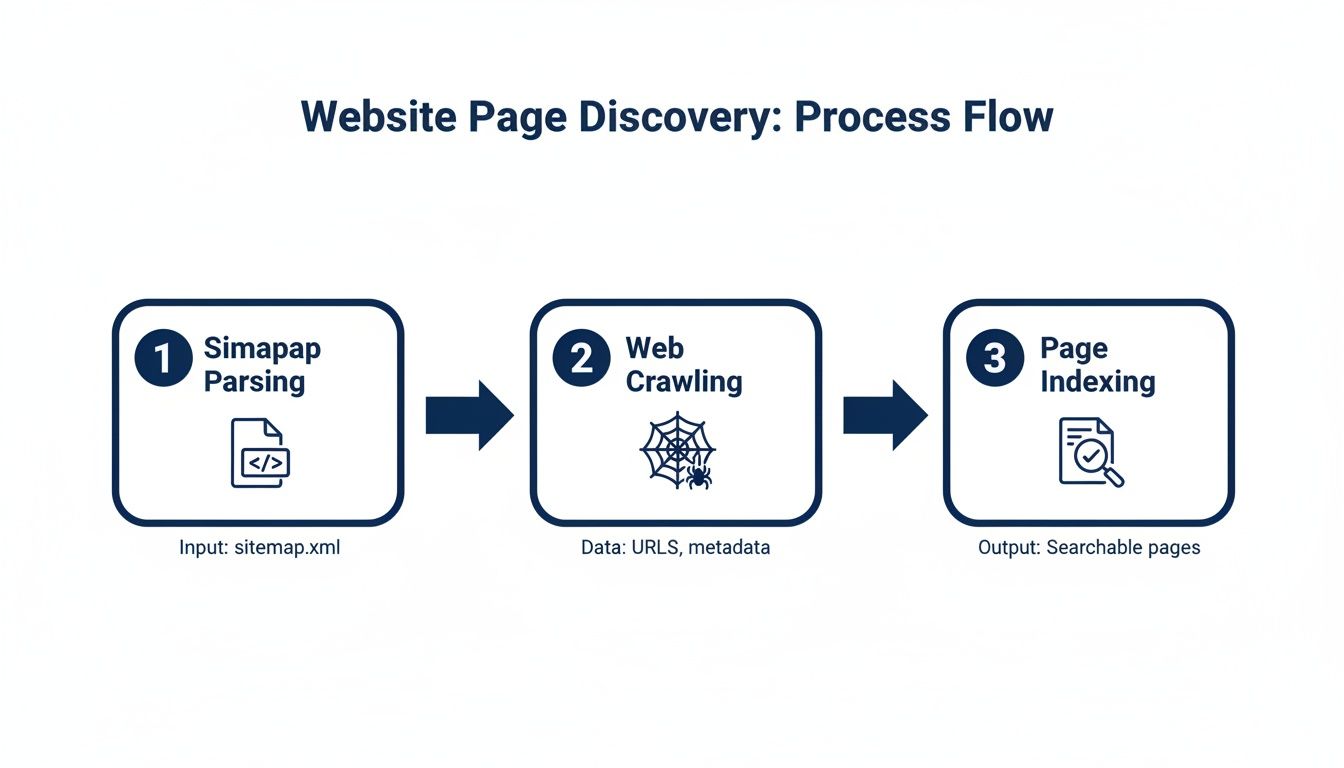
As you can see, the most comprehensive approach is a hybrid one. You kick things off by parsing the sitemap and then feed those URLs into a crawler to find everything else.
Core Page Discovery Methods Compared
Choosing the right starting point depends on your goals. Here’s a quick rundown of how these two primary methods stack up against each other.
Method | Primary Use Case | Speed | Completeness | Key Challenge |
|---|---|---|---|---|
Sitemap Parsing | Quickly finding a site's most important, intended pages. | Very Fast | Low to Medium | Relies on the site owner keeping the sitemap accurate and complete. |
Web Crawling | Discovering all linkable pages, including those not in a sitemap. | Slow to Moderate | High | Can be resource-intensive and may encounter crawler traps or blocks. |
Ultimately, these methods aren't mutually exclusive—they're complementary. Using both is the key to building a truly exhaustive list of a site's pages.
Pro Tip From the Trenches: Always start with the sitemap. It gives you a high-value list of URLs almost instantly. Then, use that list as the initial seed for your crawler. This hybrid strategy ensures you capture both the "official" pages the site advertises and the "unofficial" ones you can only find through deep exploration.
Mastering the Foundational URL Discovery Techniques

Alright, with a solid strategy mapped out, it's time to roll up our sleeves and start collecting URLs. The first step in building a complete picture of a website involves two fundamental, hands-on techniques. We'll start by tapping into the site's own roadmap—its XML sitemaps—and then we’ll build a simple crawler to explore the site link by link.
These two methods are the bedrock of any serious effort to get all pages of a website. Nailing these ensures you have the most comprehensive starting list possible, which is crucial before you dive into trickier challenges like JavaScript-heavy sites or evading anti-bot systems. The quality of this initial URL list really does dictate the quality of your entire dataset.
Starting with the Sitemap: An Easy Win
The quickest way to get a big chunk of a site's URLs is by finding its sitemap. It's truly the low-hanging fruit of URL discovery. Most websites helpfully point to their sitemap location right in their file, which is a simple text file at the root of the domain that gives instructions to bots.
Just navigate to and look for a line that starts with . It usually looks something like this:
User-agent: * Disallow: /admin/ Sitemap: https://example.com/sitemap.xml
Once you have that URL, you can download the XML file and parse it. Be aware that sitemaps are often nested. A primary file might just be an index that points to several other sitemaps, often broken down by content type, like or . Your script needs to be smart enough to handle this, recursively parsing any sitemap index files it finds.
Using a Python library like or makes this a breeze. You just need to extract every URL found inside the tags to build your initial list. This is a fantastic starting point because you're getting a list of pages the website wants search engines to find.
Building a Simple Breadth-First Crawler
Sitemaps are a great start, but they're almost never the whole story. To find every last page, you need to crawl the site yourself. A breadth-first search (BFS) crawler is a classic and effective way to go about it. The logic is to explore the website one level at a time, so you don't get lost down a single rabbit hole while missing entire sections of the site.
The process is straightforward but powerful:
Start a Queue: Begin with a list of URLs to visit. The homepage is a good start, but using the URLs you just pulled from the sitemaps is even better.
Process the First URL: Take the first URL off the queue and fetch its HTML.
Find and Normalize Links: Parse the HTML to find all the tags and pull out their attributes. You'll need to convert any relative links (like ) into absolute URLs (like ).
Update Your Lists: For each new URL you find, check if you've already visited it or if it's already waiting in the queue. If it's brand new, add it to the end of the queue. It's essential to keep a separate "visited" set to avoid getting stuck in infinite loops.
Repeat: Keep this cycle going until the queue is empty.
This systematic approach ensures you methodically map out the entire site's link structure. If you're looking for a more hands-on guide, learning how to build a simple web scraper with Python is an excellent first step.
Key Takeaway: The best approach combines sitemap parsing with breadth-first crawling. You get a quick, high-quality list from the sitemap and then let your crawler meticulously discover everything else that's linked. This hybrid strategy is the gold standard for comprehensive URL discovery.
The need for this kind of complete website data is exploding. The global web scraping market has grown significantly, showing just how vital this data is for businesses. According to Mordor Intelligence, the market was valued at USD 1.17 billion in 2026 and is projected to hit USD 2.23 billion by 2031. That's a 13-14% annual growth rate, driven by demand from e-commerce, finance, and AI. As companies scale their efforts to get all pages from a website, the tools and infrastructure to support them become more important than ever.
Tackling Modern JavaScript-Heavy Websites
If you've ever tried to scrape a modern website, you know the drill. You send a request, get the HTML, and... it's practically empty. What gives?
Welcome to the world of JavaScript-powered sites. Your crawler hits a wall because the content you're after doesn't exist in the initial download. Instead, you've received a skeleton page with a hefty JavaScript file. A real user's browser would run that script, fetch data from various APIs, and build the page right before their eyes. But a simple crawler just sees a blank slate.
Why You Can't Ignore JavaScript Rendering
This shift to client-side rendering is fantastic for creating slick, responsive web experiences, but it's a huge headache for data extraction. You can't just parse the raw source code anymore. To get to the real content—and the links hidden within it—you have to think like a browser. You need to execute the JavaScript to see the final, fully-rendered page.
This becomes non-negotiable when you're dealing with:
Single-Page Applications (SPAs): On sites built with React or Vue, clicking a link often doesn't trigger a full page reload. JavaScript just swaps out content on the fly.
Infinite Scroll: Think of a social media feed. New posts appear as you scroll, loaded in the background by JavaScript. Those links are invisible until you trigger the right action.
Client-Side Pagination: When you click "Next" on a product list and the new items load without the URL changing, that's JavaScript at work.
In all these scenarios, the links to the rest of the site's content simply aren't in the first HTML response. You have to interact with the page to uncover them.
Finding the Hidden APIs
Here's a pro-level trick: sometimes you can skip rendering entirely and go straight to the source. Modern sites load their data from internal APIs, and if you can find them, you've hit the jackpot.
Open your browser's developer tools, switch to the "Network" tab, and start interacting with the page. As you scroll or click "next," watch for requests that return clean, structured JSON. This data is far easier and more reliable to parse than a tangled mess of HTML. It's an elegant solution, but it has a catch: it's incredibly fragile. You have to reverse-engineer each site individually, and the moment they change an API endpoint, your scraper breaks.
The biggest takeaway here is that there's no silver bullet. Every JavaScript-driven site can have its own quirky way of loading content, forcing you to constantly adapt your strategy. It’s a cat-and-mouse game.
This growing complexity is shaking up the entire data extraction industry. It’s no surprise that AI-driven web scraping is one of the fastest-growing niches, with the market projected to expand by USD 3.15 billion between 2024 and 2029. That's a compound annual growth rate of 39.4%! For anyone serious about getting data from the modern web, keeping up with these tools is essential. You can get a better sense of this trend from this analysis on the growth of AI-driven web scraping.
Let a Smart Tool Do the Heavy Lifting
Instead of wrestling with your own fleet of headless browsers like Puppeteer or Selenium, you can offload the entire rendering nightmare to a specialized service. This is exactly where a tool like ScrapeUnblocker shines. You just send an API request with the URL, and it sends back the fully rendered HTML.
Here's how simple it is. A single cURL request is all it takes. Just be sure to include the parameter to tell the service to fire up a browser and execute everything.
curl "https://api.scrapeunblocker.com/scrape" -H "Authorization: Bearer YOUR_API_KEY" -G --data-urlencode "url=https://example.com/dynamic-product-page" --data-urlencode "render_js=true" --data-urlencode "country_code=us"
That one call handles all the messy details—managing browser instances, dealing with timeouts, and sidestepping JavaScript errors. You just get clean HTML, ready for you to parse. For a much deeper look at this process, we put together a complete tutorial on how to build a modern JavaScript web crawler that actually works.
Better yet, tools like this can often deliver the data in a structured JSON format, cutting out the HTML parsing step entirely.
By letting a service handle the rendering, you free yourself up to focus on the core challenge: finding the links and extracting the data you actually need.
Navigating Anti-Bot Defenses and Rate Limits

Sooner or later, every crawler hits a wall. You'll be sailing along, pulling down pages, and then—bam. Access denied. This isn't a bug in your code; it's a website's immune system kicking in, identifying your scraper as a threat.
Successfully scaling your project to get all pages of a website really hinges on your ability to fly under the radar. It means moving beyond simple, repetitive requests and adopting a much more human-like approach to crawling.
Playing by the Rules with Rate Limiting
The first line of defense against getting blocked is just good manners. A basic crawler can hammer a server with hundreds of requests a second, which is a fantastic way to get your IP address banned. This kind of aggressive behavior is an immediate red flag for any anti-bot system.
The solution is simple: rate limiting. All this means is building a small delay between your requests. A great place to start is the website’s file. Look for a directive, which is the site owner telling you exactly how many seconds to wait. If you don't find one, a one- or two-second delay is a safe, respectful bet.
Being a good digital neighbor doesn't just help you avoid blocks; it ensures you aren't wrecking the experience for actual human users.
Advanced Evasion Techniques
While politeness goes a long way, it’s often not enough. Websites are in a constant battle to protect their data, and they deploy a whole arsenal of defenses to spot and block automated traffic. And there's a lot of it—bot-driven data extraction is a huge slice of all web activity.
In fact, one 2025 report found that around 10.2% of global web traffic comes from scrapers, even with mitigation systems working overtime. The e-commerce world is a major battleground, with over 80% of top online retailers scraping their competitors daily. This constant pressure forces sites to get smarter about blocking bots, which means you need to get smarter about evading them.
Mimicking Human Behavior with Proxies and User Agents
One of the most common ways sites catch bots is by watching IP addresses. If thousands of requests pour in from a single IP in a few minutes, it’s a dead giveaway. This is where rotating residential proxies become your best friend.
These services route your requests through the internet connections of real home users. Suddenly, your traffic looks like it's coming from thousands of different people in different cities, not from a single server in a data center.
Beyond your IP, websites also scrutinize your User-Agent. This is a small string your browser sends identifying itself (like "Chrome on a Mac"). If your crawler uses the exact same User-Agent for every single request, it’s easy to spot. The fix is to rotate through a list of common, real-world User-Agents to make each request look unique.
Expert Insight: Effective evasion is all about creating unpredictability. Don't just rotate proxies and user agents in a predictable sequence. Randomize them. Sophisticated anti-bot systems look for patterns, and a simple rotation is still a pattern. True randomness is much, much harder to detect.
The Integrated Solution for Block Evasion
Let's be honest: manually managing rotating proxies, randomizing User-Agents, and figuring out how to solve CAPTCHAs is a massive headache. It's a constant cat-and-mouse game that distracts you from your real goal—getting the data.
This is where an integrated service like ScrapeUnblocker can be a game-changer. Instead of building and maintaining all that complex infrastructure yourself, you just make a single API call. ScrapeUnblocker handles the messy parts behind the scenes:
Premium Rotating Proxies: It automatically routes your requests through a huge pool of residential proxies, making your scraper look like thousands of individual visitors.
Smart User-Agent Management: The service intelligently rotates through a massive library of real browser headers, so you don't even have to think about it.
CAPTCHA Solving: When a CAPTCHA inevitably pops up to block you, the system solves it automatically, letting your crawl continue without a hitch.
When you run into a truly stubborn site, it helps to understand what you're up against. For example, it’s worth reading up on things like Cloudflare's practices in blocking AI crawlers to see how the landscape is evolving.
By offloading the evasion tactics, you can get back to focusing on parsing the data you actually want. To explore these strategies in more detail, check out our guide on https://www.scrapeunblocker.com/post/how-to-scrape-a-website-without-getting-blocked.
Making Sense of the Mess: How to Ensure Data Quality and Crawling Efficiency
So, you've unleashed your crawler and parsed the sitemaps. What you're left with is usually a sprawling, chaotic list of links. It's a great start, but it's far from usable. This is where the real work begins—transforming that raw data dump into a clean, efficient, and actionable list.
Getting this part right is absolutely crucial if you want to get all pages of a website. Sloppy data here means wasted time, redundant requests, and inaccurate results down the line. It's the difference between a successful project and a frustrating mess.
First Things First: Deduplicating Your URL List
It's almost a guarantee that your sitemap parser and your web crawler found a lot of the same URLs. The first, and easiest, cleanup task is to merge these lists and kill the duplicates.
The simplest way I've found to handle this is to throw all the discovered URLs into a set. By its very nature, a set can only hold unique values, so it instantly filters out any exact-match duplicates. If both your tools found , the set ensures it only appears once. Now you have a master list to work with.
Respecting the Canonical Truth
Duplicate content is a massive headache on the modern web. The same product page can pop up with a dozen different URLs thanks to tracking parameters, sorting filters, or session IDs. This is why the canonical tag exists.
You'll find a tag like in the HTML of many pages. It’s the website's way of telling search engines, "Hey, this is the real version of this page." Your scraper should listen to this. Before you scrape a page, always check for a canonical tag. If it points somewhere else, ditch the current URL and follow the canonical one instead.
Why this matters: Honoring canonical tags stops you from scraping the same content over and over again. It’s a fundamental step for data quality that makes sure your dataset actually reflects how the site is structured.
By playing by these rules, you're aligning your crawl with the site's own SEO strategy, which almost always results in a cleaner, more reliable dataset. This is a core concept we cover in our guide on web scraping best practices for developers.
Cleaning Up URL Parameters
URLs are often cluttered with parameters that have nothing to do with the actual content. You'll see things like for marketing analytics or a random .
For instance, these two URLs almost certainly load the exact same page content:
To avoid scraping the same page twice, you need to normalize these URLs. I keep a running list of common tracking and session parameters ( anything, , , etc.) and strip them from every URL before it goes into my crawl queue. This little bit of hygiene dramatically cuts down on redundant work, saving you both time and money.
Choosing the Right Way to Store and Manage Your URLs
Once your URLs are clean and unique, you need a solid system to manage them. The right tool for the job really depends on how big your crawl is.
Storage Method | Best For | Pros | Cons |
|---|---|---|---|
Simple Text File | Small, one-off crawls | Super easy to implement, portable. | Inefficient for big lists, no good for multiple crawlers. |
In-Memory Queue | Medium-sized, single-process crawls | Blazing fast, simple logic inside one script. | All data is lost if the script crashes, limited by RAM. |
Database Queue | Large-scale, distributed crawls | Scalable, persistent, supports many crawlers. |
Honestly, for any project that's more than a quick one-off script, I'd jump straight to a database queue like Redis. It gives you a robust, central hub to manage your to-do list of URLs. This kind of setup lets you run multiple crawlers at once, gracefully handle crashes, and easily pause and resume your work without losing a single bit of progress.
Common Questions About Finding All Website Pages
Even with the best game plan, you're bound to run into some head-scratchers when you're deep in the trenches of a web scraping project. Trying to map out an entire website is a massive undertaking, so hitting a few snags is just part of the process. Let's walk through some of the most common questions that come up.
This is where we get into the practical, real-world problems you'll face when you try to get all pages of a website. My goal here is to give you the kind of advice that helps you avoid common pitfalls and keep your project moving forward.
How Can I Be Sure I Have Every Page?
Let's be honest: you can never be 100% certain, especially with large, constantly changing websites. The idea of "all pages" is often a moving target. New content is published, old pages get taken down, and some are deliberately left as orphans with no internal links pointing to them.
Your best bet is to aim for the highest possible coverage by combining a few different techniques.
Start with the sitemaps: This is the site owner's intended map of their content. Always start here.
Launch a comprehensive crawl: Use the sitemap URLs as your starting point and let a breadth-first crawler loose to discover everything else.
Merge and compare: Cross-reference the lists from your sitemap parsing and your crawl to create one master list of URLs.
If the project is absolutely critical, you could even bring in data from backlink tools or scrape search engine results to uncover URLs your own crawler might have missed. The real goal isn't an impossible sense of perfection, but a methodical and thorough discovery process.
Key Insight: Don't get bogged down chasing an impractical 100% completion rate. Your energy is better spent building a robust, multi-layered discovery strategy. Combining sitemap parsing with a deep crawl will always get you far closer to a complete picture than relying on a single method.
What About Scraping Pages Behind a Login?
Getting at content that requires a login means your scraper has to act like a real user. This involves managing a session. First, you need to programmatically send a POST request to the login form with a valid username and password. If successful, the server will respond with session cookies or an authentication token.
From that point on, your scraper has to capture those cookies or tokens and include them in the headers of every single follow-up request. It's how you prove to the server that you're logged in. This can get a bit tricky, though. You'll often have to deal with session timeouts or pesky CSRF tokens, which are security measures designed specifically to thwart this kind of automation.
Is It Legal To Scrape All Pages From a Website?
This is a classic "it depends" situation. The legality of web scraping is a bit of a gray area and varies based on where you are and what you're scraping. Generally speaking, scraping publicly accessible information is not illegal. However, there are some hard lines you absolutely should not cross.
Always check and respect the website's file and its Terms of Service. You should never scrape personal data, copyrighted material, or anything that could be considered sensitive information. And perhaps most importantly, don't hammer the website's servers with aggressive, rapid-fire requests. A polite, ethical approach is always the best policy. If you're working on a commercial project, it's always a smart move to consult with a legal professional.
Comments