
A Practical Guide to Building a Google Shopping Scraper
- Feb 13
- 15 min read
In the world of e-commerce, a Google Shopping scraper is simply a tool that automatically pulls product data—like prices, seller names, and reviews—right from Google's search results. Think of it as a way to replace tedious, mistake-ridden manual data entry with something fast, accurate, and built for today's market. It’s how smart businesses get a real competitive edge.
Why Manual Data Collection No Longer Works
Trying to keep up with competitor pricing and product listings by hand is a fight you can't win. The sheer scale and speed of e-commerce today means that by the time you've manually filled a spreadsheet, that data is probably already stale. Prices shift, products go out of stock, and new sellers pop up constantly.
This old-school, reactive approach always leaves your business one step behind. It's like trying to drive down a busy highway by only looking in the rearview mirror—you see where you've been, but have no idea what's coming. A good Google Shopping scraper completely changes the game by giving you intelligence that’s practically real-time.
The Staggering Difference in Speed and Scale
The jump in efficiency you get from automation is hard to overstate. A business trying to track just 50 competitor products could easily burn 8-10 hours every week just on manual data entry. An automated scraper can get that same job done in less than five minutes.
That time isn't just saved—it's repurposed for high-value work like analyzing the data and making strategic decisions, not just collecting it. This kind of automation is no longer a luxury; it's a core part of modern price intelligence strategies.
Today's competitive landscape demands more than just data; it demands immediate, actionable insights. Automation is no longer an advantage—it's the baseline for survival.
Eliminating Human Error for Reliable Decisions
Beyond just being faster, automation is incredibly accurate. We've all been there—typos, missed products, or inconsistent formatting can quietly ruin an entire dataset. Those small mistakes snowball into bad analysis and poor business decisions, like pricing a product too high or completely missing a competitor's flash sale over the weekend.
A well-built Google Shopping scraper takes human error out of the equation. It's programmed to follow precise rules, every single time, so the data you get is clean, perfectly structured, and trustworthy. That kind of consistency is absolutely essential for building pricing models or inventory forecasts you can actually count on.
To really see the difference, it helps to put the two methods side-by-side.
Manual vs Automated Data Collection
Metric | Manual Collection | Automated Scraper |
|---|---|---|
Speed | Extremely slow (hours/days) | Extremely fast (minutes) |
Accuracy | Prone to human error | 100% consistent and accurate |
Scale | Limited to dozens of products | Scales to thousands of products |
Frequency | Infrequent (weekly/daily) | Near real-time (hourly/minutes) |
At the end of the day, sticking with manual methods in a world driven by automation isn’t just inefficient; it’s a genuine risk to your business. Making the switch to an automated solution is really the only way to keep up and make sharp decisions based on the freshest market data you can get.
Designing a Resilient Scraper Architecture
Building a basic scraper is one thing. Engineering a Google Shopping scraper that works day in and day out, reliably pulling the data you need, is a whole different ballgame. To get it right, your entire architecture has to be built with one thing in mind: resilience. That means thinking ahead and building in ways to handle the anti-scraping measures Google naturally has in place.
A truly robust system is far more than just sending an HTTP request and parsing whatever comes back. It's a layered strategy designed to mimic real human behavior as closely as possible, which is the secret to scaling up without getting flagged or shut down. This takes a few critical components working together perfectly.
The Core Pillars of a Modern Scraper
I've found that any durable scraper architecture boils down to three non-negotiable technologies:
JavaScript Rendering: So much of the crucial data on Google Shopping—like prices, shipping details, or even availability—is loaded dynamically with JavaScript. If your scraper only grabs the initial static HTML, you're flying blind and missing the most important information. You absolutely need a tool that can execute JavaScript just like a standard web browser.
Real Browser Execution: To take it a step further, the scraper should run inside a genuine browser environment, what we often call a "headless" browser. This is how you ensure all your requests have the right headers, cookies, and a believable digital fingerprint. To Google's servers, these requests look almost identical to those coming from a regular person.
Premium Rotating Residential Proxies: This might be the single most important piece of the puzzle. Sending thousands of requests from the same IP address is the quickest way to get yourself permanently blocked. Rotating residential proxies are the solution. They route your traffic through a massive pool of real IP addresses assigned by internet service providers, making every request look like it's coming from a different, legitimate user.
This flowchart illustrates the huge difference between slow, manual data collection and a fast, automated scraper setup.
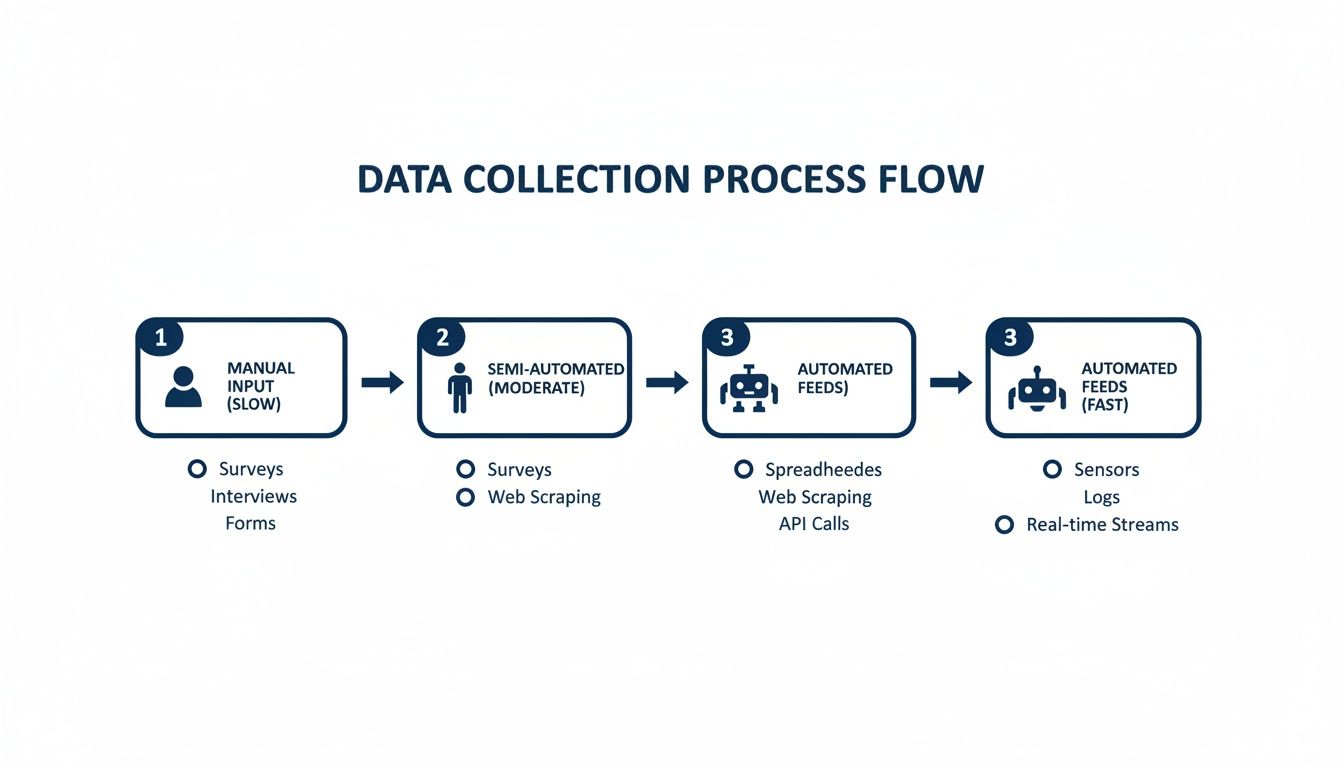
As you can see, a well-thought-out architecture completely transforms a tedious manual process into a slick, automated data pipeline.
Understanding the Data Extraction Landscape
The game changed for everyone when Google shut down its official Shopping Search API back on September 16, 2013. That decision single-handedly forced the industry to innovate, leading to the advanced scraping techniques we rely on today. Modern scraping infrastructure is now a sophisticated mix of JavaScript rendering, browser automation, and high-quality rotating proxies, all working together to get past anti-bot defenses.
Today, specialized APIs are built for specific tasks. Some are designed purely to pull search results from a query, while others are geared for deep dives into product details, grabbing everything from specifications and reviews to pricing from multiple sellers. It's worth taking the time to explore more about these scraping methodologies to see what's possible.
A scraper's resilience is directly proportional to its ability to mimic human unpredictability. Static, repetitive request patterns are easy to detect; dynamic, varied ones are not.
Differentiating Between SERPs and Product Pages
A rookie mistake I see all the time is building a scraper that treats every page as if it's the same. The Google Shopping Search Engine Results Page (SERP) and an individual product page are completely different beasts, and they demand different scraping strategies.
SERP Scraping: Here, the goal is to gather high-level data from a list of products—think titles, prices, ratings, and the links to the actual product pages. The biggest challenge is almost always pagination. You have to figure out how to click through multiple pages of results without setting off any alarms.
Product Page Scraping: This is where you go deep on a single item. You're pulling more detailed data like full descriptions, seller information, stock levels, and every available buying option. These pages are often far more complex and rely heavily on JavaScript to display information.
Your architecture needs to be flexible enough to handle both. A solid, proven approach is to use a two-stage process. First, a "crawler" scans the SERPs to collect a list of product links. Then, a "scraper" component takes that list and visits each link to pull the detailed data. By separating these tasks, you create a system that's easier to manage, scale, and debug when something inevitably goes wrong. This is how you build an intelligent, multi-faceted Google Shopping scraper that’s ready for reliable, long-term data collection.
How to Extract and Structure Product Data
Alright, you’ve got the architecture set up. Now for the fun part: actually pulling the product data. This is where your google shopping scraper goes from a blueprint to a real, working tool that can pluck specific bits of information from a crowded webpage. The whole point is to turn that messy soup of raw HTML into clean, structured data you can actually use.
The key to this whole operation is finding stable "locators" for the data you want. Whether you're after a product's title, price, or seller name, you need a reliable way to tell your scraper exactly where to look. The two main tools for the job are CSS selectors and XPath expressions.
Choosing Your Locators: CSS Selectors vs. XPath
Most developers, myself included, usually reach for CSS selectors first. Their syntax is clean, simple, and easy to read because it mirrors how you’d style a webpage with CSS. Grabbing a product title can be as straightforward as targeting an tag that has a specific class.
XPath, on the other hand, is the more powerful, albeit complex, sibling. It lets you navigate the entire HTML document tree, grabbing elements based on their relationship to other elements—not just their own attributes. This can be a real lifesaver when you're wrestling with poorly structured HTML where a clean class or ID is nowhere to be found.
Here are a few hard-won tips for picking locators that won't break on you:
IDs are gold: If an element has a unique attribute, use it. Period. It's the most direct and stable target you'll find.
Dodge generated class names: Steer clear of classes that look like gibberish (e.g., ). These are often generated automatically and can change every time the site is updated, instantly breaking your scraper.
Hunt for data attributes: Keep an eye out for custom attributes like or . Developers often add these for their own testing, and they tend to stick around longer than styling classes.
The best locator isn't always the shortest or the fanciest—it's the one least likely to change when the site gets a facelift. Stability is the name of the game.
Parsing HTML with Python and BeautifulSoup
Once you have the raw HTML from a Google Shopping page, you need to parse it. Python is the perfect tool for this, especially with its fantastic libraries. The classic combo is using the library to fetch the page and to make sense of the HTML.
Let's say you've successfully grabbed the HTML for a product page. Here’s a quick look at how you might pull out the product's title and price.
from bs4 import BeautifulSoup
Let's assume 'html_content' holds the raw HTML from your request
soup = BeautifulSoup(html_content, 'html.parser')
Example: Using a CSS selector to find the product title in an H1 tag
product_title_element = soup.select_one('h1.product-title-class') product_title = product_title_element.get_text(strip=True) if product_title_element else 'N/A'
Example: A different selector for the price, looking for a span inside a specific div
price_element = soup.select_one('div[data-price-container] span.price-value') price = price_element.get_text(strip=True) if price_element else 'N/A'
print(f"Title: {product_title}") print(f"Price: {price}")
This snippet shows the core workflow. You parse the HTML, use a selector to pinpoint an element, and then grab its text. It’s also incredibly important to build in those checks. They prevent your scraper from crashing and burning if a page is missing an element you expected to find.
Structuring Your Output for Maximum Utility
Pulling out individual data points is great, but the real magic happens when you organize that information into a clean, usable format. The two most common choices here are JSON and CSV.
JSON is fantastic for its hierarchical structure. It's perfect for representing complex product data with nested details, like a list of sellers or a collection of reviews. A single product's data might look something like this:
{ "product_id": "B08N5HRD6P", "title": "New Wireless Earbuds with Charging Case", "price": "49.99", "currency": "USD", "seller": "Example Electronics", "rating": 4.5, "reviews_count": 1205 }
This format is a breeze for other applications to read and process. For bigger datasets destined for a spreadsheet or a database, a simple CSV file is often more practical. You just define your headers (title, price, seller, etc.) and write each product's data as a new row.
Once you have this clean, structured data, it becomes a powerful asset for tasks like in-depth dropshipping product research or competitor analysis. If you want to see more examples, check out our broader guide on how to scrape Google search results to round out your skills.
Handling Dynamic Content and Inconsistencies
Here’s a reality check: Google Shopping pages are anything but static. Prices might load dynamically after the initial page is displayed, and layouts can differ from one product category to the next.
Your scraper needs to be built for this chaos. Instead of relying on one rigid selector, a smarter approach is to define a list of potential selectors for each data point. If the first one fails, your code can just try the next one on the list. This "fallback" strategy makes your scraper so much more resilient.
For content that's loaded with JavaScript, you'll need the browser rendering tools we talked about in the architecture section. A truly robust google shopping scraper doesn't just hope for the best; it anticipates these inconsistencies and has a plan to handle them gracefully.
Integrating ScrapeUnblocker for Reliable Scraping
Let's be honest: building the backend for a serious Google Shopping scraper is a massive undertaking. You're suddenly responsible for a whole stack of complex tech—managing proxy networks, spinning up headless browsers, and figuring out how to solve CAPTCHAs at scale. It's a full-time engineering job in itself.
This is where a dedicated scraping API like ScrapeUnblocker just makes sense. It takes all that heavy lifting off your plate. Instead of wrestling with infrastructure, you can focus on what actually matters: parsing and analyzing the data you collect.
Suddenly, your project is no longer about fighting a constant war against anti-bot systems. It becomes a simple, predictable API call. You send the URL you need, and you get clean HTML back. It’s a huge shortcut that saves an incredible amount of development and maintenance time down the road.
Making Your First Request with Python
Plugging a scraping API into a Python script is refreshingly simple. The entire concept is to stop sending requests directly to Google and instead point them to the API endpoint. The service then acts as your specialized middleman, handling all the tricky browser and network logic for you.
Here’s a quick example of how to grab the HTML from a Google Shopping search results page. You'll just need to grab the API key from your ScrapeUnblocker dashboard to authenticate the request.
import requests
Your API key from the ScrapeUnblocker dashboard
api_key = 'YOUR_API_KEY'
The Google Shopping URL you want to scrape
target_url = 'https://www.google.com/search?q=wireless+earbuds&tbm=shop'
The API endpoint and necessary headers
api_endpoint = 'https://api.scrapeunblocker.com/scrape' headers = { 'Authorization': f'Bearer {api_key}', 'Content-Type': 'application/json', }
The payload telling the API which URL to visit
payload = { 'url': target_url }
Send the request to the ScrapeUnblocker API
response = requests.post(api_endpoint, headers=headers, json=payload)
Check if it worked and print the HTML
if response.status_code == 200: html_content = response.text print("Successfully fetched HTML content!") # Now you can hand off 'html_content' to your parser (e.g., BeautifulSoup) else: print(f"Request failed with status code: {response.status_code}") print(f"Error details: {response.text}") This short script does the job of a much more complicated local setup involving browser automation and proxy management.
Advanced Options for Targeted Scraping
A good Google Shopping scraper needs precision. You rarely want just the generic, default version of a page. You might need to see results from a specific country, make sure JavaScript-heavy pages render correctly, or even get the data back as structured JSON.
ScrapeUnblocker handles these common scenarios with a few extra parameters in your API payload.
Geotargeting: To see prices and products available in Germany, just add the parameter.
JavaScript Rendering: For those product pages that load content dynamically, setting to true is crucial for getting the full picture.
Structured Data: If you’d rather not build a parser from scratch, you can request output for certain page types and let the API do the extraction.
Here’s what the modified payload would look like to cover these bases:
payload = { 'url': target_url, 'country': 'de', # Tell the API to browse from Germany 'javascript': True, # Make sure JS-driven content is loaded 'response_format': 'html' # Or 'json' to get pre-parsed data }
This kind of flexibility lets you fine-tune every single request. Whether you’re comparing local search results or digging into a complex product page, you have the tools you need. For a complete list of what's possible, the official ScrapeUnblocker documentation has you covered.
The real goal of a scraping API isn't just getting data; it's getting the right data with minimal friction. Simple toggles for location and rendering are absolutely essential for that.
Implementing Robust Error Handling and Retries
Even with the best tools, not every request will succeed on the first attempt. You'll inevitably run into network glitches, temporary server issues, or a page with unusually aggressive bot detection. A resilient scraper knows how to handle these hiccups gracefully instead of crashing.
One of the most effective strategies is to implement an exponential backoff for retries. If a request fails, your script waits a moment before trying again. If that second attempt also fails, it waits a bit longer, and so on. This approach avoids hammering a struggling server with rapid-fire requests.
You should also build your logic around the specific HTTP status codes the API returns:
Status Code | Meaning & Your Action |
|---|---|
200 OK | Success! Time to parse the data. |
401 Unauthorized | Something's wrong with your API key. Double-check your credentials. |
403 Forbidden | The request was blocked, likely by a tough anti-bot system. |
429 Too Many Requests | You've hit your plan's rate limit. Slow down. |
5xx Server Error | A temporary problem on the API's end. This is a perfect case for a retry. |
By reacting differently to these codes, your scraper becomes far more reliable. For instance, a error means you should stop immediately, while a is a clear signal to wait and try again. This kind of intelligent error handling is what separates a fragile, one-off script from a professional-grade data collection tool.
Advanced Strategies for Long-Term Success
Getting a scraper to work today is a great first step. But building a system that keeps delivering value for months—or even years—is a whole different ballgame. To do that, you need to think beyond just grabbing data once. Your Google Shopping scraper should become a fundamental part of your business intelligence pipeline, helping you make proactive decisions instead of just reacting to what competitors do.
The real shift happens when you stop seeing scraped data as a single snapshot in time and start treating it as a continuous stream of insight. One of the most powerful upgrades you can make is implementing historical price tracking. This lets you build a rich, long-term dataset of competitor behavior, which is where the magic really begins.
Capitalizing on Historical Price Data
With historical data, you can finally build predictive models and create truly dynamic pricing strategies. Instead of only knowing a competitor's price right now, you can see their patterns over weeks and months.
Do they run sales every third Friday? Do they slash prices the moment you launch a promotion? This is the kind of intelligence that fuels real, sustainable growth.
The competitive edge here is massive and translates directly to the bottom line. Research shows that businesses using advanced historical price data systems have seen an average profit increase of 18% in just the first quarter. This isn't just theory; it comes from monitoring competitor pricing with incredible precision. Some systems are now tracking over 1,000 product SKUs every hour, spotting promotions weeks before they even go live. You can read the full research about historical pricing data to see how it's done.
The true power of a Google Shopping scraper isn't just in gathering data, but in building an institutional memory of the market. This historical context is what separates basic monitoring from genuine competitive intelligence.
Thinking bigger, this extracted product data can also fuel sophisticated marketing campaigns. Pairing your data with tools like AI marketing software can give you a serious advantage in putting your scraped insights to work.
Multi-Platform Tracking and Data Integration
Google Shopping is a goldmine, but it's not the only one. A truly robust strategy pulls in data from multiple platforms—think Amazon, Walmart, and other major marketplaces. This gives you a much more complete picture of the competitive landscape.
Holistic Market View: Combining data sources reveals channel-specific pricing strategies and shows you where your competitors are focusing their efforts.
Data Enrichment: You can cross-reference product listings to fill in missing details or validate crucial information like stock levels and shipping costs.
Trend Identification: A broader dataset helps you spot market-wide trends that you'd completely miss if you were only looking at a single platform.
Ethical and Legal Considerations for Sustainability
Finally, let's be real: long-term success is impossible if you're not scraping responsibly. Aggressive or unethical methods will eventually get you permanently blocked, in legal trouble, or both. The longevity of your scraper depends on playing by the rules.
Always start with a site's file. This is where the site owner tells you which pages they don't want crawlers to access. While it's not legally binding, respecting it is just good practice and a cornerstone of ethical scraping.
You also have to manage your request rate. Firing too many requests at a server in a short time can slow it down for real users, and that’s the fastest way to get your IPs banned. If you need to scale up your scraping operations without getting shut down, our guide on how to scrape a website without getting blocked has you covered.
Frequently Asked Questions About Google Shopping Scraping
If you're thinking about building a Google Shopping scraper, you're probably wrestling with a few key questions. I see the same concerns pop up time and again from developers and data analysts—usually centered on legality, technical roadblocks, and the right tools for the job. Let's clear those up before you write a single line of code.
Is Scraping Google Shopping Actually Legal?
This is easily the most common question, and the answer isn't a simple yes or no. Scraping publicly available data, like product listings on Google Shopping, is generally considered permissible in many jurisdictions. Think of it as automating what a user could do manually in a browser. The legal landscape gets tricky, however, when you factor in data privacy regulations.
To keep your project on solid ground, stick to these core principles:
No Personal Data: Your target is product information—prices, sellers, reviews. Steer clear of anything that could identify a person.
Check the File: While not a legally binding contract, a website's file is a clear set of instructions for bots. Respecting it is a fundamental part of ethical scraping.
Read the Terms of Service: Google's ToS will have specific language about automated access. It’s crucial to understand their official stance.
When it comes to using this data for any commercial purpose, my advice is always the same: talk to a lawyer. They can offer guidance tailored to your specific situation and help you navigate the nuances of data privacy laws like GDPR and CCPA.
How Do You Get Around CAPTCHAs and IP Blocks?
Welcome to the cat-and-mouse game of web scraping. CAPTCHAs and IP blocks are Google's primary defenses, and they are incredibly effective. The classic way to counter this is with a large, diverse pool of high-quality residential proxies. By rotating IP addresses for each request, your scraper looks less like a single, aggressive bot and more like thousands of unique, real users.
But let's be realistic—managing a sophisticated proxy infrastructure is a full-time job. It’s complex and expensive. This is why many developers opt for a smart scraping API like ScrapeUnblocker. It bundles proxy management, browser fingerprinting, and CAPTCHA solving into a single service, letting you focus on parsing the data, not just trying to access it.
What's the Best Programming Language for This?
For web scraping, Python is the undisputed king. It's not just about its easy-to-learn syntax; it's the incredible ecosystem of libraries built for this exact purpose. Tools like Requests, BeautifulSoup, and the more advanced Scrapy framework have massive community support and can handle almost any scraping task you throw at them.
That said, Node.js is a fantastic alternative, especially when you're dealing with modern, JavaScript-heavy sites. Its libraries, particularly Puppeteer and Playwright, are designed to control headless browsers, which is essential for scraping sites that render content dynamically on the client side.
Comments