
A Guide to Amazon Price Scraping
- Nov 23, 2025
- 17 min read
When it comes to Amazon price scraping, you have to think bigger than a simple script. A basic request-based scraper is practically guaranteed to fail. The real secret to success lies in building a resilient architecture—a system of specialized components working together to navigate Amazon’s defenses. It's less about writing a single tool and more about constructing a specialized data factory.
Building Your Amazon Scraper Architecture
Before you even think about code, let's talk architecture. This is, without a doubt, the most critical step for any serious, long-term scraping project. A script thrown together in an afternoon might work for a day, but a well-designed system can adapt and keep running for months or years, even as Amazon constantly tweaks its website. The objective here is to build a data pipeline that is modular, tough, and ready to scale.
This isn't just about sending requests. It's about managing them smartly. Simple scripts are brittle; they snap the moment Amazon changes a single class name. A robust architecture, however, is built for the long haul.
The Core Components of a Resilient Scraper
An effective scraper isn't a single monolithic program. It's a collection of key modules, each with a specific job. By designing them to be independent, you make your life a whole lot easier down the road. When Amazon updates its product page layout and breaks your price extractor, you only have to fix that one small module, not rewrite the entire application.
Here are the essential pieces you need for a professional-grade scraper:
Smart Request Queue: Think of this as the brain of your operation. Instead of just hammering URLs one by one, a queue (I'm a fan of RabbitMQ or Redis) holds all the product pages you plan to visit. This brilliantly decouples finding pages from scraping them. It lets you control your request rate, set priorities, and—crucially—restart a failed job without losing your entire list of targets.
Versatile Proxy Manager: This is your front line against IP blocks. This module needs to do more than just swap IPs; it should intelligently rotate them, manage different proxy types (like residential and datacenter), and automatically retry failed requests with a fresh IP. The best ones even monitor the health of each proxy, sidelining any that seem to be getting flagged by Amazon.
Precise Parsing Engine: This is where the magic happens—turning messy HTML into clean, structured data. Using a library like Beautiful Soup in Python, this component dives into the webpage's source code to pull out the exact data you need: price, title, ASIN, stock status, you name it. It has to be built for easy updates because, trust me, Amazon will change its HTML layout.
Reliable Database: All that data you're collecting is useless if it's not stored properly. For a small one-off project, a few CSV files might do the trick. But for anything serious, you'll want a scalable database like PostgreSQL. This ensures your hard-won information is saved in a clean, queryable format.
Choosing Your Technology Stack
The right tools can make or break your project. For Amazon price scraping, the conversation usually revolves around two major players: Python and Node.js. Each has its own distinct advantages.
Python is the long-standing champion of the web scraping world, mostly thanks to its incredible ecosystem. You can use a powerhouse framework like Scrapy, which gives you a full-fledged architecture right out of the box—complete with queuing, request scheduling, and data processing pipelines. If you prefer building from the ground up, combining libraries like for fetching pages and for parsing gives you immense flexibility. For anyone new to the language, our guide on how to scrape a website with Python is a great place to start.
Node.js, on the other hand, really shines with its asynchronous nature, making it a perfect fit for tackling modern, JavaScript-heavy websites. With a headless browser library like Puppeteer or Playwright, your scraper can behave just like a real person. It can click buttons, scroll down, and wait for scripts to execute, revealing prices and other content that are loaded dynamically.
So, which one should you choose? It really boils down to your specific target. If you're dealing with mostly static content and need raw speed, Python with Scrapy is hard to beat. But for those complex, dynamic pages that lean heavily on JavaScript, Node.js paired with a headless browser is often the only reliable way forward.
Bypassing Blocks with a Smart Proxy Strategy
Once you've got your scraper's architecture sorted, you'll run headfirst into the real challenge of Amazon price scraping: staying invisible. If you just send a flood of requests from a single IP address, you're practically asking to get shut down. Amazon’s anti-bot measures are ruthlessly efficient at spotting and blocking that kind of traffic, sometimes in just a few minutes. This is where a smart proxy strategy isn't just a nice-to-have—it's absolutely essential for any serious project.
A proxy server basically acts as a middleman, cloaking your scraper's real IP address. Instead of every request originating from your server, a proxy rotator cycles through a large pool of different IPs. This makes your traffic look like it’s coming from hundreds or thousands of different, genuine users. It’s your first and most powerful line of defense against getting blocked.
The diagram below shows exactly how a proxy manager slots into a resilient scraping pipeline, serving as a crucial buffer between your scraper and Amazon's servers.
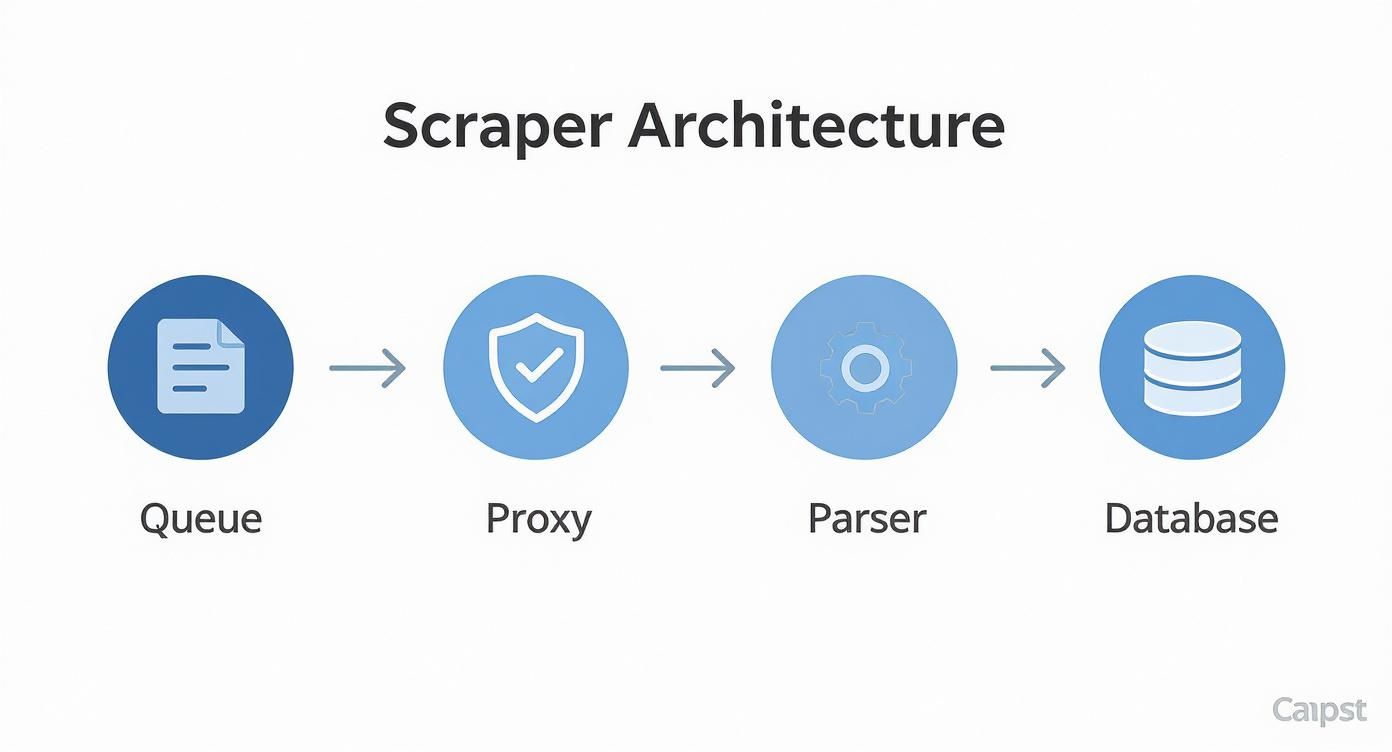
This setup ensures each request is funneled through a fresh IP, dramatically lowering your odds of being detected by separating your scraper's identity from its actions.
Choosing the Right Proxy Type
Not all proxies are created equal, and the type you choose will have a direct impact on your scraper's success rate and your budget. The three main players—datacenter, residential, and mobile—each have their own strengths when it comes to scraping Amazon.
Datacenter Proxies: These are your workhorses. They’re IP addresses from commercial data centers, meaning they are fast, cheap, and easy to get. They’re a great place to start, but because their IP ranges are public knowledge, they're also the easiest for Amazon to spot and block.
Residential Proxies: These IPs are assigned by Internet Service Providers (ISPs) to real homes. Since they belong to actual devices, they're incredibly tough for anti-bot systems to distinguish from legitimate shoppers. This makes them the gold standard for reliable scraping, though they do cost more.
Mobile Proxies: Sourced from cellular networks like 3G/4G/5G, these are the heavy hitters. They offer the highest level of authenticity and are pretty much non-negotiable if you’re trying to scrape mobile-specific versions of Amazon or are hitting the toughest security walls.
For most Amazon price scraping jobs, a hybrid approach is the way to go. Kick things off with datacenter proxies for high-volume, low-risk requests. When you start hitting blocks or CAPTCHAs, seamlessly switch over to a pool of residential proxies to get through.
Building an Intelligent Rotation System
Just having a list of IPs to rotate isn't enough; you need to do it intelligently to mimic human behavior. A truly smart rotator goes beyond just swapping IPs and adds layers of randomization to make your scraper look less like a bot.
First, your system needs to cycle through a diverse list of User-Agents. Sending every request with the same header is a rookie mistake. Your scraper should be programmed to pick a different, modern browser User-Agent string for each request, or at least for each session.
Second, you have to manage your cookies and headers like a pro. A real user's session persists for a bit with consistent cookies. Your rotator should be able to maintain a session for a handful of requests before clearing the cookies and starting over with a new IP and User-Agent, simulating someone closing and reopening their browser. For a deeper dive into these advanced tactics, check out our guide on rotating proxies for web scraping unlocked.
Unlocking Localized Pricing with Geo-Targeting
One of the biggest hurdles with Amazon is that prices aren't the same for everyone. Amazon is a master of geo-targeted and device-based price segmentation. Prices can change not just from country to country, but down to specific states, ZIP codes, and even between mobile and desktop users.
To get accurate, local price data, you absolutely have to use proxies that are physically located in the regions you’re targeting. This is where geo-targeted residential proxies are worth their weight in gold, allowing you to see the exact price a customer in that specific location would see.
Pro Tip: When a proxy gets a CAPTCHA or a block, don't just throw it away. Instead, "cool it down" by moving it to the back of your rotation queue. Often, a temporary block is lifted after a few hours, and that IP becomes usable again. This simple trick extends the life of your proxy pool and saves you money.
Scraping JavaScript-Rendered Product Data
If you’re only sending simple HTTP requests to Amazon, you're going to get incomplete—or just plain wrong—data. It’s a common mistake. Many Amazon product pages are more like miniature applications than static documents. All the good stuff, like the final price, stock availability, and even seller information, often gets loaded with JavaScript after the initial HTML has already been sent.
This means the first response your scraper gets is just a bare-bones skeleton of the page. The critical data you’re actually trying to capture hasn't even arrived yet.
To get the full picture, your scraper has to act like a real browser: it needs to wait, execute all the necessary JavaScript, and let the dynamic content populate the page. This reality presents a major fork in the road for your scraper’s architecture. Do you go with a lightweight solution or a full-blown headless browser? The choice has big implications for performance, cost, and ultimately, your success.
Choosing Your JavaScript Rendering Strategy
Deciding how to handle JavaScript is one of the most important architectural decisions you'll make. A simple HTTP client is fast and cheap but blind to dynamic content. A headless browser sees everything but can be slow and expensive. The right tool depends entirely on what kind of data you're after.
Feature | Headless Browser (e.g., Puppeteer) | Advanced HTTP Client (e.g., Scrapy Splash) | Best Use Case |
|---|---|---|---|
JS Execution | Full, runs a real browser engine (Chromium, Firefox, WebKit). | Limited, can execute some JS but may struggle with complex frameworks. | Headless is essential for single-page applications or pages with heavy client-side rendering. |
Resource Usage | High (CPU and RAM intensive). | Moderate (Lighter than a full browser but heavier than a basic request). | Advanced clients are a good middle ground for pages with moderate JS that don't require full browser emulation. |
Scraping Speed | Slower due to rendering overhead. | Faster than headless browsers but slower than pure HTTP requests. | Choose the lightest option that reliably gets the data to maximize speed. |
Anti-Bot Evasion | Excellent, as it mimics real user behavior very closely. | Decent, but can be fingerprinted more easily than a real browser. | Headless browsers are the gold standard for navigating advanced anti-bot systems that analyze browser behavior. |
Implementation | More complex to set up and manage, especially at scale. | Simpler to integrate into existing scraping frameworks like Scrapy. | Start with the simplest tool that works. Only move to a headless browser when you absolutely have to. |
Ultimately, if the price or stock data is generated on the client-side after a series of complex API calls, a headless browser isn't just an option—it's a necessity.
Headless Browsers for Complex Rendering
When you’re up against a page where the price is calculated on the fly or loaded from a hidden API, you need to bring out the heavy hitters. Headless browsers like Puppeteer and Playwright are your best bet here. They automate a real browser engine, typically Chromium, letting your scraper behave just like a human user would.
This approach gives you a massive advantage in data accuracy. You’re no longer guessing what the page might look like; you're scraping the final, fully-rendered DOM that an actual visitor sees. This is how you nail down those tricky prices that only appear after you select a size or color, or the stock count that loads as you scroll down the page.
But all that power comes with a price tag. Headless browsers are resource hogs. They eat up far more CPU and memory than a simple HTTP request, which will slow your scraper down and drive up your server costs, especially when you're running thousands of jobs.
A headless browser is mission-critical when the data you need doesn't exist anywhere in the initial HTML source. If the price is injected by a script, you have no choice but to run that script.
The Art of Intelligent Waiting
Just firing up a headless browser isn't enough. You have to tell it when to grab the HTML. If you're too fast, you'll get the same empty shell you would with a basic request. If you're too slow and just use a generic delay like , you're burning precious time and money.
The secret is to wait intelligently. Instead of blind delays, you need to wait for specific conditions to be met on the page.
Wait for a Selector: This is the most common method. Tell your script to pause until a key element, like the CSS selector , is present in the DOM. This is a direct confirmation that the price has loaded.
Wait for a Network Call: A more advanced technique is to watch the browser's network traffic. You can wait for a specific API request (maybe one containing ) to finish. This is incredibly efficient because you act the moment the data is fetched from Amazon's backend.
Wait for an Event: In some cases, you can listen for custom JavaScript events that signal when the page has finished its dynamic updates.
This render-aware approach is a cornerstone of reliable web scraping. For a deeper dive into tooling, our Puppeteer vs. Playwright offers a guide to modern web scraping and can help you pick the right framework. By mastering intelligent waits, you build scrapers that are both fast and deadly accurate.
How to Structure and Store Scraped Amazon Data
Getting the raw HTML from an Amazon product page is a great first step, but it's really only half the battle. That messy code is basically useless until you can parse it and organize it into a clean, structured dataset. The real power of Amazon price scraping comes from having well-organized information you can actually analyze, and that all starts with a solid data schema.
Think of it like this: your scraper gathers the raw ingredients, but your parser is the chef. It's the parser's job to clean, chop, and prep everything so it's ready for the final dish—your analysis. A poorly designed parser will leave you with a mess of inconsistent, dirty data that takes hours to clean up manually. A smart one, however, gives you a reliable dataset right from the get-go.
Defining Your Data Schema
Before you even think about writing a CSS selector, you need to map out exactly what data you want to capture. A classic rookie mistake is just grabbing the price. Sure, the price is critical, but on its own, it lacks crucial context. A truly valuable dataset includes multiple data points that, when combined, tell the whole story of a product.
As the world’s biggest online retailer, Amazon has a goldmine of information beyond just a price tag. Pulling details like ASINs, ratings, stock levels, promotions, and even whether a product is sponsored is a vital practice for anyone looking for a competitive edge. This kind of rich data can feed into machine learning models to predict market trends or fine-tune your own product listings. Of course, getting this data consistently requires tools that can get past Amazon's anti-bot defenses. You can learn more about the importance of comprehensive data extraction and see how it fuels modern business analytics.
At a minimum, I recommend including these essential fields in your schema:
ASIN: The Amazon Standard Identification Number. This is the single most important field. It’s a unique identifier for each product and makes a perfect primary key for your database.
Product Title: The full, descriptive name of the product.
Current Price: The main selling price. Make sure to extract this as a float or decimal so you can perform calculations easily.
List Price: The original or "slashed-out" price, if one is shown.
Currency: Always grab the currency code (e.g., USD, EUR, GBP). You'll regret it later if you don't.
Seller Name: Who is fulfilling the order? Is it Amazon itself or a third-party merchant?
Stock Status: Is the item available? Look for messages like "In Stock" or "Only X left in stock."
Review Count: The total number of customer reviews submitted.
Average Rating: The product's star rating, usually on a scale of 1 to 5.
Building Resilient Selectors
Amazon is constantly tweaking its website. Its developers run A/B tests and update layouts all the time, which means your carefully crafted CSS selectors and XPath queries will break. It’s not a matter of if, but when. The trick is to write selectors that are as resilient as possible to minimize the maintenance headaches.
Avoid relying on brittle, auto-generated selectors like . Instead, anchor your queries to stable, semantic identifiers. Amazon often uses specific attributes for key page elements, and these tend to change far less frequently than the surrounding class names or element structure.
My Personal Tip: Always build in fallback selectors. For instance, if your primary selector for the price, maybe something like , suddenly fails, have a backup ready to go. A good secondary option might target an element with a data attribute, like . This simple bit of redundancy can be the difference between a successful scrape and an empty dataset.
Choosing the Right Storage Solution
Once you have clean, structured data flowing in, you need a place to store it. The best choice really depends on the scale and goals of your project.
CSV or JSON Files: For small, one-off scraping jobs, you can't beat the simplicity of a good old CSV or JSON file. They’re easy to generate, human-readable, and can be imported directly into spreadsheets or data analysis tools. This is the perfect approach for quick market snapshots.
SQLite: If your project needs a bit more structure but you don't want the hassle of setting up a full-blown database server, SQLite is a fantastic option. It’s a self-contained, serverless database engine that neatly stores everything in a single file on your disk.
PostgreSQL or MySQL: For any large-scale, continuous scraping operation, a proper relational database is non-negotiable. PostgreSQL is my personal go-to; it's robust, scales incredibly well, and has powerful features for handling structured data. Using a database like this ensures data integrity and lets you run complex queries to analyze pricing trends over months or even years.
Scaling Your Scraper and Navigating Ethical Waters
Getting your first script to pull data from a single Amazon page is one thing. Turning that into a high-volume data pipeline that can handle thousands of pages is a completely different ballgame. This is the point where a simple tool evolves into a serious data-gathering operation. To get there, you have to start thinking in parallel.
Instead of hitting one product page after another in a slow, sequential line, scaling means you're fetching hundreds, or even thousands, at the same time. This is how you get data fast. But be warned: it also dramatically increases your chances of getting blocked if you don't manage it properly. The trick is to spread those requests across your entire proxy pool, making sure no single IP is hitting Amazon too frequently.
Taming High-Volume Scraping Tasks
When your target list grows into the thousands of URLs, you absolutely need a system to manage the chaos. This is where a message queue like RabbitMQ or Redis becomes your best friend. Think of it as a central dispatcher, holding all your scraping jobs (the product URLs) and feeding them out to a team of scraper "workers."
This kind of setup gives you some massive advantages:
Decouples Your System: The part of your code that finds URLs is completely separate from the part that scrapes them. One system can be busy discovering new products while another is working through the existing queue.
Built-in Resilience: What happens if one of your scraping workers crashes? No big deal. The URL it was working on just goes right back into the queue for another worker to grab. No data is lost.
Effortless Load Balancing: The queue naturally hands out tasks to any available worker, which means your resources are always being used efficiently. You avoid overwhelming any single part of your infrastructure.
Solid error handling is just as important. Let's be realistic: not every request is going to succeed. You'll run into network timeouts, proxies that fail, and temporary blocks from Amazon's servers. A professionally built scraper anticipates this. It will automatically catch these errors and have a retry system in place—often with an exponential backoff—to give the system a moment to breathe before trying again with a fresh proxy.
Walking the Ethical Tightrope
With great scraping power comes great responsibility. While gathering publicly available data is generally accepted, how you do it is what really counts. The ethical and legal side of web scraping is a bit of a gray area, so you need to be mindful to avoid causing problems or crossing a line.
The number one rule is simply not to be a jerk. Never hammer a website with so many requests that you slow it down or, even worse, cause it to crash. That's not just bad ethics; it's also a fantastic way to get your entire IP range permanently blacklisted. Your goal is to fly under the radar and collect data without disrupting the service for actual human users.
A Quick Word on Politeness: Always, always respect a site's file. It’s not a legally binding contract, but it's the website owner's explicit set of rules for bots. Ignoring it is a clear sign you're not acting in good faith and will only bring unwanted attention your way.
It's also important to know that Amazon's Terms of Service explicitly forbid scraping. While the legal enforceability of these terms is a complex topic, violating them can get your accounts shut down and your IPs blocked. For any serious commercial project, the smartest and most sustainable strategy is to operate respectfully.
This means keeping your request rate reasonable, adding random delays between requests, and cycling through a wide variety of proxies and user agents to look as human as possible.
The Real-World Value of Real-Time Data
For anyone in e-commerce, keeping up with Amazon's pricing isn't just a good idea—it's essential for survival. Prices on the platform are in constant flux, tweaked by algorithms that respond instantly to competitor pricing, customer demand, and inventory levels.
Consider a real-world example: A Consumer Packaged Goods (CPG) company used real-time Amazon price scraping to notice a key competitor had run out of stock over a weekend. By strategically raising their own prices just slightly, they captured a 22% boost in margin without seeing any drop in sales. This is the power of timely data. You can discover more insights about strategic pricing on Nimbleway and see how it helps companies stay competitive.
Common Questions About Amazon Price Scraping
When you get into scraping Amazon for pricing data, you quickly run into the same set of questions over and over. It's a tricky field, full of technical hurdles and some ethical gray areas. Let's break down the most common questions I hear from people just starting out.
Is Amazon Price Scraping Legal?
This is always the first question, and for good reason. The short answer? It's complicated.
Generally speaking, scraping publicly available data isn't illegal. Major court rulings have consistently upheld this idea. However, how you scrape matters a great deal. If you're hammering Amazon's servers so hard that you impact their service, you're crossing a line and violating their Terms of Service. That can get you into trouble.
The golden rule is to be a good internet citizen. What does that mean in practice?
Respect : Think of this file as Amazon's direct instructions for bots. Ignoring it is a fast way to get flagged.
Keep your request rate polite: Don't bombard their servers. A slow, steady pace avoids disrupting the site for actual human shoppers.
Never touch private data: Stick to public product info like prices, reviews, and descriptions. Personal user data is a huge no-go.
For any serious commercial project, I always recommend talking to a lawyer who knows this space. It’s a worthwhile investment.
How Often Should I Scrape Amazon Prices?
The right frequency really boils down to what you're trying to achieve. Amazon's prices are incredibly fluid, especially for certain product categories.
For competitive niches like consumer electronics, prices can swing wildly throughout a single day. In that kind of environment, you might need to check in every few hours to catch meaningful changes. For more stable categories—think books or kitchen gadgets—a daily scrape is usually plenty.
My advice is to start slow and gather data. Kick off with a once-daily scrape for your target products. Watch the price volatility for a week or two. If you notice big jumps happening between your checks, you can dial up the frequency until you hit that perfect balance between data freshness and not getting blocked.
What Is the Best Programming Language for Scraping Amazon?
If you ask ten developers, nine of them will probably say Python. It's the king of web scraping, and for good reason. The ecosystem is just fantastic. Libraries like Scrapy, Requests, and Beautiful Soup let you build a functional scraper incredibly fast.
But Python isn't the only tool for the job. If you’re up against a product page that loads prices and other key details using JavaScript, Node.js is a brilliant choice. Pairing it with a headless browser library like Puppeteer or Playwright gives you a powerful way to control a real browser, letting you scrape a page just as a human would see it.
Honestly, the "best" language is often the one you or your team already knows well. But for most Amazon price scraping projects, Python gives you the quickest path from idea to data.
Why Does My Amazon Scraper Keep Breaking?
This is the endlessly frustrating part of the job. If your scraper is constantly failing, it's almost always one of two things: Amazon changed their website, or Amazon blocked you.
Amazon’s front-end team is always tweaking the site. A simple change to an HTML class name or the structure of a can instantly break the selectors your scraper depends on. This is why you have to build your scraper with maintenance in mind from day one.
More often than not, though, the problem is that you’ve tripped one of their anti-bot measures. This can happen for all sorts of reasons—a burned-out IP address, a generic user agent, or a request pattern that just looks too robotic. This is exactly why a solid proxy rotation strategy and careful header management aren't just nice-to-haves; they are absolutely essential for any scraper you want to run reliably.
Don't let these challenges discourage you. If managing proxies, rendering JavaScript, and figuring out how to bypass blocks sounds like a full-time job (it is!), a service like ScrapeUnblocker can handle all that heavy lifting for you. We bundle all that complex infrastructure into a single API call, so you can focus on your application instead of fighting anti-bot systems. Get started for free and see just how simple it can be.



Comments