
Build a Web Crawler in JavaScript From Scratch
- Nov 16, 2025
- 13 min read
If you're looking to pull data from a modern, dynamic website, building your web crawler in JavaScript is the way to go. Forget old-school methods; a JavaScript crawler can actually render a page, click buttons, and navigate single-page applications (SPAs). This is how you get the complete dataset, not just the initial HTML.
Choosing Your JavaScript Crawling Toolkit
Before you even think about writing code, you need to make a foundational decision about your crawler's architecture. This choice will define everything—its power, its complexity, and how well it holds up against tricky websites.
The web has moved far beyond static HTML. We're now dealing with rich applications built on frameworks like React, Angular, and Vue. That's precisely why building a web crawler in JavaScript is so effective. In fact, a quick look at the top million websites reveals over 6.5 million JavaScript library detections. It's a clear signal that client-side rendering is king, and a simple HTTP request just won't cut it anymore—you'll miss all the data loaded after the initial page load.
Headless Browsers vs. HTTP Clients
So, what's it going to be? Your choice boils down to two main paths.
Headless Browsers (like Playwright or Puppeteer): Think of these as real browsers, just without the visual interface. They load a webpage, execute all the JavaScript, and see the content exactly like a human user would. This is your go-to for scraping SPAs, interactive dashboards, or anything with an infinite scroll.
HTTP Clients + Parsers (like Axios and Cheerio): This is the lightweight, speedy approach. You make a direct HTTP request, grab the raw HTML, and parse it. It’s incredibly fast and perfect for static sites, blogs, or simple product pages where all the content is baked into the initial server response.
This infographic lays out the decision pretty clearly.
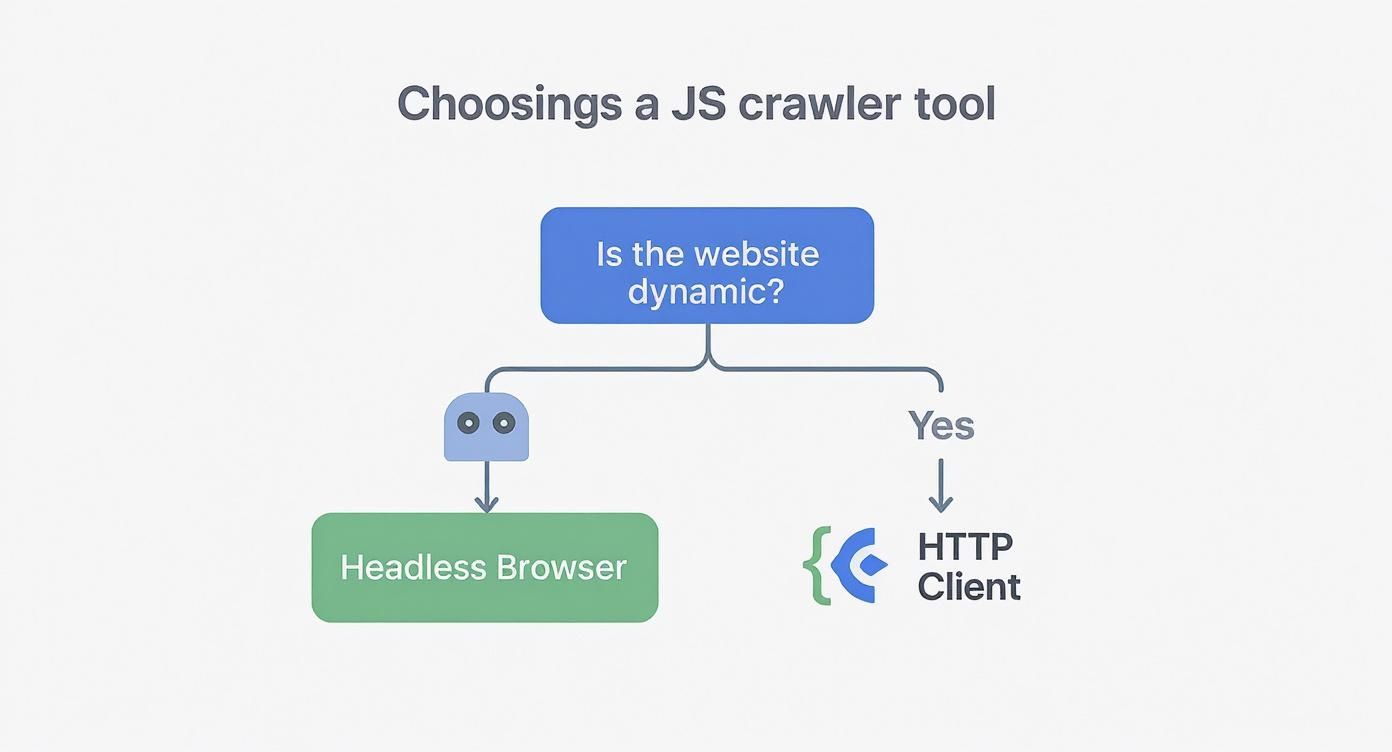
As you can see, if the site you're targeting depends on JavaScript to render its most important content, a headless browser isn't just an option—it's a necessity.
To help you decide, here's a quick comparison of the main JavaScript crawling libraries and the approaches they represent.
Comparing JavaScript Crawling Libraries
Approach | Core Libraries | Best For | Key Limitation |
|---|---|---|---|
Headless Browser | Playwright, Puppeteer, Selenium | Dynamic sites, SPAs, and anything requiring user interaction (clicks, scrolls). | Slower and more resource-intensive (CPU/RAM). |
HTTP Client + Parser | Axios, Got, Cheerio, JSDOM | Static HTML sites where all data is in the initial response. | Cannot execute JavaScript or interact with the page. |
Ultimately, picking the right tool from the start saves a massive amount of time and frustration down the road.
I can't stress this enough: analyze your target website first. Open its developer tools, go to the "Network" tab, and see what happens when the page loads. If a flood of XHR/Fetch requests appear after the initial load to populate the page, you absolutely need a headless browser.
If your project involves tackling sophisticated anti-bot systems right out of the gate, building from scratch might not be the best use of your time. In that case, you might want to look at pre-built solutions. You can explore our guide on the 12 best web scraping API options for 2025 to see if a managed service is a better fit.
Getting Your Node.js Crawler Project Off the Ground
Alright, with the theory out of the way, it's time to actually build something. Let's get our hands dirty and lay the foundation for our web crawler in JavaScript. Getting the initial setup right is crucial—it'll save you a ton of headaches later when things inevitably get more complex. We'll start by spinning up a new Node.js project and then dive into the two core ways of grabbing web content: a basic HTTP request and the more powerful headless browser approach.
First things first, let's create a home for our project. Pop open your terminal, make a new directory, and jump inside.
mkdir js-crawlercd js-crawler
Now, we'll initialize it as a Node.js project. This command whips up a file, which is basically the brain of your project, keeping track of all the important details and the libraries you'll be using.
npm init -y
That little file is the heart of your project's configuration. Simple, right?
Your First Crawl: Two Paths to the Same Goal
With our project ready, we need to install our tools. For this walkthrough, we'll grab Axios and Cheerio for the lightweight HTTP method and Playwright for the heavy-duty headless browser approach.
npm install axios cheerio playwright
Getting these installed sets us up with two very different ways to fetch web content. One is lightning-fast and direct; the other is a bit slower but sees the web exactly like a real person does. This distinction is a big reason why the global web crawling market, valued at around $1.03 billion, is booming. The modern web is packed with complex sites built on frameworks like React or Vue, and they demand tools that can handle JavaScript. This is fueling a projected 14.2% CAGR for the industry through 2030. If you want to dig deeper, you can discover more insights about these industry benchmarks and see just how critical JavaScript-aware crawling has become.
Comparing the Fetching Approaches
Let's see what it actually looks like to grab a simple webpage with both methods.
The HTTP Client Method (Axios + Cheerio)
This is my go-to for static sites. It’s incredibly efficient. You just send a request, get the raw HTML back, and then use Cheerio to pick it apart.
import axios from 'axios';import * as cheerio from 'cheerio';
async function simpleFetch() { try { // Make the request and get the HTML const { data } = await axios.get('https://example.com');
// Load the HTML into Cheerio to parse it like jQuery
const $ = cheerio.load(data);

// Find the H1 tag and grab its text
const pageTitle = $('h1').text();
console.log(`Title via Axios/Cheerio: ${pageTitle}`);
} catch (error) { console.error('Error fetching with Axios:', error); }}
simpleFetch();
The Headless Browser Method (Playwright)
When you’re up against a dynamic, JavaScript-heavy site, a headless browser isn't just nice to have—it's essential. It boots up a real browser behind the scenes, renders the entire page (JavaScript and all), and lets you interact with the final result.
import { chromium } from 'playwright';
async function browserFetch() { const browser = await chromium.launch(); const page = await browser.newPage();
try { // Navigate to the URL and wait for it to load await page.goto('https://example.com');
// Playwright has a handy method for getting the final page title
const pageTitle = await page.title();
console.log(`Title via Playwright: ${pageTitle}`);
} catch (error) { console.error('Error fetching with Playwright:', error); } finally { // Don't forget to close the browser! await browser.close(); }}
browserFetch();
Key Takeaway: See the difference? The Axios/Cheerio method is lean and mean. Playwright involves more overhead—launching a browser, managing a page, closing it down—but it hands you the keys to the kingdom when it comes to interacting with a fully rendered page. The right choice here depends entirely on what kind of website you're targeting.
Tackling Dynamic Content and SPAs with Playwright
The days of simple request-and-get HTML are long gone. Modern websites are living, breathing applications, often built as Single-Page Applications (SPAs). This means the juicy content you're after is often rendered by JavaScript after the initial page load.
Your basic HTTP client is blind to all this. It sees the empty shell, not the finished product. This is precisely why a headless browser like Playwright isn't just a nice-to-have—it's essential for any serious web crawler in JavaScript. Playwright sees the final, fully-rendered page, just like a human user would, letting you wait for the right moment to pounce on the data.
Mastering the Art of the Wait
The rookie mistake when scraping SPAs? Trying to grab the data too early. The page might look ready, but there's a good chance a crucial API call is still chugging away in the background. If you're too quick, you get nothing.
This is where Playwright’s built-in waiting mechanisms save the day. Forget about clumsy, unreliable hacks. We need to use intelligent waits that react to the page’s actual state.
Wait for an Element: The method is your go-to. It tells your script to just chill until a specific CSS selector actually appears in the DOM. This is perfect for waiting on a that gets filled by a background request.
Wait for the Network to Settle: A great all-purpose tool is . This pauses your script until network traffic dies down, which is a pretty solid sign that all the asynchronous data has finally loaded.
Wait for a Specific Response: For surgical precision, you can use to wait for a specific API endpoint to fire back a response. It’s the ultimate way to know your data has arrived.
Learning to wait properly is fundamental for scraping dynamic sites. While these examples are in JS, the core concepts are universal. You can see similar principles at play in our guide to mastering dynamic data with Selenium web scraping in Python.
Simulating How a Real User Clicks and Scrolls
Lots of sites won't show you everything at once. They hide content behind "load more" buttons, accordions, or infinite scroll mechanics. Your crawler has to be smart enough to mimic these actions to get the full picture.
Let's take a common scenario: a blog with a "Load More Posts" button. A simple scraper will only ever see that first page of articles. With Playwright, getting the rest is surprisingly simple.
async function scrapeAllPosts(page) { const loadMoreButtonSelector = '#load-more-posts';
// Keep clicking as long as the button is there while (await page.isVisible(loadMoreButtonSelector)) { await page.click(loadMoreButtonSelector);
// Give the new content time to load before the next loop
await page.waitForLoadState('networkidle');
}
// By now, all posts are on the page and ready for scraping}
This little loop will continuously click that button, patiently waiting after each click for the new posts to load, until the button finally disappears.
This is where a headless browser truly shines. It’s not just about fetching HTML; it’s about driving a web application to the exact state you need before you start extracting data.
The same logic applies to infinite scroll. Instead of clicking, you programmatically scroll to the bottom of the page, wait for new content to get tacked on, and repeat. You keep going until scrolling down doesn't load anything new. This ensures your web crawler captures 100% of the dataset, not just the tiny slice that loads initially.
Managing Proxies and Avoiding Detection

Let's be blunt: a crawler that gets blocked after a few dozen requests is a failed project. Once you start crawling at any real scale, you'll hit a wall. Fast. That single IP address you're using? It's your biggest liability.
Websites deploy sophisticated anti-bot systems that watch for high-volume requests, and a flood of traffic from one IP is the most obvious red flag. This is where proxies stop being a "nice-to-have" and become an essential part of your crawling stack.
A proxy server is basically a middleman. It takes your request and forwards it to the target website, masking your real IP with one of its own. By using a large pool of proxies, you can spread your requests across hundreds or even thousands of different IP addresses. Suddenly, your crawler's activity looks much more like organic user traffic, dramatically lowering your chances of getting blocked.
Choosing the Right Proxy Type
Not all proxies are built the same, and picking the right one is crucial for your success rate. What you need really depends on how tough your target site's defenses are.
Datacenter Proxies: These are the workhorses—fast, cheap, and plentiful. They come from servers in data centers, but there's a catch. Their IP ranges are public knowledge, making them the easiest for anti-bot systems to spot and block.
Residential Proxies: These IPs are assigned to real homes by Internet Service Providers (ISPs). Because they look exactly like legitimate visitors, they're incredibly effective at bypassing blocks. Naturally, they cost more.
Mobile Proxies: This is the top-shelf option. Mobile IPs come from cellular networks and are excellent for hitting mobile-first websites. They're also the most expensive by a wide margin.
For the majority of projects I've worked on, residential proxies hit the sweet spot, offering the best blend of reliability and performance. If you want to go deeper, our guide on rotating proxies for web scraping unlocked is a great resource.
Beyond Proxies: User Agents and Headers
Just cycling through IPs won't cut it. You have to make your crawler's entire digital fingerprint look human, and the User-Agent string is a huge piece of that puzzle. This is an HTTP header that identifies your browser and OS to the server. Sending the default or User-Agent is like waving a giant flag that says "I AM A BOT."
Your goal is to blend in, not stand out. Sending thousands of requests with an identical, generic User-Agent is like wearing a neon sign that says "I am a scraper."
You should always maintain a list of common, up-to-date User-Agents and rotate them with every single request. Don't stop there—make sure you're also sending other realistic headers, like and , to complete the disguise.
Mimicking Human Behavior
Finally, you need to think about rhythm and timing. Real people don't browse with the precise, relentless speed of a machine.
Introduce randomized delays between your requests to avoid that tell-tale robotic pattern. When you're using a headless browser like Playwright, you can even program slight, random mouse movements before an element is clicked. These seemingly minor details make your web crawler in JavaScript appear far less automated, helping it stay undetected by even advanced anti-bot measures.
Extracting and Storing Your Crawled Data

Alright, so you've successfully fetched a webpage. That’s a huge first step, but what you have now is a giant blob of raw HTML. The real magic happens when you turn that chaotic markup into clean, structured data you can actually use.
This is where the art of data extraction comes in.
No matter if you're using a full-blown headless browser or a simple HTTP client, the core idea is the same: you need to target specific elements on the page with surgical precision. If you've built a lightweight web crawler in javascript with something like Axios, a library like Cheerio is your best friend. It gives you a familiar, jQuery-like syntax for navigating the DOM, letting you grab data with simple CSS selectors.
Pinpointing Data with Precision
When you're working with a headless browser like Playwright, you have an even more powerful set of tools at your disposal. Playwright's locators are fantastic because they go beyond basic selectors. You can find elements by their text content, their accessibility role, or even their position relative to other elements on the page. This is a lifesaver for navigating complex, modern web layouts.
Let's imagine you're scraping a list of products from an e-commerce site. The pattern is almost always the same:
First, you zero in on the main container holding all the product cards—usually a or .
Next, you loop through each individual product item within that container.
Finally, inside each card, you use more specific selectors to pull out the good stuff: the product title, the price, the image URL, and so on.
This nested approach keeps your extracted data organized and helps prevent errors.
Pro Tip: Always clean your data as you extract it. Text from the web is messy. It's often full of extra whitespace, newlines, and weird characters like currency symbols. Use string methods like and a few simple regular expressions to sanitize your output before it ever touches your database.
Choosing Your Storage Method
Once you have your clean, structured data, you need to decide where to put it. The right storage solution really depends on what you're trying to accomplish.
For quick, one-off scrapes: Don't overcomplicate it. Just writing to a CSV or JSON file is often the fastest and easiest way to go. It requires almost no setup and works perfectly for smaller datasets you might want to open in a spreadsheet or import into another tool.
For ongoing, larger-scale projects: You're going to need a real database. A SQL database like PostgreSQL is perfect for highly structured, relational data—think product catalogs or user profiles. On the other hand, a NoSQL database like MongoDB gives you more flexibility, which is great for data that might not have a consistent structure, like news articles or social media posts.
Thinking through your data pipeline from extraction to storage is what separates a fragile script from a resilient, production-ready crawler. The choices you make here will determine how easily you can access, analyze, and ultimately get value from the information you've worked so hard to collect.
Common Questions About JavaScript Web Crawlers
When you start building web crawlers, you’re bound to run into a few common hurdles. I've been there myself. So, let's tackle some of the most frequent questions that pop up for developers building a web crawler in JavaScript.
Think of this as your go-to guide for troubleshooting the tricky spots and making smarter decisions from the get-go.
Is It Legal to Build a Web Crawler?
This is the big one, and the short answer is: it depends. The act of web crawling itself isn't illegal—it’s the foundation of every major search engine. What matters is how you crawl and what data you collect.
Your first stop should always be the website's file. This is where site owners lay out the rules for bots. While it's not a legally binding contract, ignoring it is a quick way to get your crawler blocked and is considered bad practice. You also need to be keenly aware of privacy regulations like GDPR and CCPA, especially if you're pulling any data that could be considered personal.
How Can I Prevent My Crawler From Getting Blocked?
If you build crawlers, you will get blocked. It’s a rite of passage. The trick is to make your crawler look less like a bot and more like a real person browsing the web.
Use rotating proxies: For any serious project, this is essential. A good proxy service from a provider like Bright Data or Oxylabs will route your requests through a massive pool of different IP addresses, so you don't look like a single, aggressive bot.
Rotate your User-Agents: Don’t stick with the default User-Agent from your library. Keep a list of current, real-world browser User-Agents and pick a new one for every request or session.
Add realistic delays: Blasting a server with rapid-fire requests is a dead giveaway. Add randomized delays between your requests—somewhere in the 2 to 5-second range is a decent starting point.
The name of the game is blending in. If your crawler fires off hundreds of requests a minute from the same IP with identical headers, you’re basically waving a giant flag that says, "I am a bot!"
Should I Use Puppeteer or Playwright?
Both Puppeteer and Playwright are fantastic headless browser libraries, and you can't go too wrong with either. But if I were starting a new web crawler in JavaScript today, I’d lean towards Playwright.
Playwright simply feels more modern and capable right out of the box. It supports Chromium, Firefox, and WebKit without any extra configuration and its API has some really smart features, like better auto-waiting logic that just makes your life easier. Puppeteer is still a workhorse, but Playwright’s developer experience and feature set give it the edge for most complex scraping jobs.
Tired of managing proxies, solving CAPTCHAs, and dealing with blocks? ScrapeUnblocker handles all the complex infrastructure for you, delivering the clean data you need with a simple API call. Stop fighting anti-bot systems and start focusing on your data at https://www.scrapeunblocker.com.
Comments